
For cost-sensitive teams, developers, or anyone who needs full control over hosting and data, n8n is the stronger pick. For non-technical teams who want the fastest route to a working automation, Zapier remains the easier starting point. If neither route suits your operational realities, a workflow-first development partner can build or adapt the automation for you, so you get the outcome without managing a platform at all.
TL;DR:
- Zapier charges per task, and failed runs, retries, and scheduled jobs can consume quotas; track each during a pilot to uncover true costs.
- Self hosting n8n removes per execution fees but shifts server costs, patching, and monitoring to your team, so assign a capable maintainer before launch.
- Zapier’s prebuilt connectors speed up common app links, while n8n can reach APIs through HTTP requests or code but requires more setup.
- A pilot lasting two to eight weeks should include one to three representative workflows, sample data, monitoring, and targets for time saved, errors, and execution cost.
Table of Contents
- At a glance: cloud-managed no-code vs developer-first automation
- What these platform styles actually are
- Where the two approaches genuinely differ
- Running a pilot before you commit
- How we help SMEs choose and build the right automation
- Mobile and offline capabilities
- Data ownership, privacy policies, and export options
- Support, community resources, and customer service quality
- Security and compliance features relevant to SMEs
- What the comparison guides get wrong
- Ready to see a working automation instead of comparing platforms?
- FAQ
- Sources
At a glance: cloud-managed no-code vs developer-first automation
Zapier represents the cloud-managed, no-code approach: you sign up, connect apps and build automations through a visual interface with little technical setup. n8n represents the developer-first, self-hostable approach: you get full workflow logic, custom code steps and the option to run it on your own infrastructure. n8n is widely described as a developer-first platform that supports self-hosting and deep customisation, which suits complex or high-volume workflows where per-execution pricing on managed platforms gets expensive.
The practical differences come down to three things:
- Cost drivers: Zapier charges per task executed across tiered plans; n8n’s self-hosted option has no per-execution fee, only infrastructure and maintenance cost.
- Hosting: Zapier is cloud-only and managed entirely by Zapier; n8n can run on managed cloud, private cloud or your own servers.
- Ease of use: Zapier’s visual builder needs no coding knowledge; n8n rewards familiarity with JSON, APIs and basic scripting.
Use this quick checklist to match your situation to a platform style. Choose the no-code route if you need something running this week, your team has no developer support, and your automation volume stays modest. Choose the developer-first, self-hostable route if you expect to scale executions, you need the data to stay on infrastructure you control, or your workflows involve branching logic and custom code. If neither description fits comfortably, because you want a tailored outcome without owning either platform, that is where a workflow-first development partner fits in.
What these platform styles actually are
Cloud-managed no-code platforms (Zapier is the best-known example) host everything for you. You build “Zaps” or equivalent flows through a drag-and-drop interface, connect pre-built app integrations, and the vendor handles servers, updates and uptime.
Developer-first, self-hostable platforms (n8n is the best-known example) give you a visual canvas too, but let you write custom JavaScript or Python inside nodes, self-host on your own servers, and control exactly how data moves and where it lives.
Typical use cases split along these lines:
- Simple ops automations (new lead to Slack notification, form submission to spreadsheet row): either style works, and cloud-managed no-code platforms usually get you there faster.
- CRM and sales workflows with multiple branching conditions: developer-first platforms handle the logic more cleanly, especially when you need custom error handling.
- Complex data flows involving transformation, batching or calls to multiple APIs with retries: developer-first, self-hostable platforms are built for this, particularly where execution volume would make per-task billing costly.
Who runs the project matters as much as which platform you pick. Non-technical staff can usually own a cloud-managed no-code build end to end. Developer-first platforms tend to need at least one person comfortable with JSON and API documentation, both to build the first version and to maintain it after launch when an integration changes or a workflow breaks.
Where the two approaches genuinely differ
The headline differences sit in five areas: pricing, integrations, hosting, workflow logic and ease of use. Each one changes the real cost and risk of a project, not just the sticker price.
Pricing models. Cloud-managed no-code platforms typically bill per task or per tiered plan with a monthly task ceiling; go over it and you either get throttled or billed overage, which can be managed effectively using content marketing automation tools. Developer-first platforms that you self-host charge nothing per execution: your cost is the server and your time. Comparison articles repeatedly contrast managed, no-code services as faster to deploy and easier for non-technical teams, but with different cost trade-offs once volume climbs. The hidden costs that catch teams out are rarely the plan price itself: they are failed runs that still count against your quota, retries that multiply task counts, and scheduled jobs that run constantly in the background whether or not anything changed.
Integration coverage. Cloud-managed platforms win on breadth of pre-built, one-click connectors, which matters if you are joining mainstream SaaS tools with no custom API work. Developer-first platforms offer fewer pre-built connectors but compensate with generic HTTP request nodes, webhook support and custom code steps, so almost anything with an API is reachable, just with more setup work. Some automation environments also support running custom code paths directly inside a workflow step. Pyodide, which runs Python in the browser, is one example of the wider tooling trend towards in-browser compute that extends what a workflow can do without leaving the platform.
Hosting choices. Managed cloud means zero maintenance but no control over where your data physically sits. Private cloud gives you a dedicated instance with more control at a higher cost. Self-hosting gives you full control over data residency and uptime, at the cost of someone on your team (or a partner) patching servers and monitoring the instance.
Workflow logic. Both styles support branching and loops now, but developer-first platforms generally go further: custom error-catching nodes, workflow versioning, and the ability to write a function node in actual code when the visual builder cannot express what you need.
Ease of use. Practitioners report a real learning curve when adopting developer-first workflow tools, with expectations around JSON, data mapping and basic API handling. Cloud-managed platforms are built so a non-technical operations person can ship a working automation in an afternoon.
On AI and LLM support, both styles now offer nodes for calling large language models, but developer-first platforms give you more control over prompt chaining, retries on malformed output and custom parsing logic, which matters once an automation depends on consistent LLM output rather than a one-off call.
- Pricing: per-task billing versus infrastructure cost.
- Scale: execution quotas and concurrency limits matter more as volume grows.
- Control: self-hosting trades convenience for data ownership.
Pro Tip: Track failed runs and retries separately during any trial. They are the two most common causes of unexpected task counts or server load once an automation goes live.
A practitioner note worth acting on: industry comparisons consistently flag self-hosting and execution control as the main lever against runaway per-task costs, which matters most once a workflow runs dozens of times a day rather than a handful.
Running a pilot before you commit
A short pilot tells you more than any feature comparison. Keep it tight: 2 to 8 weeks, one to three representative automations, and a clear measurement plan from day one.
- Set goals before you start: define time saved per run, an acceptable error rate, and a target cost per execution.
- Pick a minimal, realistic scope: choose workflows that represent your actual volume and complexity, not the simplest possible example.
- Stage before you go live: test with sample data in a non-production environment first.
- Check operational basics during the pilot: monitoring and alerting, retry policy on failed steps, backup of workflow configurations, and role-based access if more than one person touches the build.
- Review against your success criteria at the midpoint and at the end, not only once everything is finished.
A sensible timeline runs: week one for scoping and access setup, weeks two to four for building and testing the pilot workflows, weeks five to six for monitoring under real conditions, and a final week to review results against your original goals. Budget for one internal owner’s time plus, where needed, a developer’s hours for anything beyond simple drag-and-drop configuration.
Our pilot checklist for teams deciding between Zapier or Make and a custom app walks through the same decision points in more detail, including when the pilot result tells you it is time to stop platform-hopping and commission something built for the job.
Pro Tip: Run the pilot on your worst-case data volume, not your best case. A workflow that behaves well on ten test rows can behave very differently on ten thousand.
How we help SMEs choose and build the right automation
We start every engagement the same way: understanding the operational problem before naming a solution. A complimentary app fit review looks at your actual workflow, then tells you whether a ready-made product, an adapted existing build, or a custom application is the most economical route, with cost direction given early rather than after a lengthy proposal process.
That review decides between three paths:
- Adapt an existing product (POSFlow, QueueFlow, EventFlow, PriceFlow, LeadsFlow or PresenceFlow) when your workflow matches a proven foundation closely enough to adjust rather than rebuild.
- Integrate or configure existing platforms when your needs are genuinely served by off-the-shelf automation tools, which we will say plainly if that is the case.
- Build a custom application when neither a ready product nor a platform workflow covers your process without compromise.
For readers weighing whether to hire a developer at all rather than keep patching together platform automations, our piece on when Zapier alternatives make sense for SMEs with twenty or more users covers the signals worth watching for.
A typical next step after the fit review is a scoped proposal with a quote for a custom build, or a setup and plan fee quote if a ready-made product fits. Confidentiality is respected throughout, and there is no pressure to commit before you have clear cost direction.
This article is researched and written by Ronald for FlowLab Insights, drawing on hands-on setup notes and pilot checklists built from real SME engagements.
Mobile and offline capabilities
Cloud-managed no-code platforms generally run as web dashboards with limited or no dedicated mobile app, since most automations trigger in the background without needing a phone screen. Developer-first, self-hosted platforms are similar: the workflow runs on your server regardless of whether anyone opens a mobile interface, though monitoring on the go is usually more limited than on managed platforms with polished mobile dashboards.
Offline capability is not a strong feature of either approach, since both rely on triggers (webhooks, scheduled polls, API calls) that need connectivity to function. If your operation genuinely needs offline-capable tools, such as a point-of-sale system that must keep working through a connectivity drop, that is a different requirement from workflow automation entirely, and it is one we design for directly in products like POSFlow rather than leaving to a general-purpose automation platform.
For most SMEs, the practical question is not “can I automate from my phone” but “will I be notified fast enough when something breaks.” Both platform styles support alerting through email, Slack or SMS integrations, so build that into your workflow regardless of which approach you choose. Mobile access becomes more important for monitoring and quick fixes than for the automations themselves.
Data ownership, privacy policies, and export options
Where your data lives and who can access it depends heavily on hosting choice rather than brand. On a cloud-managed platform, your workflow data and any data passing through it sits on the vendor’s infrastructure, governed by their privacy policy and data retention terms. On a self-hosted developer-first platform, your data never leaves infrastructure you control, which matters for businesses handling sensitive customer information or operating under strict data residency expectations.
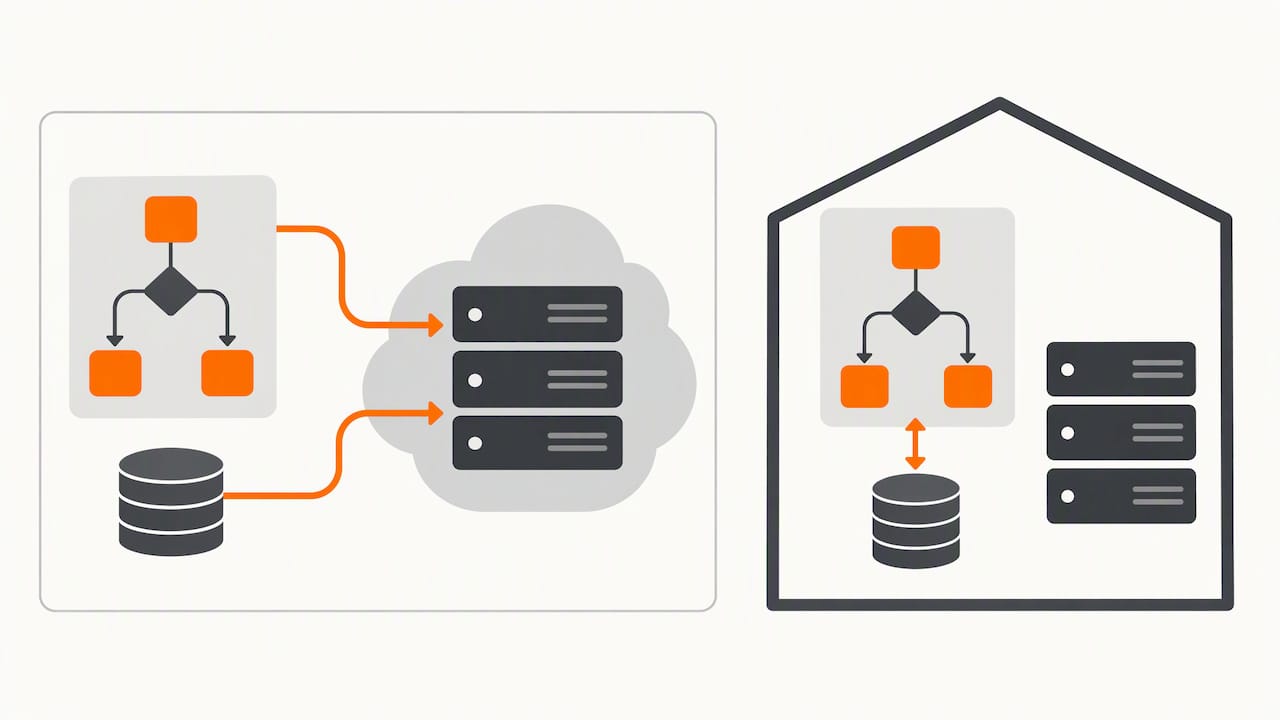
Export options vary by platform and plan tier, so check whether you can export workflow definitions, not just the data that passes through them, before you build anything substantial. Losing the ability to export your workflow logic locks you into whichever platform you started with.
For SMEs weighing this trade-off, the honest question is whether the convenience of a managed platform is worth the reduced control over where data sits. If data ownership is a hard requirement rather than a preference, self-hosting or a custom-built application gives you a definitive answer, because the data genuinely stays on infrastructure you choose.
Support, community resources, and customer service quality
Cloud-managed no-code platforms generally offer structured customer support (ticketing, live chat on higher tiers) alongside large user communities and extensive public documentation, which helps when you are stuck on a specific app integration. Developer-first, self-hosted platforms tend to lean more heavily on community forums and public documentation, with formal support often reserved for paid cloud or enterprise tiers.
Neither model guarantees a fast answer to a workflow-specific problem, since community support depends on someone else having hit the same issue before you. This is where a workflow built and supported by a development partner differs: when we build or adapt an automation for you, support is a direct conversation about your specific workflow, not a forum search. For teams without the time or inclination to become platform experts themselves, that difference tends to matter more than it looks on a feature comparison page.
Security and compliance features relevant to SMEs
Security considerations split along the same lines as hosting. Managed cloud platforms handle infrastructure security, patching and uptime for you, which suits SMEs without dedicated IT resource. Self-hosted platforms put that responsibility on you or a partner, in exchange for full control over where data sits and how access is controlled.
For SMEs handling customer data, payment details or staff records, the practical compliance question is less about which platform claims which certification and more about whether you can answer basic questions: who can access this data, how long is it kept, and can you produce or delete it on request. Role-based access control, audit logs and clear data retention settings are worth checking on any platform before you connect it to anything sensitive.
When a custom application is built or adapted for an SME, security and access control are scoped into the project from the start, based on actual data and who needs to touch it, rather than applied generically after the fact. That is part of why the fit review happens before any build begins: it surfaces what actually needs protecting before cost or architecture decisions get made.
What the comparison guides get wrong
Most comparison content treats this as a brand decision: n8n or Zapier, pick a winner. That framing misses the point. The real decision is about hosting, cost structure and who maintains the thing after launch, and those answers depend entirely on your team’s technical capacity and data sensitivity, not on which platform has the slicker landing page.
The most overrated factor in most buying guides is integration count. A platform with a thousand pre-built connectors is irrelevant if the five you actually need are not among them, and both platform styles can reach almost any API through a generic HTTP node anyway.
What the reader should prioritise first is not “which tool” but “who maintains this in six months.” A non-technical team building on a developer-first platform without ongoing developer support will eventually hit a wall when something breaks. A cost-sensitive team on a per-task cloud plan will eventually hit a different wall when volume grows. Answer that question honestly before touching either platform, or before concluding you need one at all.
— Ronald
Ready to see a working automation instead of comparing platforms?
If you have read this far and still are not sure which route fits, that is normal: the right answer depends on your workflow, not on general platform features. Our complimentary app fit review looks at your actual process and tells you plainly whether a ready product, an adapted build, or a custom application makes the most economical sense, with cost direction given before anything is built.

A few places to see what a finished outcome looks like rather than a feature list:
- Run a sample sale from product to payment with the POSFlow demo.
- Turn attendance into a live operating view with the PresenceFlow demo.
- Try the complete queue journey with the QueueFlow demo.
If you would rather talk through your specific workflow first, get in touch for your app fit review and we will tell you honestly what fits and what it is likely to cost.
FAQ
Is anything better than n8n?
There is no single tool that beats n8n on every measure: cloud-managed platforms like Zapier are faster to start with for non-technical teams, while n8n’s self-hosting and customisation strengths suit teams with developer support and high execution volume. The better question is which approach fits your team’s technical capacity and budget, not which tool ranks highest generically.
Which is better, n8n, Make, or Zapier?
Each suits a different buyer: Zapier and similar cloud-managed platforms favour speed and ease of use for non-technical teams, while n8n favours cost control at scale and self-hosting for teams with developer capacity. Rather than picking by reputation, match the platform style to your priorities on hosting, pricing model and in-house technical skill.
Is n8n basically a Power Automate alternative?
n8n and Power Automate both let you build multi-step workflows visually, but n8n’s defining feature is the option to self-host and customise with code, which Power Automate’s managed, Microsoft-centred model does not offer in the same way. They serve overlapping but not identical buyer needs, so the choice again comes down to hosting preference and existing toolset.
Does Zapier use n8n?
No, Zapier and n8n are separate, independently built platforms with different ownership, architecture and hosting models. They compete for the same automation use cases rather than one running on the other.