
Small teams that want a CRM running within days should favor the easier-to-adopt platform, while businesses with complex workflows and a tighter budget often get more long-term value from the deeper, more configurable option. The real trade-off is not price versus features. It is speed of adoption versus how much time you are willing to invest in shaping the system around your process.
TL;DR:
- Smaller teams or solo founders will find HubSpot’s ease of use speeds up setup, while mid-market companies with complex workflows benefit from Zoho’s customization.
- HubSpot offers more polished, out-of-the-box dashboards, but Zoho supports deeper report creation with higher setup requirements.
- HubSpot’s pricing escalates primarily based on contact volume and marketing features, whereas Zoho’s cost depends more on user seats and automation add-ons.
- Zoho’s pipeline and automation are more flexible but demand a skilled admin, whereas HubSpot favors quick deployment with less technical configuration.
- Both platforms offer standard security features, but Zoho provides more detailed permissions, and vendor support quality favors HubSpot slightly.
Table of Contents
- HubSpot vs Zoho at a glance
- How the core features actually compare
- What HubSpot and Zoho actually cost you
- Who should choose HubSpot and who should choose Zoho
- How to choose without getting sold to
- Security and data privacy features
- Mobile app functionality and usability
- Migration and data import and export
- Trial options and free tier comparison
- When a bespoke app beats CRM customisation
- Book a FlowLab app fit review
- Where this comparison’s figures come from
- Sources
- FAQ
HubSpot vs Zoho at a glance
Before booking demos, it helps to see where each platform tends to win and where it asks more of your team.
- Ease of use: HubSpot is consistently rated easier to pick up, scoring around 8.7 out of 10 on ease of use versus roughly 8.2 for Zoho CRM, according to G2’s comparison data.
- Pricing shape: HubSpot’s entry pricing is simple but tends to escalate as you add contacts and marketing tools, while Zoho CRM generally remains more affordable as you scale seats and features.
- Best-fit company size: Micro teams and lean marketing-led SMBs often prefer HubSpot’s guided setup, while mid-market teams with layered sales processes lean towards Zoho’s flexibility.
- Support quality: HubSpot scores higher for support, at roughly 8.6 out of 10 against Zoho’s 7.6 to 7.9 range, per the same G2 review data.
- Customisation depth: Zoho generally allows deeper process modelling and configuration, though it demands more setup skill or outside help to use that depth well.
If you are a solo founder or a team of two to five, the ease-of-use platform will usually get you live faster with less friction. If you are running multiple sales teams with layered approval or quoting rules, the more configurable platform tends to repay the extra setup time. Mid-market buyers weighing both should read the fuller comparison below before running any trial, since the categories that matter most (automation, reporting, integrations) behave differently under real use than they do in a sales demo.
How the core features actually compare
The headline ratings only tell part of the story. Where the two platforms diverge most is in how they handle contacts, automation, reporting and the admin work behind the scenes.
Contacts and pipeline. Both platforms organise records around contacts, companies and deals, but the practical experience differs. HubSpot’s pipeline view is opinionated: stages, properties and deal cards are pre-structured so a new sales rep can start logging activity within an hour. Zoho CRM’s pipeline is more of a blank canvas: you define stages, validation rules and layouts yourself, which suits teams with an established sales process but slows down a team that hasn’t defined one yet.
Automation and AI. This is where category, not brand, matters most.
- Lead scoring, workflow automation and sequence-building exist in both platforms, but HubSpot’s automation builder is more visual and requires less configuration to get a basic nurture sequence running.
- Zoho’s automation (Blueprint and workflow rules) can model more complex, multi-branch business logic once it is set up.
- AI assistants are present on both sides, generally for drafting content, summarizing records or suggesting next actions, though capability varies by plan tier.
Reporting and analytics. HubSpot ships with more polished dashboards out of the box, which suits marketing-led teams who want visibility without building anything themselves. G2’s feature comparison shows HubSpot scoring higher on marketing ROI analytics, at roughly 8.2 versus 7.9 for Zoho. Zoho’s reporting is more flexible for building bespoke reports from scratch, but that flexibility means someone on your team needs to know how to build them.
Integrations and ecosystem. Both have sizeable marketplaces and open APIs. HubSpot’s ecosystem is deeper for marketing and content tools, partly because of its CMS and broader inbound marketing suite; independent commentary on HubSpot’s CMS and its automation options gives a sense of how far that ecosystem extends. Zoho’s ecosystem leans into its own suite of business apps (finance, HR, support), which is an advantage if you already use several Zoho products, but a neutral factor if you don’t.
Admin overhead. This is the point buyers underestimate most. Forbes Advisor’s 2026 comparison notes that feature depth and pricing structure shift considerably between plans, and that shift usually tracks with how much admin time a platform demands. HubSpot needs less ongoing administration for standard use cases. Zoho rewards a skilled admin or an implementation partner who can model your workflow properly. Without that skill in-house, Zoho’s flexibility can sit unused while automations pile up as technical debt rather than time savers.
Pro Tip: During any trial, build one real sales sequence end to end, from lead capture to a closed deal, rather than testing individual features in isolation.
What HubSpot and Zoho actually cost you
Neither platform prices simply by seat. Understanding the billing shape matters more than any single number.
- HubSpot bills primarily per seat with contact-tier limits that increase cost as your database grows, and marketing features are often gated behind higher tiers.
- Zoho CRM bills per user with fewer contact-based penalties, but advanced automation, AI features and some integrations sit behind higher-tier add-ons.
- Migration and onboarding costs are rarely quoted upfront by either vendor and often show up only once you request implementation support.
To make this concrete, picture three sketches. A micro team of three people mainly needs contact management and basic email tracking: cost stays low on either platform, but HubSpot’s guided onboarding usually means fewer paid hours spent on setup. A growing SMB of fifteen people running marketing campaigns alongside sales will see HubSpot’s marketing add-ons push the bill up quickly, while Zoho stays comparatively flat but needs someone to configure the automation. A scaling mid-market business with fifty or more users and custom approval chains will likely find Zoho’s per-seat cost more forgiving at volume, provided the workflow modelling is done properly upfront, an area where Zapier’s comparison rightly stresses testing a genuine end-to-end process rather than isolated features.
Whichever platform you trial, run it for at least two to three weeks and test the parts that don’t show up in a sales demo: exporting a report, adding a custom field mid-pipeline, or connecting an existing tool you already rely on. Hidden costs tend to surface exactly there, not in the headline pricing page.
Who should choose HubSpot and who should choose Zoho
Matching the platform to your situation matters more than matching it to a feature checklist.
- Solo founder or micro team: Prioritise fast setup and low admin burden. Check that the free or entry tier covers your contact volume before you commit, since HubSpot’s free tier is generous for basics but nudges towards paid tiers once you add marketing tools.
- SMB with a small marketing team: Prioritise integrated email marketing and reporting you don’t have to build yourself. HubSpot’s polish here tends to save time, but confirm the contact-tier pricing won’t spike as your list grows.
- Mid-market with complex workflows: Prioritise configurability over convenience. If your sales process has multiple approval stages, custom quoting logic or several departments feeding into one pipeline, Zoho’s deeper customisation, backed by a skilled admin or partner, usually outperforms a rigid out-of-the-box structure.
- Compliance-heavy or highly regulated teams: If your needs go beyond what either CRM’s standard security and permissions model covers, this is often the point where a dedicated internal tool, built around your specific compliance requirements, is worth evaluating alongside either CRM.
How to choose without getting sold to
A structured evaluation protects you from being sold on features you won’t use and pricing tiers you haven’t fully modelled.
- List your must-have workflows first. Before any demo, write down the three or four processes the CRM absolutely must handle, such as lead routing, quote approval or renewal reminders.
- Ask for the pricing at your real contact volume. Don’t evaluate list price. Ask the vendor to quote your actual contact count and seat number twelve months out, not today.
- Request a sandbox, not just a guided demo. A guided demo shows you the best case. A sandbox with your own sample data shows you the real one.
- Ask directly about support response times. Zoho and HubSpot both publish support tiers, but ask what response time applies to your specific plan, not the enterprise tier shown in marketing material.
- Check what happens when you downgrade or cancel. Ask what data you keep, in what format, and whether export is free or charged.
Red flags worth recording during any trial include vague answers about contact-tier pricing, automation features that require an unlisted add-on to test properly, and support teams that redirect basic questions to a paid onboarding package.
Pro Tip: Ask each vendor the same five questions in writing and compare the answers side by side. Inconsistent or evasive answers are more telling than any feature list.
Security and data privacy features
Both platforms offer role-based permissions, data encryption in transit and at rest, and standard compliance certifications suitable for most SMB use cases. Admin controls let you restrict which users see which records, which matters most once you have more than a handful of staff touching customer data.
Where they differ is granularity. Zoho’s permission model allows more detailed field-level restrictions once configured properly, which suits businesses handling sensitive client data across several departments. HubSpot’s permissions are simpler to set up but less granular by default. Neither platform’s standard security tier is a substitute for a proper data protection review if your business handles regulated data such as health or financial records. In those cases, checking the specific certifications each vendor holds against your regulatory obligations is worth doing before, not after, signing.
Mobile app functionality and usability
Both HubSpot and Zoho offer mobile apps covering the core functions: contact lookup, deal updates, call logging and basic notifications. Field sales teams tend to rate HubSpot’s mobile app slightly higher for straightforward navigation and speed, consistent with its broader ease-of-use advantage.
Zoho’s mobile app carries more of the desktop version’s configurability, which is useful if your team has built custom fields or layouts they need on the road, but it can feel busier for a rep who only needs to log a quick call. If your sales process depends heavily on mobile use, such as a field team visiting clients daily, testing the mobile app specifically during your trial matters as much as testing the desktop version.

Migration and data import and export
Both platforms support CSV import and export as standard, along with guided import tools for common formats. Migrating from a spreadsheet or a smaller CRM is generally straightforward on either platform for basic contact and deal data.
The complexity increases with historical data, custom fields and attached files. HubSpot’s import tools are more guided for standard use cases, reducing the need for technical help on a simple migration. Zoho’s import tools support more complex field mapping, which suits a business migrating a heavily customised legacy system but again benefits from someone comfortable with data structures. In both cases, export is generally free and unrestricted, but it is worth confirming this directly with the vendor for your specific plan before you commit any data.
Trial options and free tier comparison
HubSpot offers a genuinely usable free tier for basic CRM functions, with paid tiers unlocking marketing automation, more custom reporting and higher contact limits. Zoho CRM offers a free tier for small teams (typically capped at a handful of users) alongside a standard free trial period on paid plans.
Neither vendor’s trial period is long enough to test everything properly, which is why the two to three week minimum mentioned earlier matters. Use the free tier, where available, to test day-to-day usability with your own team before committing to a paid trial of the more advanced features.
When a bespoke app beats CRM customisation
We start every conversation with a workflow-first review before recommending any tool, CRM or otherwise. That review is complimentary, and its purpose is simple: understand what your team actually does day to day before suggesting how to fix it.
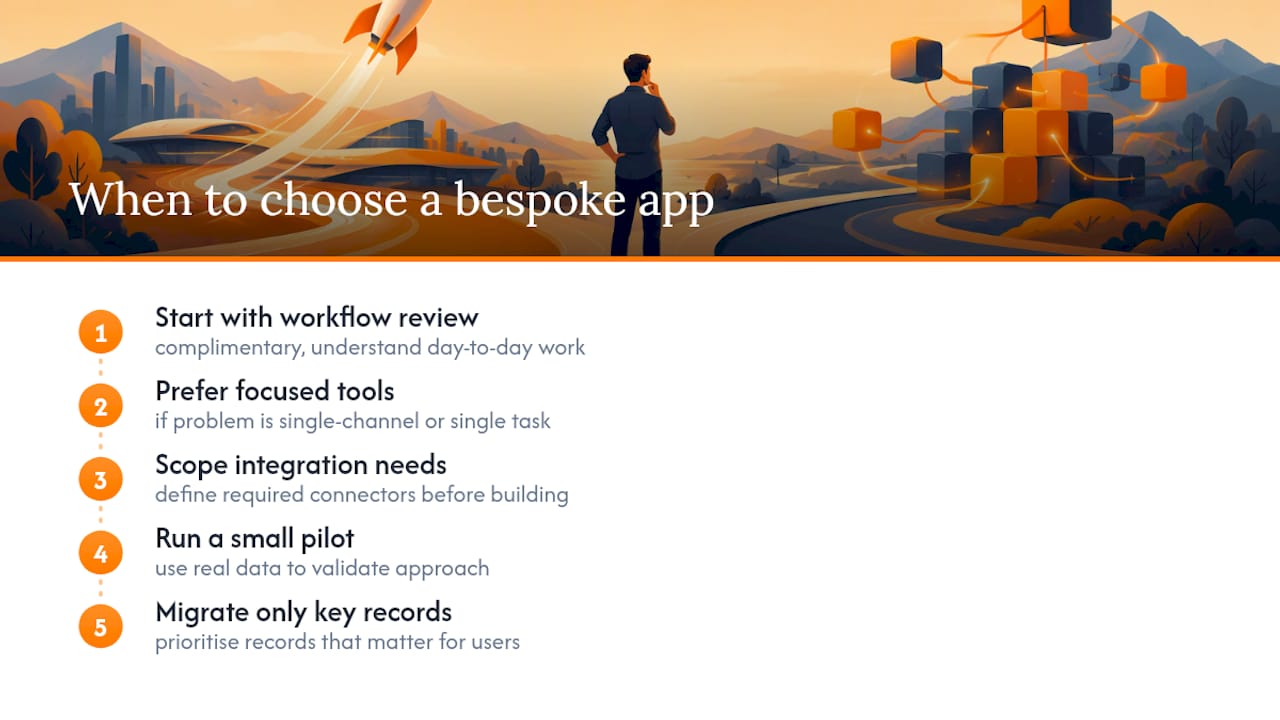
CRMs like HubSpot and Zoho are built to handle sales pipelines broadly. They are not always the most economical answer to a narrow, specific problem. If your real bottleneck is lead capture from a single channel, a focused tool like LeadsFlow can solve that without the licensing cost or configuration overhead of a full CRM rollout. Similarly, if your operational pain point sits outside sales entirely, in attendance tracking, queue management or point-of-sale, a specialised product built for that single workflow is often cheaper to run and faster to adopt than shaping a general-purpose CRM around it.
The pattern we see most often among SMEs considering heavy Zoho customisation or a HubSpot upgrade is this: the workflow they are trying to solve is narrower than the platform they are evaluating. When that is the case, we recommend scoping the integration needs first, running a small pilot with real data, and prioritising migration of only the records that matter, rather than a full-scale CRM implementation. If you’re evaluating a technical partner for that kind of build, our guide to choosing an app developer covers the questions worth asking before you commit.
— Ronald
Book a FlowLab app fit review
If the CRM route feels like more than your workflow needs, a complimentary app fit review can give you a clearer, cheaper picture before you sign anything.

We look at your actual operational bottleneck first, then tell you honestly whether a ready-made product, an adapted foundation, or a custom build fits best, along with early cost direction so there are no surprises later. Depending on what surfaces, that might mean:
- A focused lead-management setup through LeadsFlow instead of a full CRM rollout.
- A point-of-sale workflow handled end to end with POSFlow.
- Queue and front-of-house coordination through QueueFlow, with a full demo of the queue journey available on request.
- Attendance and live operating visibility through PresenceFlow.
Come to the conversation with a rough sense of your busiest process and where it currently breaks down. That’s enough for us to start. You can book a demo or app fit review directly, with no commitment attached.
Where this comparison’s figures come from
The ratings, scores and framing in this comparison are drawn from a small set of primary sources, each covering a different angle of the HubSpot versus Zoho decision.
- G2’s HubSpot Sales Hub vs Zoho CRM reviews provide the overall ratings and category scores for ease of use and support.
- G2’s feature-level comparison breaks down scores for email marketing, lead management and reporting.
- Forbes Advisor’s 2026 comparison covers pricing structure and who each platform suits best.
- Zapier’s comparison offers a practitioner’s view on usability trade-offs and trial strategy.
Sources
- G2 — HubSpot Sales Hub vs Zoho CRM comparison and reviews
- Forbes Advisor — HubSpot Vs. Zoho CRM (2026 comparison)
- Zapier — HubSpot vs Zoho comparison
FAQ
Who is Zoho’s biggest competitor?
Analyst commentary generally places Zoho CRM in direct competition with HubSpot for SMBs wanting an all-in-one suite, according to background context on Zoho Corporation. Zoho competes largely by bundling broader functionality at a lower price point than many rivals.
Who is HubSpot’s biggest competitor?
Beyond Zoho, HubSpot’s main competition sits at the enterprise end of the market, alongside sales-focused platforms like Pipedrive for SMBs, according to the same analyst context. The choice between them often comes down to whether a buyer wants breadth or a narrower, sales-first focus.
What are the disadvantages of HubSpot?
HubSpot’s main drawbacks are pricing that escalates quickly as contact volume and feature needs grow, along with licensing that can feel complex once you add marketing and service hubs. Industry commentary on Zoho Corporation notes this pricing escalation as a recurring concern for growing teams.
Is Zoho a Chinese or Indian company?
Zoho Corporation is an Indian company, not Chinese, as detailed in background information on Zoho Corporation. It has grown into a broad suite of business applications beyond its CRM product.
Is HubSpot or Zoho better for a small business?
For most small businesses prioritising fast setup and low admin effort, HubSpot tends to score higher on ease of use, at roughly 8.7 out of 10 against Zoho’s 8.2, per G2’s review data. Businesses with more complex workflows and a tighter budget for licensing often find Zoho’s flexibility better value once properly configured.