
The fastest, lowest-risk route for most SMEs is not to build anything yourself. It is to commission a workflow-first developer who reviews your operations first and recommends a ready or adapted product before proposing custom work. Starting options usually fall into three families: point-of-sale systems, queue and service management tools, and pricing or product lookup apps. The simplest next step is a complimentary app fit review to see which one fits.
TL;DR:
- Most SMEs should start with a ready or lightly adapted product, as these are cheaper and faster to deploy for standard workflows.
- Choosing a vendor who properly analyzes your problem and offers clear support, ownership, and integration terms reduces the risk of costly missteps.
- Budgets for ready products can be covered within days, while custom builds tend to take longer and cost more due to discovery, design, and development phases.
- A workflow-first review helps identify the best approach, ensuring you avoid unnecessary custom projects and get solutions tailored to your operation.
- Avoid vendors who quote before discovery, refuse to clarify ownership, or give vague post-launch support answers, as these are red flags for poor service.
Table of Contents
- Matching your operational need to the right product route
- Choosing a supplier: criteria, questions, and red flags
- What SME app projects typically cost and take
- A quick checklist: ready, adapted, or custom
- Why we push for workflow-first commissioning
- How FlowLab can help you get started
- Further reading on choosing and costing an app project
- FAQ
Matching your operational need to the right product route
Most SME app problems fall into a handful of categories, and each one points towards a different starting product rather than a blank-slate build.
- Point of sale: a shop or café that needs to track sales, stock and payment in one place usually fits a ready or lightly adapted point-of-sale product.
- Pricing and product lookups: retail or wholesale staff who need instant, accurate pricing information benefit from a dedicated lookup tool rather than a spreadsheet or a memorised price list.
- Queue and service flow: clinics, salons and service counters with variable footfall need a system that manages waiting customers and staff allocation.
- Event registration: businesses running workshops, launches or ticketed sessions need check-in and registration handled without manual lists.
- Lead tracking: sales teams juggling enquiries across calls, forms and walk-ins need a simple way to capture and follow up leads.
A ready product is nearly always cheaper and faster to deploy because the core workflow is already built and tested. Adaptation becomes worthwhile once your process has a genuine quirk, such as a non-standard discount structure or a multi-location stock rule, that a standard product cannot absorb without configuration.
FlowLab’s product lines map directly onto these needs. POSFlow is a point of sale that keeps the whole operation in view, suited to retail and food businesses that want sales, stock and payment together. Readers can run a sample sale from product to payment to see how it behaves before committing. PriceFlow gives staff the right product answer, right when staff need it, which suits businesses with large or frequently changing catalogues. QueueFlow handles service queues and customer flow for businesses where waiting time affects the customer experience.
Choosing a supplier: criteria, questions, and red flags
Picking the right developer matters more than picking the right platform. A vendor who skips proper discovery will happily quote you a custom build when a ready product would have solved the problem for a fraction of the cost.
Six criteria are worth checking before you sign anything:
- Problem analysis: does the vendor ask about your workflow before proposing a solution, or do they jump straight to a quote?
- Integrations: can the app connect to your existing accounting, payment or inventory systems?
- Timeline: is the delivery date realistic given the scope, and what happens if it slips?
- Ownership and IP: who owns the code and data once the project is delivered?
- Support and SLAs: what happens when something breaks after launch, and how quickly?
- Data confidentiality: how is your operational and customer data handled during and after the build?
In an initial call, ask directly: How will you confirm the exact problem before quoting? What is included in the price, and what counts as a change request? Who owns the code once the project ends? What support is included after launch, and for how long? How do you handle our data during development?
Three red flags are worth walking away from: a fixed quote given before any discovery call, reluctance to put ownership terms in writing, and vague answers about post-launch support.
Pro Tip: Ask for a written scope summary after the first call, even if it is informal. It shows whether the vendor actually understood your operation.
A complimentary app fit review removes much of this guesswork early, because it identifies the simplest suitable solution and gives you a cost direction before any commitment is made.
What SME app projects typically cost and take
Budgets and timelines vary by route, and knowing the shape of each helps you plan without guessing.
- Ready product: lower setup cost, covering configuration and onboarding, with deployment often measured in days rather than weeks.
- Adapted product: a moderate scoped-implementation fee on top of the base product, covering the specific workflow changes you need.
- Custom build: a fixed project fee that covers discovery, design, development and testing, with delivery typically taking longer because everything is built from scratch.
Timelines commonly slip for three reasons: unclear integration requirements with existing systems, compliance or data-handling requirements discovered late, and data migration from old spreadsheets or legacy software taking longer than expected.
A clearly scoped project is the single biggest lever against cost overruns. Vague briefs lead to change requests, and change requests are where most budget creep happens. This is one reason a workflow-first review, done before pricing, tends to produce a more reliable estimate than a quote given on a first call. Ready products avoid most of this risk entirely because the workflow is already fixed. Custom builds carry the most scoping risk, which is exactly why the discovery stage deserves more attention than the price tag.
A quick checklist: ready, adapted, or custom
Run through these five points before deciding which route to commission.
- Process maturity: if your workflow is still changing month to month, a ready product is easier to adjust than a custom build.
- Differentiation needs: if the app touches something that sets you apart from competitors, adaptation or a custom build protects that advantage.
- Expected scale: if you plan to grow into multiple locations or a larger team soon, check the product handles that scale before you commit.
- Integration needs: heavy dependence on existing systems usually pushes you towards adaptation rather than a fully custom build.
- Regulatory constraints: specific data-handling or industry rules may require custom handling that a standard product cannot offer out of the box.
A single-location café with a straightforward till process fits a ready product and can expect value within weeks. A clinic with a specific patient-flow rule fits adaptation. A business with a genuinely unique operational process, and the budget to match, is the right candidate for a custom build, with returns typically taking longer to materialise given the longer build cycle.
Why we push for workflow-first commissioning
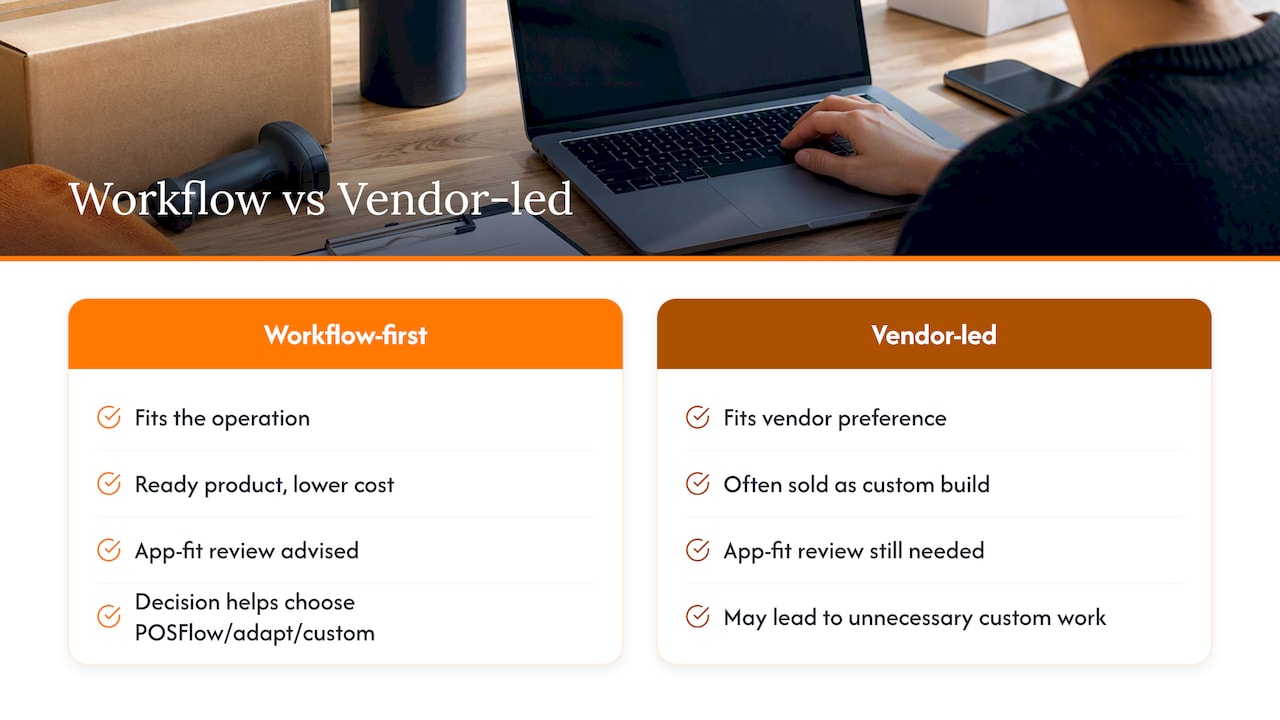
We built FlowLab around a simple frustration: too many SMEs get sold a custom build when a ready product would have done the job for less. Starting with a workflow-first review means the recommendation fits the operation, not the vendor’s preferred project size.
The complimentary app fit review exists because most owners cannot tell in advance whether they need POSFlow, an adapted version of it, or something built from nothing. Confidentiality matters here too. You are describing how your business actually runs, sometimes including its weak points, and that conversation should stay private regardless of what you decide to build.
— Ronald
How FlowLab can help you get started
Once a fit review shows which route suits your operation, you are usually guided towards one of three practical starting points: a ready product, a lightly adapted version of one, or a scoped custom build. Custom web apps, internal business tools, workflow automation and more all sit within the same discovery process, so you are never pushed towards a bigger project than your workflow needs.

Before your review, it helps to have a rough picture of your current process and where it breaks down, whether that is stock tracking, pricing lookups or managing a queue. You do not need a technical brief. That is our job to work out with you.
| Route | Best for | Typical support |
|---|---|---|
| Ready product | Standard workflows, fast rollout | Included onboarding and configuration support |
| Adapted product | Workflows with specific quirks | Scoped implementation plus ongoing support |
| Custom build | Unique or regulated processes | Post-launch support agreed as part of the project |
Book a complimentary app fit review through FlowLab’s app development page to get a clear picture of your options and costs before anything is agreed.
Further reading on choosing and costing an app project
For a deeper look at vendor selection, see how to choose an app developer. For budgeting detail beyond the ranges above, see the app development cost guide. You can also try FlowLab’s product demos directly. For a broader view of automation potential, AmmarAI’s guide to AI tools for small businesses is a useful companion read.
FAQ
What counts as the best low-code platform for a small business?
For most SMEs, the best route is not a platform you build on yourself but a workflow-first developer who recommends a ready or adapted product before proposing custom work. This keeps costs proportionate to the actual problem rather than defaulting to a full build.
How much does a custom business app typically cost?
Costs depend heavily on scope, with ready products carrying lower setup costs and custom builds priced as a fixed project fee covering discovery through testing. A complimentary app fit review gives you a cost direction specific to your workflow before you commit to anything.
Should I choose a ready-made app or a custom build?
Choose a ready product when your workflow is standard and speed matters, and choose a custom build when your process is genuinely unique or tied to specific regulatory needs. Most businesses sit somewhere in between, which is why adaptation of an existing product is often the practical middle ground.
What questions should I ask an app developer before signing?
Ask how they confirm the problem before quoting, what is included in the price, who owns the code afterwards, and what support is included post-launch. A developer who avoids these questions or quotes before any discovery call is a warning sign.
Does FlowLab offer ready-made products or only custom builds?
FlowLab offers both: ready products such as POSFlow, PriceFlow and QueueFlow, plus adaptation and fully custom builds where needed. A complimentary app fit review determines which of these suits your operation before any cost is agreed.