
A flexible database platform like Airtable suits teams managing varied records, from inventory to customer pipelines, where views and relationships matter more than strict project timelines. A sheet-first platform like Smartsheet suits teams that need scheduling, dependencies and resource planning for recurring projects. When your workflow is recurring, specific and tightly governed, a bespoke app often costs less over time than either option.
TL;DR:
- The database approach is ideal for linked records, complex relationships, and collaborative data organization, especially for managing inventory or customer pipelines.
- Sheet-based platforms excel in scheduling, task dependencies, and resource planning, making them suitable for projects with clear timelines and dependencies.
- Limitations such as record caps, link quantity, and formula complexity can affect scalability, requiring careful testing before full deployment.
- Automation and integrations are generally straightforward for SMEs but may require custom development when connecting multiple disparate systems or enforcing strict workflows.
- A bespoke app may become more cost-effective over time when recurring workflows grow in complexity or governance needs exceed what ready-made tools can reliably support.
Table of Contents
- Quick snapshot: comparing the two categories at a glance
- How the data model affects day-to-day scalability
- Project management, resource planning and reporting
- Automation, integrations and when to build custom
- What to test before you commit: pilots and governance
- Security features and compliance certifications
- When a bespoke app beats either platform category
- How FlowLab helps you choose a direct, workflow-first route
- Sources
- FAQ
Quick snapshot: comparing the two categories at a glance
Choosing between a flexible database tool and a sheet-first project platform comes down to what your team tracks day to day, not which one has more features. Here is the shortlist view.
- Flexible database category: best for linked records, varied field types and collaborative organisation. Good for inventory, CRM-style pipelines and content calendars. Avoid when you need strict Gantt dependencies or heavy resource forecasting.
- Sheet-first project category: best for timelines, task dependencies and resource allocation across teams. Good for construction schedules, marketing campaigns and multi-phase rollouts. Avoid when your real need is relational data with many linked tables.
- Data model: the database category uses linked records and multiple views; the sheet category uses rows, columns and grid-based logic closer to a spreadsheet.
- Pricing shape: both typically scale by user seats and feature tier, with automations and higher record or row limits gated behind paid plans.
A quick test: if you are describing your workflow in terms of “records that link to other records”, lean database. If you are describing it as “tasks that depend on other tasks”, lean project sheet.
How the data model affects day-to-day scalability
The core difference between these two categories sits in how they store and connect information. A relational, record-based model lets one entry, say a customer, link directly to related entries such as orders, invoices or support tickets. Changing the customer’s details updates every linked record automatically. A flat-sheet model, by contrast, stores data in rows and columns much like a spreadsheet, with less native support for relationships between separate tables.
For an SME, this distinction shows up fast in practice. A business tracking inventory across multiple suppliers benefits from linked records: one product entry can connect to supplier details, purchase history and stock levels without duplicating data. Product summaries of flexible database tools describe exactly this kind of record linking, alongside rich field types, forms and multiple view options, as a core strength for collaborative organisation.
A sheet-first model handles simpler, linear data well: a single project roster, a budget tracker, a straightforward task list. It struggles once you need the same piece of information to appear correctly in three different places at once.
Both categories have practical limits worth checking before you commit. Record or row caps, attachment size restrictions and the number of linked tables you can build without performance dragging are common constraints across database-style platforms. Sheet-style platforms tend to hit limits around the number of sheets you can cross-reference cleanly, or the complexity of formulas before maintenance becomes a full-time job. G2 reviewer sentiment notes that ease of use and flexibility are strong points, but recommends testing actual workflows for governance and resource planning rather than assuming either tool scales cleanly by default.
The governance question matters as much as the technical one. When data lives in multiple tables with different owners, who has the final say on what counts as the current customer record? That question needs an answer before rollout, not after.
Project management, resource planning and reporting
Scheduling and resourcing are where the two categories diverge most clearly. Sheet-first platforms generally offer stronger native support for timeline views, task dependencies and capacity planning: if Task B cannot start until Task A finishes, or if a team member is booked across three projects at once, that category is built to surface it. Database-style platforms can approximate this with linked records and date fields, but the dependency logic is rarely as direct.
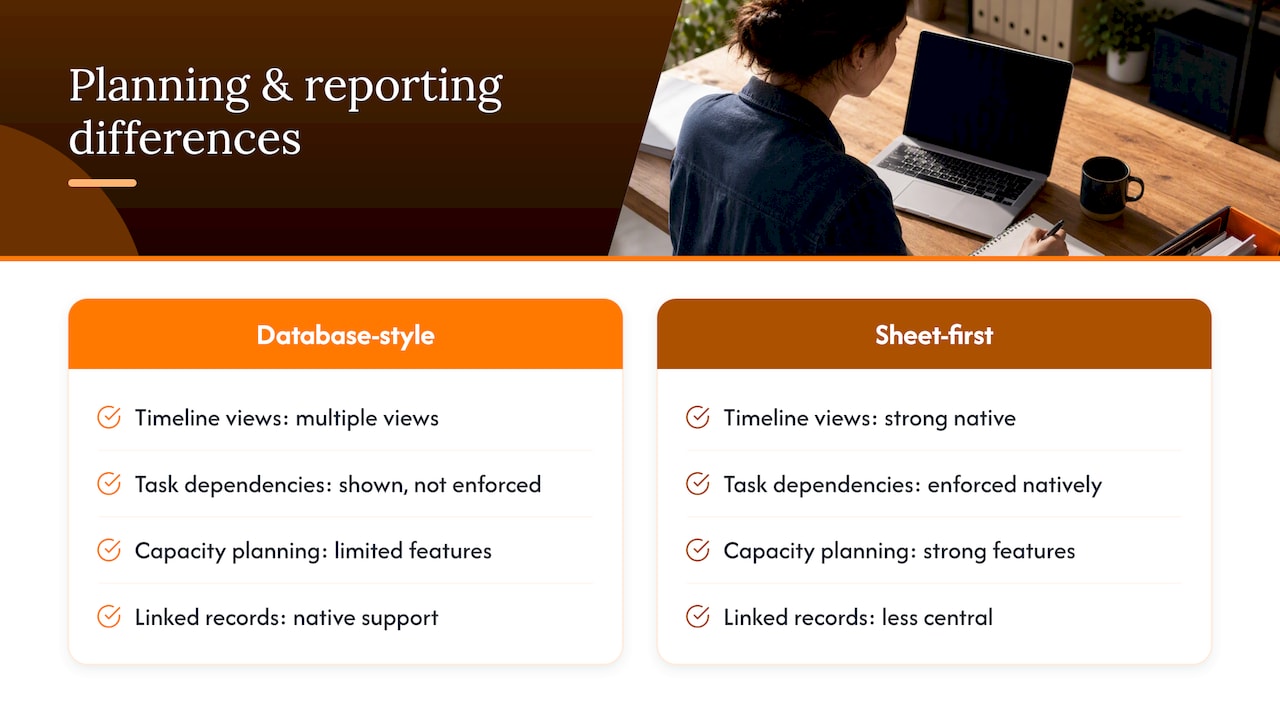
Independent comparisons frame this as the core choice axis: one category leans database-oriented with multiple views, the other leans toward sheet-like planning with stronger resource features. That framing helps avoid getting locked into a platform based on surface-level features alone.
Reporting needs follow the same pattern. A recurring operational process, such as monthly staff rostering, benefits from audit-ready reporting that shows who changed what and when. Event planning teams juggling vendor timelines, campaign delivery teams tracking multi-channel launches and rostering managers balancing shift coverage all need some combination of dependency tracking and clear audit trails.
The practical question to ask is whether your team needs to see dependencies (a database view can show this) or needs the system to enforce them (a project-planning tool does this natively).
Automation, integrations and when to build custom
Most SMEs need the same handful of automations regardless of which platform category they pick: notifications when a record changes, syncing data to a point-of-sale or ERP system, and capturing form submissions without manual re-entry.
- Notifications and alerts: triggered when a status field changes or a deadline approaches.
- System sync: connecting the platform to POS, accounting or ERP tools, often through native connectors or middleware.
- Form intake: capturing customer or staff submissions directly into records without copy-pasting.
Low-code automations inside either platform category handle straightforward cases well. The decision point for a custom integration, or a bespoke workflow automation, arrives when you are connecting multiple systems that were never designed to talk to each other, or when a native connector cannot be configured to match your exact approval chain. Feature comparisons across the two categories routinely list automation depth and native integrations as a key point of difference worth testing directly rather than assuming from marketing pages.
Pro Tip: Map every manual handoff in your current process before shortlisting tools. If a step still needs a person to copy data between systems, that is your automation priority, not a nice-to-have.

What to test before you commit: pilots and governance
A short pilot, run on a real workflow rather than a demo dataset, exposes problems no sales page will mention.
- Pick one recurring workflow (such as order intake or event registration) and run it fully through the platform for two to three weeks.
- Test data migration with a real export and import, checking for dropped fields or broken links.
- Confirm integration points actually sync, not just connect, with your POS, accounting or ERP system.
- Set permission roles for each team member and verify they see only what they should.
- Check audit logs: can you trace who changed a record and when, after the fact?
- Document an export and retention plan before go-live, not after a renewal deadline forces the question.
The main cost drivers to watch during a pilot are per-user licence fees, paid automation tiers and storage or attachment limits that force an upgrade mid-year. A pilot that surfaces these early saves a renegotiation later.
Security features and compliance certifications
Security and compliance questions deserve the same scrutiny as features, especially once a workflow touches customer data, payment records or staff information. Checking a platform’s published security documentation, including encryption standards, data residency options and access control granularity, should happen before data migration, not after.
Permission structures vary across platforms: some offer field-level permissions, letting you hide sensitive columns from certain roles, while others only support view-level or sheet-level restrictions. For an SME handling customer payment details or staff records, field-level control is often the deciding factor.
Compliance certifications, such as SOC 2 or ISO 27001, are typically published on a vendor’s own security or trust page rather than in general comparison articles, so verify directly with the vendor for your specific regulatory needs rather than relying on secondhand summaries. If your business operates under sector-specific rules, such as handling health or financial data, confirm the certification covers your exact use case, not just a general category.
Data residency matters too: where your data is physically stored can affect which regulations apply to it. For workflows built around sensitive or regulated information, this is worth confirming in writing before signing a contract, not assuming from a features page.
When a bespoke app beats either platform category
The company starts every engagement with a workflow-first review, not a product pitch. A complimentary app fit review looks at what a business actually does day to day before recommending a ready product, an adapted one, or a custom build.
Recurring workflows tend to move from platform to bespoke for one of two reasons: licence costs climb as the team grows, or governance needs outgrow what a general-purpose tool can enforce. A queue management process, an attendance system or an event registration flow that repeats weekly often reaches that point faster than a one-off project tracker.
The decision is rarely about which platform has more features. It is about which approach costs less to run once your workflow is set, five years from now, rather than which one looks best in a sales demo today.
— Ronald
How FlowLab helps you choose a direct, workflow-first route

If a flexible database or a sheet-first platform covers your needs, use it. If your workflow is recurring, specific and growing in complexity, a tailored build often ends up the more economical route once licence fees and workaround time are counted properly.
Our complimentary app fit review looks at your actual process and tells you plainly whether a ready product, an adapted one, or a custom build makes sense, with early cost direction before any commitment. For recurring front-of-house workflows, QueueFlow shows how an adapted product handles queue management without a custom build. For attendance and rostering, PresenceFlow turns daily check-ins into a live operating view.
Browse FlowLab’s product demos to see a workflow in action, or get in touch for a fit review before deciding anything.
Sources
- Compare Airtable and Resource Management by Smartsheet | G2
- Tech
- Airtable product summary and features — OnlinePilot
FAQ
What are the downsides of using Airtable?
Reviewers commonly flag record limits, attachment size caps and the cost of paid automation tiers as the main constraints, especially for teams scaling past a small pilot. G2 reviewer feedback suggests testing resource planning and governance needs directly, since flexibility does not automatically mean the platform enforces structure.
What is Airtable mainly used for?
It is mainly used as a flexible database for organising linked records, such as inventory, customer pipelines or content calendars, with multiple views over the same data. Product feature summaries describe record linking, rich field types and forms as its core strengths.
What is a good replacement for Smartsheet?
For teams with recurring, specific workflows such as queue management, attendance tracking or event registration, an adapted or custom-built app can replace a general sheet-first platform while matching the exact process rather than approximating it. Products like QueueFlow or PresenceFlow illustrate this adapted-product route for specific operational needs.
Is Airtable basically Excel?
No. Airtable uses a relational, record-based model where entries link to other entries across tables, while Excel and similar spreadsheets store data in flat rows and columns with limited native relationships. The practical difference shows up once you need the same customer or product record to update correctly across several linked views.
Which is better, Airtable or Smartsheet, for project management?
Neither is universally better: the sheet-first category generally handles task dependencies, timelines and resource allocation more directly, while the database category suits varied, linked records better than strict scheduling. Independent comparisons frame the choice around this core distinction rather than a single winner.