
Hosted form builders work well when your forms stand alone and collect straightforward data. A bespoke app makes more sense once your forms need to talk to other systems, protect sensitive information, or drive an operational process rather than just capture it. If either applies, a quick app fit review can confirm the most economical route before you commit to either path.
TL;DR:
- Hosted form builders are ideal for quick, simple data collection but can lead to vendor lock-in, limited customization, and integration challenges as volume grows.
- A bespoke app offers greater control over data storage, offline capabilities, and system integrations but requires longer planning, higher upfront costs, and ongoing maintenance.
- Costs for custom development depend heavily on complexity, with lengthy timelines for integrations and compliance, while hosted solutions typically take only days to set up.
- Prioritizing your key systems and data privacy needs before choosing a path helps avoid unnecessary features and ensures the chosen solution meets actual operational requirements.
- Conducting a thorough app fit review clarifies whether ready-made products, adapted solutions, or a custom build best support your workflow and budget before committing to development.
Table of Contents
- Trade-offs: speed, flexibility, data control, integration and maintenance
- Typical costs and schedules: what moves the numbers
- Decision checklist and developer briefing prompts
- A publisher’s view on choosing the workflow-first route
- FlowLab’s complimentary app fit review and live demos
- FAQ
Trade-offs: speed, flexibility, data control, integration and maintenance
A hosted form is live within hours. You pick a template, add your fields, publish a link. A bespoke app takes longer to plan and build, but it does things a form simply cannot: multi-step approvals, conditional branching based on earlier answers, offline data capture in areas with patchy connectivity, and workflows that route information to the right person automatically.
Data control is where the two approaches diverge most. With a hosted tool, your data sits on the vendor’s servers under their retention rules, and exporting it cleanly can be harder than it looks once you have months of submissions. A bespoke app puts you in charge of where data lives, how long it stays, and who can see it. Hosted form builders minimise time to market but can introduce vendor lock-in, per-submission fees and connector limitations, which matters more as your form volume grows.
Integrations follow a similar pattern. Hosted platforms connect to common tools through pre-built connectors, but linking to a point-of-sale system, a CRM, or an ERP platform often needs a paid add-on or a workaround. A bespoke app can be built to talk directly to those systems from day one, an approach FlowLab uses in its ERP integration work.
Branding and maintenance round out the picture:
- Branding: hosted tools limit you to their design framework, while a bespoke app can match your existing interface exactly.
- User experience: forms are built for one-off input, whereas an app can guide someone through an ongoing process step by step.
- Support: hosted platforms offer vendor support tied to your subscription tier, while a bespoke app relies on a developer relationship for updates and fixes.
- Maintenance: hosted tools handle their own upkeep, but a bespoke app needs a clear agreement on who patches, hosts, and updates it over time.
Pro Tip: Before you compare features, list the systems your form data needs to reach. That single question often decides which route makes sense.
Typical costs and schedules: what moves the numbers
Hosted subscriptions are predictable: a flat monthly fee, sometimes with per-submission charges once you cross a plan’s threshold. A small bespoke build costs more upfront but avoids the compounding fees that hosted tools charge as volume grows.
Several variables move a bespoke project’s price and schedule:
- Integrations. Connecting to an existing POS, CRM, or ERP system takes longer than a standalone form and is one of the most common reasons a quote rises. Common cost drivers for bespoke apps are integrations, offline capability, custom logic, and compliance requirements.
- Data migration. Moving historical records from spreadsheets or an old system into a new app adds setup time.
- Offline features. Apps that need to work without a live connection require extra engineering for syncing once connectivity returns.
- Compliance requirements. Sectors handling sensitive personal or payment data may need additional safeguards built in from the start.
On timeline, hosted setup takes hours to a few days. A bespoke minimum viable product typically runs four to twelve weeks, moving through scoping, design, build, and testing milestones. Ongoing costs to plan for include hosting, any third-party licence fees, connector charges, and a maintenance arrangement with your developer.
Decision checklist and developer briefing prompts
Work through these questions before you commit to either route:
- What business outcome does this form or workflow need to produce, not just what data does it collect?
- How sensitive is the data, and does it require restricted access or specific storage rules?
- Which existing systems does this need to connect to, now and in twelve months?
- What volume of submissions do you expect at peak, and does pricing scale with it?
- Does the process need to work offline, or only when connected?
- How far do you expect this to grow, and would a bespoke app need to support new features later?
Adopt a privacy-by-design approach: assess what data you actually need before choosing a tool, rather than picking a platform and working backwards. It shifts the decision from which tool has the most features to what data you need and how it must be stored.
If a bespoke app looks like the right route, bring these questions to any developer you brief:
- Where is our data stored, and who owns it once the project is delivered?
- What are your backup and recovery arrangements?
- What service levels apply after launch, and what do they cost?
- Do we receive the source code on handover?
Watch for red flags: a developer with no references, a scope document that stays vague on deliverables, no maintenance plan mentioned before signing, or connector costs that only surface after the build starts.
Pro Tip: Ask for a written scope before any commercial discussion. A developer who resists this is usually the one who later asks for more money mid-project.
FlowLab’s complimentary app fit review works through this same checklist with you, then sets out the most economical options against your actual requirements rather than a generic feature list.
A publisher’s view on choosing the workflow-first route
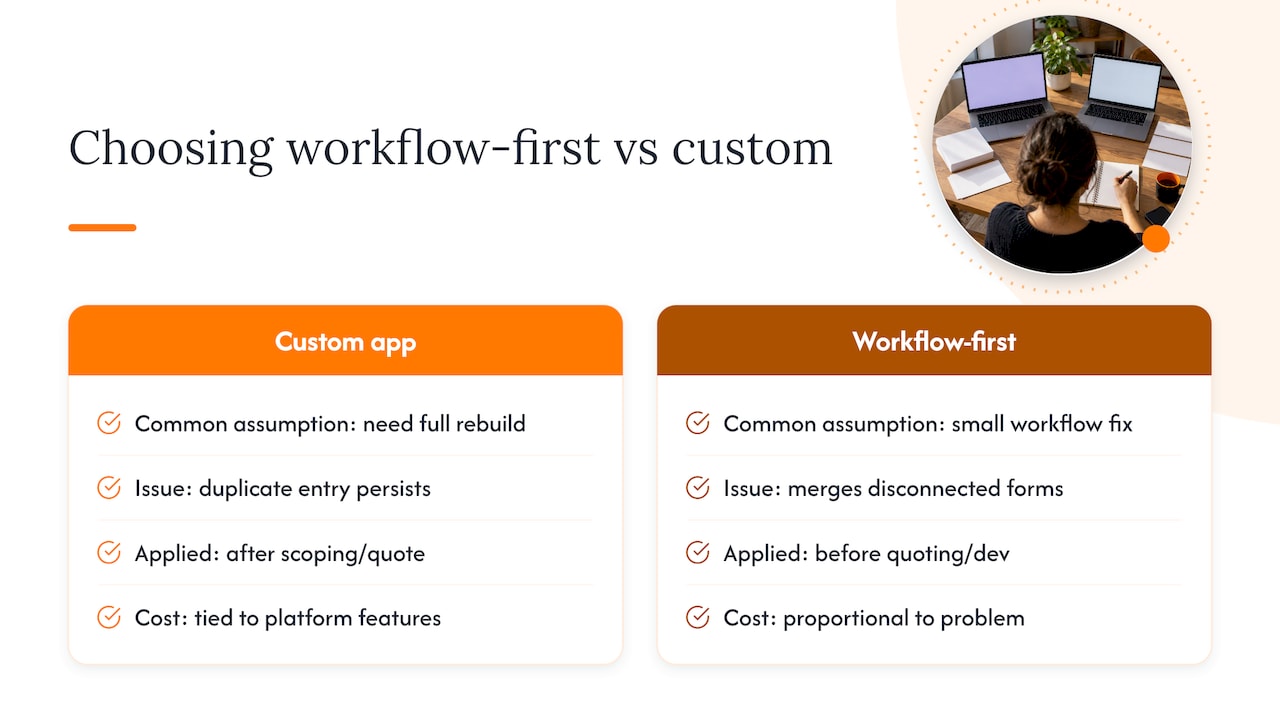
Most SMEs who come to us assume they need a fully custom app. Often what they need is smaller: one workflow fixed, not a system rebuilt. App fit reviews regularly turn up duplicate data entry across two or three separate forms, or several disconnected forms that should really be one workflow with a single source of truth.
A workflow-first review catches that before any development starts, which is why we run it before quoting on anything. It keeps the cost proportional to the actual problem, not to what a form builder happens to offer.
— Ronald
FlowLab’s complimentary app fit review and live demos
If your forms are starting to strain against what a hosted tool can do, a complimentary app fit review can give you clarity before you spend anything. The review looks at your current process, flags where a ready product could cover it, and provides a rough cost estimate for anything that needs building.

The review typically includes:
- An honest read on whether an adapted product, like QueueFlow or PresenceFlow, already solves your problem.
- A rough cost estimate for any bespoke work required, so there are no surprises later.
- A recommended next step, whether that’s a demo, a scoped build, or simply sticking with your current setup.
You can also try our product demos directly, including a full queue journey walkthrough, before booking a review. When you’re ready to talk specifics, our app development page explains how we scope a project from that first conversation.
FAQ
Is a bespoke app always better than a hosted form builder?
No. A hosted form builder is often the better choice for simple, standalone data collection with low volume and no sensitive information. A bespoke app earns its cost when you need integrations, offline capture, or tighter data control.
How long does it take to build a bespoke form-based app?
A small bespoke build typically takes four to twelve weeks from scoping to a working minimum viable product, depending on integrations and custom logic required. Hosted setup, by contrast, takes hours to a few days but offers far less flexibility as needs grow.
What data protection issues should I consider with hosted forms?
Businesses remain accountable for data security even when using third-party cloud forms, so it’s worth checking where data is stored and how it’s retained. Certified processing systems can reduce certain compliance burdens in some jurisdictions, but the underlying responsibility for the data usually stays with your business.
How much does FlowLab’s app fit review cost?
The app fit review is complimentary and is designed to identify the most economical route, whether that’s an existing product, an adapted solution, or a custom build, before any commitment is made. Pricing for the resulting project depends on scope and is available on request.
What happens if my needs change after launch?
A bespoke app can usually be extended as your workflow evolves, provided the original build was scoped with future integrations in mind. This is one of the questions worth raising with a developer before the project starts, alongside who owns the source code and what ongoing support costs look like.