Author: flowlabowner

  • Web App vs Mobile App: A Decision Guide for SMEs

    Web App vs Mobile App: A Decision Guide for SMEs

    Start web-first unless the core workflow genuinely requires native-only device features, continuous background tracking, or app-store presence for discovery. That covers most operational tools SMEs commission: dashboards, booking systems, POS front ends, lead trackers. The exceptions are narrower than most founders assume. Hardware-heavy work like Bluetooth scanning or biometric checks, AR or gaming experiences, and regulatory device integrations usually push you toward native or hybrid builds. Continuous background location tracking is another firm exception.

    Progressive web apps sit in between, offering installability and partial offline access without app-store submission, and modern PWAs now support push notifications and limited offline caching on most current browsers. The practical test isn’t which platform sounds more impressive. It’s which one satisfies the user’s critical job.

    • Web-first: fastest to build, cheapest to update, best for internal tools and browser-based customer workflows.
    • PWA: adds installability and some offline behavior without store review.
    • Native-first: justified by hardware access, background execution, or store distribution needs.

    Key Takeaways

    Most SME operational apps should start web-first because the critical job rarely requires native-only hardware, and web builds cost less to launch and maintain.

    Point Details
    Default to web-first Start with a web app or PWA unless hardware access or background tracking is core to the job.
    Watch for hidden costs Native development doubles codebase work across iOS and Android, raising both cost and timeline.
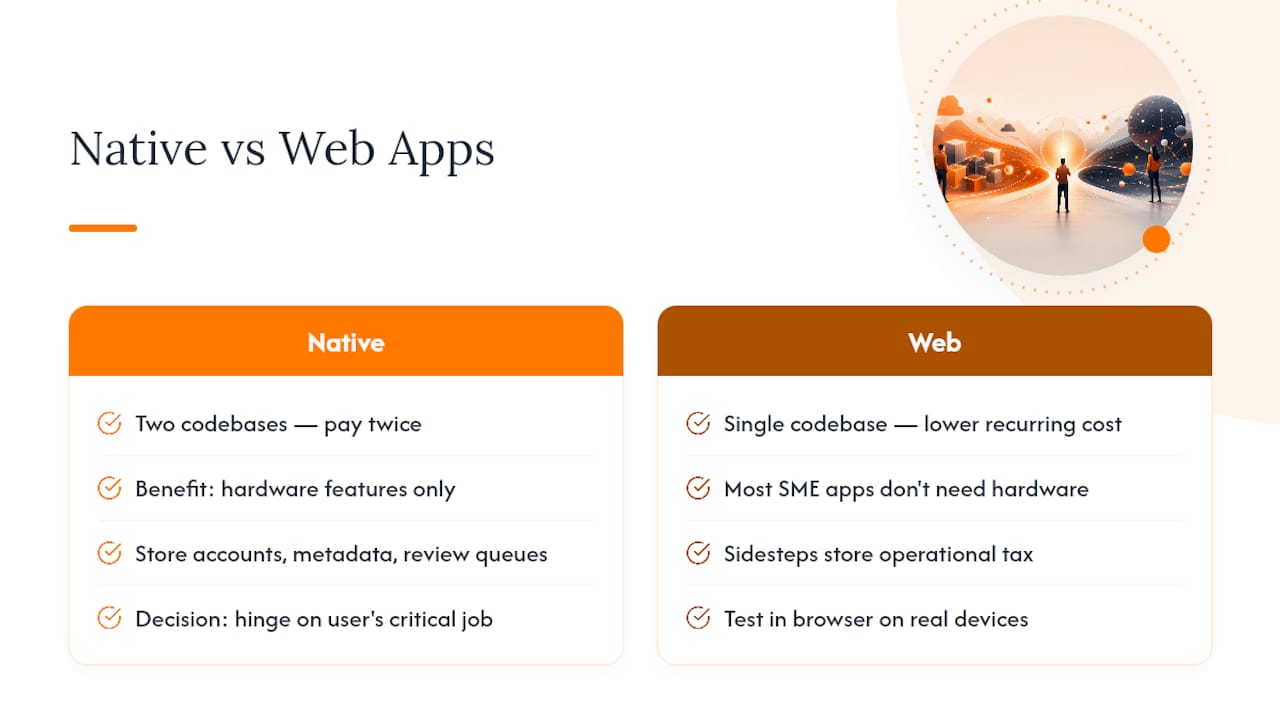
    Release burden is real Store accounts, metadata, and review queues add a recurring operational cost native builders often miss.
    Test hardware assumptions early Prototype camera, Bluetooth, or GPS behavior on real devices before locking in an architecture.
    Start with Flowlab’s fit review Flowlab’s complimentary app fit review matches your workflow to a ready-made, adapted, or custom solution.

    Table of Contents

    Web App vs Mobile App: What Each Term Actually Means

    A web app runs in a browser and lives at a URL. Users reach it by typing an address, clicking a link, or tapping a bookmark. No download, no app-store account, no approval queue.

    A native mobile app is built for a specific operating system, iOS or Android, using that platform’s own tools and APIs. It’s distributed through Apple’s App Store or Google Play, installed as a binary, and updated through the same store channel.

    Two intermediate forms matter here. A hybrid app wraps web technology inside a native shell, giving you app-store presence with mostly shared code across platforms. A progressive web app (PWA) is a web app enhanced with service workers so it can be installed to a home screen, cache content for partial offline use, and in some cases send push notifications.

    Here’s the quick reference:

    • Web app: best when speed of iteration and reach matter more than device depth. Distributed by URL, updated instantly.
    • PWA: best when you want installability and light offline resilience without store review. Distributed by URL or added to a home screen.
    • Hybrid app: best when you want app-store listing with one shared codebase across platforms. Distributed through app stores.
    • Native app: best when the product depends on deep hardware integration or background processes. Distributed through app stores, gated by review.

    The distribution split is the clearest dividing line. A web app is reachable the moment someone clicks a link, while a native app requires a store download and platform approval for every update. That single difference shapes almost everything else in this comparison: cost, update speed, and how fast you can react to a support ticket.

    Which Device Features Actually Need a Native App?

    This is where founders overestimate their needs most often. Browsers have closed a lot of ground on hardware access, but the gap hasn’t disappeared.

    • Camera: reliable in both. Browser camera APIs work well for photo capture and QR scanning.
    • GPS: works in browsers for foreground use; continuous background tracking still favors native.
    • Bluetooth: partial browser support (Web Bluetooth), inconsistent across iOS Safari; native is more dependable for peripheral pairing.
    • Biometrics (Face ID, fingerprint): native has the edge; browser-based WebAuthn is improving but adoption varies by device.
    • NFC: mostly a native strength; browser support is limited and inconsistent on iOS.
    • Background tasks: native owns this. Service workers can sync in the background under specific conditions, but they don’t match native’s persistent background execution.

    The variability isn’t evenly distributed, either. iOS Safari tends to lag behind Android Chrome in rolling out newer browser APIs, so a feature that works cleanly on one platform can behave differently, or not at all, on the other. Service workers add real capability but come with real limits: they can’t run indefinitely in the background, and caching behavior has to be deliberately designed rather than assumed.

    Security considerations differ too. Web apps rely on browser storage and session handling, subject to the same-origin model and HTTPS requirements. Native apps declare data usage upfront through platform-mandated privacy labels and are sandboxed at the OS level, which gives users a clearer, if more rigid, picture of what an app can touch.

    Hands turning physical key in server lock

    Pro Tip: Don’t take a web-first assumption on faith if your product touches hardware. Prototype the specific browser API, camera pipeline, background sync, whatever’s in question, on the actual devices your users carry before committing to an architecture.

    How Much More Does a Native App Cost to Build and Maintain?

    The single biggest cost driver is codebase count, not raw complexity. A web app or PWA ships from one codebase that every user hits through their browser. A native strategy covering both iOS and Android usually means two separate codebases, two sets of platform conventions, and two QA processes, unless you go hybrid to share logic.

    Web apps are generally simpler, cheaper, and faster to build; native apps require platform-specific development that typically extends both timeline and cost. That’s not a small variance. It compounds every time you ship a feature, because you’re paying to build and test it twice.

    Maintenance follows the same pattern:

    • Web/PWA: one deployment pipeline, updates go live the moment you push to production.
    • Native (per platform): binary builds, store submission, review wait times, staged rollouts.
    • Hybrid: shared logic reduces duplication, but native shell updates still route through app-store review.

    Testing scope diverges too. A web app’s test matrix is a set of browser and screen-size permutations; a native app’s matrix spans OS versions, device models, and store-specific QA checks before anything reaches users. Budget for ongoing maintenance as a recurring share of your original build cost, not a one-time expense; the FlowLab cost guide breaks down what SMEs typically see across both models.

    How Do Users Find and Update Web vs Mobile Apps?

    1. Discovery: web apps get found through search engines, shared links, and social posts, no gatekeeper involved. Native apps get found through app-store search, featured placements, or paid store promotion, which means competing for visibility inside a closed catalog.
    2. Installation: a web app needs zero installation, just a tap on a link. A native app requires a store download, an account, and enough phone storage to hold the binary.
    3. Updates: web apps update the instant you deploy to your server, every user sees the new version on their next visit. Native apps require you to submit a new binary, wait through review, and hope users actually download the update rather than running an old version indefinitely.
    4. Release burden: native adds real operational overhead here, developer account fees, store metadata upkeep, screenshots, version history, and the administrative weight of managing multiple live versions in the wild simultaneously.
    5. PWAs: split the difference, keeping URL discoverability while adding a home-screen icon and install prompt, without a store queue in the way.

    Founders frequently underweight that release burden when they choose native for the prestige of an app icon. It’s a recurring cost, not a one-time setup task, and it shows up every single release cycle.

    Does a Web App Feel as Fast as a Native App?

    Native apps generally feel snappier, mostly because they render UI with the operating system’s own components and skip the network round-trip a browser needs for a first paint. That gap has narrowed for content and workflow apps as web frameworks improve, but it still shows up in animation-heavy interfaces and apps juggling large local datasets.

    Offline behavior is where the architectures genuinely diverge. Native apps store data locally by default and sync when a connection returns. Web apps and PWAs achieve something similar through service workers and caching strategies, letting core screens load without a live connection, but that behavior has to be engineered deliberately rather than assumed as a given feature of the platform.

    • Caching: service workers can pre-cache assets and serve stale data offline, but coverage depends entirely on what the development team chose to cache.
    • Battery and memory: native apps typically manage sensor-heavy or media-heavy sessions more efficiently, since they access hardware more directly.
    • Long sessions: apps with continuous video, audio, or sensor use tend to drain resources faster in a browser tab than in an optimized native process.
    • Perceived speed: for typical SME use cases, form entry, booking, dashboards, the performance gap is small enough that most users won’t notice.

    For most operational tools, the offline question matters more than raw speed. If your team needs to log data in a warehouse with no signal, that’s a service-worker design problem worth solving early, not a reason to default to native.

    When Should You Choose Web-First, PWA, Hybrid, or Native?

    Run through these five questions before committing to a build:

    1. What’s the user’s one critical job? Name it specifically. Vague answers lead to over-built apps.
    2. Does the workflow require offline or background operation? If yes, and it’s continuous, lean native or hybrid.
    3. Does it depend on hardware the browser can’t reliably reach? NFC payments, biometric locks, and persistent Bluetooth pairing usually mean native.
    4. Is app-store presence part of your growth or retention strategy, or is reach through search and shared links enough?
    5. What’s your actual budget and timeline? Two native codebases cost more than one web codebase, every time.

    Mapping common scenarios:

    • Internal staff dashboard, no store need → web-first.
    • Customer booking tool with occasional offline use → PWA.
    • Consumer app needing store visibility plus shared logic → hybrid.
    • Fitness tracker with continuous background GPS → native-first.
    • Field inspection app needing camera plus offline forms → PWA, tested against real devices first.

    Prototyping device-dependent behavior early, on the actual hardware your users carry, catches assumption errors before they become expensive rebuilds.

    Pro Tip: Build the smallest possible web version first and measure real usage before locking in a native rebuild. A web-first MVP gives you evidence of actual demand, which is worth more than any architecture debate.

    How Flowlab Helps SMEs Pick the Right Path

    Flowlab runs a complimentary app fit review before any build starts. You walk through your actual workflow, not a generic requirements form, and get a straight answer on whether a ready-made product, an adapted existing foundation, or a custom build fits your critical job and your budget.

    • Cost clarity before any commitment, so there’s no surprise scoping later.
    • A recommended path mapped to your specific operational bottleneck, not a sales pitch toward the most expensive option.
    • Options range from ready-made products like queue and pricing tools to fully custom app development when the workflow demands it.

    Most SMEs don’t need a native app. They need the simplest suitable solution for the one job that’s actually costing them time or money.

    The Overlooked Cost of Choosing Native for the Wrong Reasons

    Most comparisons treat this decision as a technical checklist. It isn’t. It’s a resourcing decision, and the conventional advice, “go native for a better experience”, skips the part where two codebases mean paying twice for every feature, every bug fixes, and every future pivot.

    The research here points to a sharper rule: distribution prestige, the appeal of a home-screen icon, is a weak reason to build native first. The decision should hinge on the user’s critical job, not on what looks more legitimate to investors or customers. A booking tool doesn’t need NFC. A dashboard doesn’t need background GPS. Most SME operational apps simply don’t touch the hardware territory where native earns its cost premium.
    The Overlooked Cost of Choosing Native for the Wrong Reasons — overview diagram

    What gets underrated is the release burden. Store accounts, metadata, review queues, staged rollouts, that’s a recurring operational tax most founders budget for once and then forget compounds every release cycle. A web app sidesteps that tax entirely.

    Prioritize this first: name the one job the app absolutely must do, then test whether a browser can do it on the actual devices your team or customers use. Everything else, aesthetics, store presence, platform prestige, comes after that answer, not before it.

    — Ronald

    Get a Clear Answer for Your Own App Decision

    Reading a comparison only gets you so far. If your workflow involves queue management, staff-facing product guidance, or lead tracking, Flowlab has already built the ready-made foundation for it, which means you skip months of custom development for problems that are already solved.

    Flowlab’s complimentary app fit review gives you a direct answer on whether your operation needs a custom build or a faster, cheaper adapted product, before you spend a dollar. If queue flow is your bottleneck, you can try the complete queue journey right now. If your staff need faster answers at the counter, the right product answer, delivered right when staff need it, might solve it without a custom build at all. For projects that need front-end design support on top of the build, Coleman Web Designs is a partner worth a look.

    Book your complimentary app fit review and get a clear, honest recommendation before you commit to anything.

    Sources

  • How Long Does App Development Take, Start to Finish?

    How Long Does App Development Take, Start to Finish?

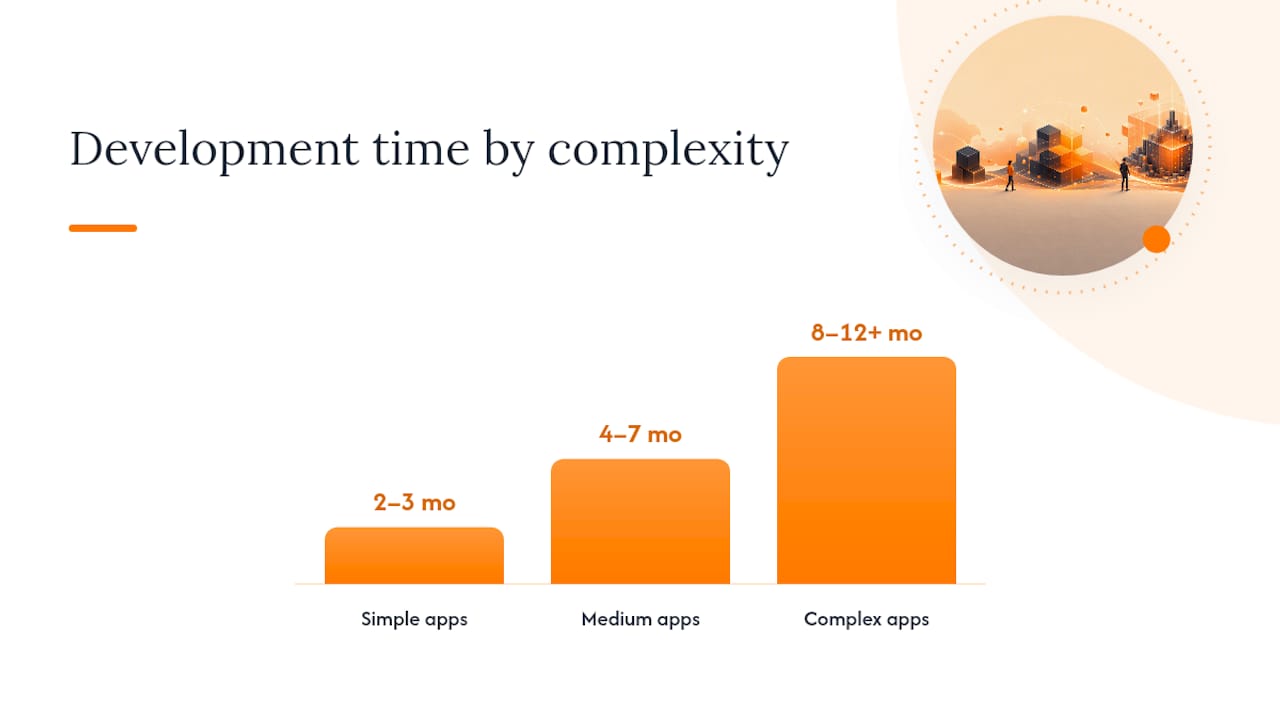
    Most mobile apps take 3 to 12 months to build, depending on scope: simple apps run 2 to 3 months, medium-complexity apps run 4 to 7 months, and complex, multi-role apps run 8 to 12+ months. Ranges shift with platform choice, integrations, and how many features you’re trying to launch on day one, but the number that actually controls your finish date is the critical path, the sequence of dependent tasks that can’t be skipped or parallelized.

    A typical project moves through six phases, and industry data puts the full cycle at roughly 20 to 40 weeks from discovery to launch, with planning at 2 to 3 weeks, design at 2 to 4 weeks, development at 3 to 6 months, testing at 3 to 6 weeks, deployment at 1 to 2 weeks, and post-launch stabilization at 2 to 4 weeks.

    Before you commit to a schedule, answer two questions: How many distinct user roles does the app need (customer only, or customer plus staff plus admin)? And how many outside systems does it have to talk to (payment gateways, inventory software, CRMs)? Your answers place you in one of three complexity bands covered next.

    Key Takeaways

    App development timelines are controlled by the critical path, not total feature count, so schedule risk comes from dependent tasks and integrations, not from how long your feature list looks.

    Point Details
    Match complexity to timeline Simple apps run 2 to 3 months, medium apps 4 to 7 months, complex apps 8 to 12+ months.
    Discovery sets the pace A clear, prioritized feature list and MVP definition upfront prevents the rework that stretches development later.
    Protect the critical path Map dependent tasks early and apply a recovery playbook immediately when any milestone slips.
    Don’t compress testing Cut scope to save time before cutting QA, since skipped testing resurfaces as post-launch emergencies.
    Consider Flowlab’s fit review Flowlab’s complimentary app fit review gives a rough timeline, cost band, and recommended build approach before you commit.

    Table of Contents

    App Development Timeline by Complexity: Simple, Medium, Complex

    Complexity isn’t about how the app looks. It’s about how many decisions, data sources, and user roles it has to juggle at once. A single-purpose booking app with no login screen behaves nothing like a multi-vendor marketplace, even if both fit on a phone screen.

    Simple apps solve one problem for one type of user. Think a digital menu, a basic loyalty punch card, or a static event schedule. There’s little to no backend logic, often no user accounts, and minimal data storage.

    • Calendar range: 2 to 3 months
    • Typical features: one core function, static or lightly dynamic content, no third-party integrations
    • Example apps: appointment reminder tool, single-location queue display, internal price lookup app

    Medium apps add user accounts, some form of payment or data collection, and at least one meaningful integration. This is where most SME operational tools land.

    • Calendar range: 4 to 7 months
    • Typical features: login and profiles, one or two API integrations (payment, SMS, or maps), a basic admin dashboard
    • Example apps: appointment booking with payments, staff attendance tracker with reporting, lead capture app tied to a CRM

    Complex apps carry multiple user roles, real-time features, and several integrations that all need to stay in sync. Enterprise-grade queue systems, multi-branch POS platforms, and marketplace apps sit here.

    • Calendar range: 8 to 12+ months
    • Typical features: multi-role permissions (customer, staff, admin), real-time syncing, several third-party APIs, custom reporting

    Industry guides consistently group projects into these same three buckets, which tells you the pattern holds across most SME-scale builds, not just one vendor’s experience.

    Phases can overlap once requirements are locked. Design can start while discovery wraps up its final sign-off, and backend development can begin before every screen is finalized. What can’t overlap is testing before development finishes the feature it’s testing, or deployment before app-store review clears. Trying to force that overlap is the single most common cause of a blown launch date.

    App Development Timeline by Complexity: Simple, Medium, Complex — overview diagram

    App Development Phases: What Happens and How Long Each Takes

    Each phase produces a specific deliverable that marks it “done.” Vague endings (“design is mostly finished”) are where schedules quietly slip by weeks. Here’s what each phase should hand off before the next one starts.

    Discovery and planning (1 to 4 weeks)

    This phase turns a business problem into a documented plan. It includes stakeholder interviews, a requirements document, and a prioritized feature list that separates “must-have for launch” from “nice to have later.”

    1. Stakeholder interviews and workflow mapping (2 to 5 days)
    2. Requirements document draft and review (3 to 7 days)
    3. Prioritized feature list and MVP definition, sign-off (2 to 5 days)

    Projects with a clear existing process (you know exactly what the app needs to replace) land at the low end. Projects where the team is still debating “what should this even do” stretch toward four weeks, and that time is worth spending. A structured discovery deliverable, one that includes a feature list, a vendor risk register, and an MVP definition, cuts a meaningful chunk of the uncertainty out of everything downstream.

    Design (2 to 6 weeks)

    Design converts the requirements into wireframes, then interactive prototypes, then a signed-off visual system. The duration depends almost entirely on iteration count: a two-round review cycle finishes in two weeks, while a five-round cycle with multiple stakeholders can run past six.

    • Wireframes and user flow diagrams (1 to 2 weeks)
    • Interactive prototype and stakeholder review (1 to 2 weeks)
    • Final design sign-off and asset handoff (3 to 7 days)

    Design sign-off should function as a hard milestone, meaning zero-duration and gate-based, not a task with its own duration. Confusing milestones with tasks is one of the most common ways plans quietly lose a week: the milestone gets budgeted like a task, and the actual gating decision gets skipped.

    Development (3 to 6 months)

    This is where most of the calendar time lives, and it’s where feature count drives duration most directly. A single-role app with no integrations might clear core development in 6 to 8 weeks. Add payment processing, a second user role, and an API connection to inventory software, and you’re looking at 3 to 5 months. Add real-time syncing across multiple locations and you’re in 5 to 6 month territory.

    Development typically runs in sprints of one to two weeks, with front-end and back-end work happening in parallel once API contracts are agreed. Integration points, the moments where your app has to talk to a payment gateway or a third-party system, are usually the slowest part, because you’re dependent on someone else’s documentation and someone else’s support queue.

    Pro Tip: Ask any third-party API vendor for their actual integration turnaround time in writing before you build it into your schedule. “Should take a few days” from a sales call and “took three weeks because their sandbox environment was broken” from an engineer are two very different numbers.

    Testing (3 to 6 weeks)

    Testing includes unit tests (checking individual functions), integration tests (checking that pieces work together), and user acceptance testing, or UAT, where real stakeholders try the app against real workflows. Automated test suites reduce QA time in later sprints, but only if you build that automation early. Skipping it to “save time” upfront usually costs more time later, when every new feature requires a full manual retest.

    Deployment (1 to 2 weeks)

    Deployment covers app-store submission, review, and go-live. Apple’s review process typically runs a few days but can extend if your app touches payments, health data, or anything requiring extra compliance checks. Google Play review is usually faster. Build a rollback plan before you submit, not after something breaks in production.

    1. Final build preparation and store listing assets
    2. Submission and review (allow buffer for rejection and resubmission)
    3. Staged or full release with monitoring in place

    Post-launch (2 to 4 weeks, then ongoing)

    The weeks right after launch need a hotfix window, meaning a team on standby for issues that only show up under real user load. Analytics setup should happen before launch, not after, so you have baseline data from day one. Beyond that window, maintenance becomes a scheduled cadence, not a fire drill, with a backlog for the features you deliberately deferred during MVP prioritization.

    What Factors Actually Move Your App Development Timeline

    Every schedule change traces back to one of six variables, and knowing which one is at play tells you exactly how many weeks to add.

    Scope and feature count. Each meaningful feature typically adds 1 to 3 weeks of development plus proportional testing time. Five extra features rarely means five extra weeks. It often means eight to ten, because features interact and each interaction needs its own test pass.

    Integrations. Every third-party API you depend on carries its own lead time and its own maturity risk. A well-documented payment gateway might integrate in days. A legacy accounting system with sparse documentation can eat two to three weeks on its own, entirely outside your team’s control.

    Platform choice. Building natively for iOS and Android separately roughly doubles front-end development and testing time compared to a single cross-platform codebase, though native apps often perform better for graphics-heavy or hardware-dependent features.

    Hands connecting smartphones for hardware testing

    Team model and resourcing. A dedicated full-time team moves faster than one staffed with part-time contributors juggling other projects. Hiring lag alone, the gap between deciding you need a specialist and having them productive, commonly adds 2 to 4 weeks before development even starts.

    Regulatory and security requirements. Data residency rules, enterprise single sign-on, or industry-specific compliance needs typically add 2 to 6 weeks, mostly in design and testing, because these requirements have to be verified, not just built.

    Approval cycles. Every round of stakeholder review that requires sign-off from multiple people acts as a schedule multiplier. A single decision-maker approving design in two days is very different from five stakeholders needing a week each to review the same deliverable, especially if their feedback conflicts.

    None of these factors work in isolation on a real project. A payment integration (factor one) built on a cross-platform codebase (factor two) with a part-time contractor (factor three) compounds delay in ways a simple checklist won’t show you, which is exactly why the businesses building app market volume at scale invest in discovery work before writing a line of code.

    Three Sample App Timelines You Can Adapt

    Simple app: a single-location booking tool (10 to 12 weeks total)

    1. Discovery and requirements: weeks 1 to 2
    2. Design and prototype sign-off: weeks 3 to 4
    3. Development: weeks 5 to 8
    4. Testing and bug fixes: weeks 9 to 10
    5. App-store submission and launch: weeks 11 to 12

    Medium app: a booking-plus-payments platform with CRM sync (20 to 24 weeks total)

    1. Discovery, requirements, and vendor risk assessment: weeks 1 to 3
    2. Design across two sprint reviews: weeks 4 to 7
    3. Development in two-week sprints, front-end and back-end in parallel: weeks 8 to 17
    4. Payment gateway and CRM integration testing (often the tightest bottleneck): weeks 15 to 18
    5. Full QA and UAT: weeks 18 to 21
    6. Deployment with staged rollout: weeks 22 to 24

    Complex app: multi-branch queue and staff management system (36 to 44 weeks total)

    1. Discovery across multiple stakeholder groups (ops, IT, finance): weeks 1 to 5
    2. Design with role-based interface variants: weeks 6 to 11
    3. Parallel development workstreams (customer app, staff app, admin portal): weeks 12 to 30
    4. Cross-system integration testing across branches: weeks 28 to 34
    5. Staged rollout, one branch at a time: weeks 35 to 40
    6. Stabilization and full-network go-live: weeks 41 to 44

    Pro Tip: If you need to compress any of these, cut scope, don’t compress testing. Removing a lower-priority feature saves real weeks with low risk. Cutting testing time to hit a date is how launches turn into emergency hotfix cycles.

    Project Management Tactics That Keep the Schedule on Track

    Your finish date is set by the longest chain of dependent tasks, the critical path, not by your total task count. A project with fifty tasks but a short critical path can finish faster than a project with twenty tasks stuck in a long dependency chain. Map your critical path early and update it every time a task slips.

    Keep milestones and tasks separate in your plan. A milestone (design sign-off, API integration complete, UAT passed) has zero duration and should trigger a decision or a payment, not consume calendar time on its own. Tasks are the work; milestones are the gates.

    • Report weekly to the delivery team, biweekly to stakeholders who need visibility but not daily detail
    • Flag any critical-path slip within 48 hours, not at the next scheduled check-in
    • Reserve a 10 to 15% schedule buffer for integration and review cycles, since these are where delays cluster most

    When a milestone slips, apply a recovery playbook immediately rather than just pushing the end date. Isolate the critical path, pause non-essential feature work, and reassign staff to the tasks actually blocking delivery.

    Teams that apply a short recovery playbook the moment a milestone slips recover their schedule roughly twice as often as teams that simply extend the deadline without reallocating resources.

    Know when to rebaseline versus renegotiate. If the slip is a one-off (a vendor delay, a sick team member), rebaseline the schedule and move on. If the slip stems from scope that quietly grew past the original plan, that’s a scope conversation, not a scheduling one, and pretending otherwise just guarantees the next milestone slips too.

    FlowLab’s Approach to Realistic App Timelines

    Most timeline overruns trace back to one root cause: unclear requirements discovered mid-build instead of before it. Flowlab runs discovery first, mapping your actual operational workflow before recommending anything, which is why projects that start with a clear feature list and MVP definition tend to avoid the rework that eats weeks later in development.

    Not every project needs a custom build. When your workflow closely matches an existing pattern, queue management, point-of-sale, event registration, lead tracking, Flowlab recommends adapting a ready-made product foundation instead. That path typically shortens the calendar significantly compared to building every screen and integration from zero, because the core architecture and integrations already exist and only need configuration for your workflow.

    Flowlab’s complimentary app fit review produces three things before you commit to anything:

    • A rough calendar estimate based on your actual workflow, not a generic template
    • A cost band so you know what range you’re planning against
    • A recommended approach: ready-made product, adapted solution, or custom build

    To get the most out of the review, come with a plain-language description of your current process and where it breaks down. No technical brief required.

    Why Most Timeline Advice Skips the Real Question

    Most timeline guides answer “how long does an app take” as if every project starts from zero. That’s the gap in the conventional advice: the biggest schedule lever isn’t sprint velocity or team size, it’s whether you’re building from scratch at all. A workflow that matches an existing product pattern, a queue system, a booking flow, a lead tracker, can often skip months of the build entirely, and no amount of agile process discipline substitutes for that decision made correctly at the start.

    Where I think most SME owners get it wrong is treating discovery as a formality to rush through so “real work” can start sooner. The data doesn’t support that instinct. A rushed discovery phase is exactly what produces the mid-development scope changes that blow up a 5-month plan into an 8-month one. The two or three weeks spent nailing down a prioritized feature list is the cheapest insurance you’ll buy on the entire project.

    Prioritize getting your workflow assessed honestly before you prioritize a launch date. The date should follow from the assessment, not the other way around.

    — Ronald

    Get a Realistic Timeline for Your Own App

    Flowlab gives you a straight answer to “how long will this actually take” before you spend a dollar, not after. Where a typical agency quotes a custom build by default, Flowlab starts by checking whether your workflow already matches an existing product foundation, which is often the difference between a 3-month timeline and a 7-month one.

    Flowlab

    If your business runs on customer queues, Flowlab’s queue platform is worth seeing in action first. You can try the complete queue journey yourself to see how much of that “custom build” your team assumed you needed is actually already solved. For pricing and inventory workflows, the right product answer, ready when your staff need it, works the same way: configuration instead of construction.

    Every engagement starts with a complimentary app fit review, no commitment, no technical brief required. Bring a plain description of how your team currently handles the process you want to fix, and request your app fit review with Flowlab to get a rough timeline and cost band back before deciding anything.

    Sources

    The phase ranges and recovery tactics in this guide draw from a handful of practitioner sources worth bookmarking if you’re building your own schedule.

  • What a Single Source of Truth Really Means for Your Business

    What a Single Source of Truth Really Means for Your Business

    A single source of truth (SSoT) is the one authoritative, governed record your business trusts for a given piece of information, like a customer’s billing address or a product’s current price. If three systems show three different answers to “how much stock do we have left,” you don’t have one yet.

    The verdict: pursue an SSoT when reporting conflicts, duplicate records, or “which number is right?” meetings are costing you real time. Start small.

    • Customer data: one trusted record for contact details, order history, and account status.
    • Product data: one trusted record for pricing, specs, and inventory information.

    At Flowlab, we’ve walked SMEs through exactly this kind of prioritization, and it rarely starts with a big migration. It starts with picking the right domain first.

    Key Takeaways

    A single source of truth succeeds when it’s scoped to one high-friction domain first and treated as governance plus integration rather than a full data migration.

    Point Details
    Start with one domain Pick customer or product data first based on where conflicts cause the most visible pain.
    SSoT is not physical consolidation Treat it as a governed view above existing systems, not a mandate to migrate everything into one database.
    Assign real owners Name a data steward and domain owner before building anything, or governance decays within months.
    Test the golden record before syndicating Validate identity resolution against messy real data, not clean samples, before pushing it downstream.
    Flowlab starts with a fit review A complimentary app fit review maps your actual data conflicts before recommending a build or adaptation.

    Table of Contents

    What Is a Single Source of Truth, and Where Does It Stop?

    An SSoT is an architectural and governance concept, not a building you construct once and forget. It’s the agreed answer to “which system wins when two records disagree,” backed by rules for who can edit what and how changes propagate. Techopedia defines SSoT as a central, standardized dataset that eliminates the fragmented snapshots teams end up arguing over.

    Here’s where expectations need adjusting:

    • SSoT is often conceptual, not one physical database. Data can stay in different systems as long as one governed view is authoritative.
    • It differs from a “single version of the truth,” which usually describes a reporting layer, like a data warehouse, that reflects consistent numbers for analysis without controlling live operational data.
    • Full enterprise-wide SSoT across every domain at once is rarely practical for a growing business. Gartner’s framing of master data management treats it as a maturity journey, not a single event, moving from siloed awareness toward broader optimization over time.

    Trying to unify every record on day one is how these projects stall. Pick a domain. Prove it works. Expand from there.

    How Does a System of Record Differ From an SSoT?

    A system of record (SOR) is the transactional workhorse: the CRM that captures every sales call, the POS that logs every transaction. It’s built for speed and day-to-day capture, not for giving you one clean answer across every department.

    An SSoT sits above that. It’s the authoritative view decision-makers and analytics tools pull from once data has been cleaned, matched, and reconciled across sources.

    A practical pairing looks like this:

    • CRM as the SOR for raw sales activity, calls logged, deals updated, tickets opened.
    • MDM or an integration layer as the SSoT that consolidates the CRM with billing, support, and inventory systems into one trusted customer or product view.
    • Update flow: the SOR captures the transaction first; the SSoT layer ingests, cleanses, and republishes the governed version other systems consume.

    Confusing the two is a common mistake. Treating your CRM as your SSoT means every downstream report inherits whatever mess is sitting in sales notes.

    Which Architecture Pattern Fits Your Data Setup?

    The right pattern depends on how many systems you’re reconciling and how fast that data changes.

    1. Master data management (MDM) hub. Best when you have several systems (CRM, ERP, e-commerce) all claiming ownership of the same customer or product records. SAP describes the MDM lifecycle as match, merge, and publish, producing a single trusted “golden record” other systems reference.
    2. Event sourcing / event store. Useful for domains where the sequence of changes matters as much as the current state, like order status or attendance tracking. Every change is logged as an event, and the current “truth” is derived by replaying that log.
    3. Data warehouse or data lake. Strong for reporting consistency but weaker as an operational SSoT. Wikipedia’s overview of SSoT patterns notes a warehouse often becomes a “single version of the truth” for dashboards without ever becoming the live source systems write back to.
    4. Integration or federation layer. Connects existing systems through APIs rather than forcing a physical data migration, respecting vendor constraints instead of rewriting them.

    Pro Tip: Don’t pick a pattern based on what’s trendy. Pick it based on whether your data changes by transaction (event sourcing), by record ownership conflict (MDM), or by reporting need (warehouse).

    How Do You Roll Out an SSoT in Phases?

    Trying to unify everything simultaneously is the fastest way to burn budget and stall momentum. A phased approach works better for almost every organization we’ve seen.

    1. Assess. Inventory where customer or product data currently lives and where conflicts actually cause pain. Tech vendors commonly recommend starting with customer data because it touches marketing, sales, and service simultaneously, making ROI visible fast.
    2. Pilot. Build a canonical data model for one domain, run identity resolution to merge duplicate records, produce a golden record, and syndicate it to two or three consuming systems.
    3. Expand. Add domains only once the pilot’s reconciliation error rate is low and stable.
    4. Optimize. Automate what was manual: real-time sync for time-sensitive data, scheduled batch updates for anything slower-moving.

    Track these as you go:

    • Data quality score (percentage of records passing validation rules)
    • Reconciliation error rate between source systems
    • Time-to-insight for reports that used to require manual cross-checking

    Choosing real-time sync everywhere sounds appealing but adds cost and complexity most SMEs don’t need for every domain. Batch updates overnight are often good enough for inventory counts; real-time matters more for live pricing or appointment availability.

    Who Should Own Your Single Source of Truth?

    Governance sounds abstract until you assign it to actual people. Without named owners, your SSoT decays back into competing spreadsheets within a quarter.

    • Data steward: owns day-to-day data quality for one domain, resolves conflicts, flags anomalies.
    • Domain owner: a business stakeholder (sales lead, ops manager) who decides what “correct” means for their data.
    • Architect: owns the technical model, schema versioning, and how systems connect to the SSoT layer.

    Change control needs teeth, not just good intentions. Version your schema so changes don’t silently break downstream reports. Set approved change windows instead of letting anyone push updates whenever. Keep an audit trail of who changed what and when, which matters as much for compliance as for debugging.

    Access control matters too: decide who can edit the golden record directly versus who can only submit change requests for review.

    Pro Tip: Assign the domain owner role to someone who already gets blamed when the numbers are wrong. They’ll enforce the rules because they have skin in the game.

    How Do You Keep an SSoT Accurate Over Time?

    An SSoT isn’t a project with an end date. It’s an ongoing operation, and skipping maintenance is how “single source of truth” quietly becomes “source of outdated truth” within months.

    • Run automated reconciliation jobs that compare source systems against the golden record and flag mismatches automatically.
    • Maintain data lineage so you can trace any figure back to its origin system, which matters both for trust and for audits.
    • Schedule periodic deduplication and cleansing, since customer and product records drift and duplicate over time even with good governance.
    • Set clear decision rules for divergence: when two systems disagree, who has final say, and how fast does the fix need to happen?

    SAP notes that the golden record is inherently dynamic, requiring continuous identity resolution rather than a one-time cleanup, since new records and edge cases keep appearing as the business grows.

    What Should You Check Before Launching a Pilot?

    Most SSoT failures trace back to skipping one of these steps, not to picking the wrong technology.

    1. Confirm you’re not scoping the whole enterprise on day one. One domain, proven, beats five domains half-finished.
    2. Verify ownership exists before you build anything. If no one owns the customer domain today, assigning a steward is step zero, not an afterthought.
    3. Test integration with your legacy or vendor systems early. Discovering an old POS system can’t expose an API halfway through a project is expensive to fix late.
    4. Validate identity resolution and the golden record before syndicating it anywhere. Push a flawed golden record to five downstream systems and you’ve multiplied the error, not fixed it.

    Pro Tip: Run your identity resolution logic against your messiest real records, not clean sample data, before you trust it enough to publish.

    How Flowlab Approaches SSoT Differently for SMEs

    We work with small and medium-sized businesses where a full MDM platform license is overkill and a from-scratch data warehouse is out of budget. Practitioner guidance on MDM backs an integration-first approach for smaller teams: build a canonical model for one domain and syndicate it through APIs rather than licensing heavy enterprise tooling.

    • Complimentary app fit reviews to map your actual data conflicts before recommending anything
    • No technical jargon required from you to get a clear cost and scope picture

    What Business Impact Does a Working SSoT Actually Deliver?

    The payoff isn’t abstract. It shows up in fewer meetings spent arguing about whose spreadsheet is right and faster decisions because the number in front of you is the real one.

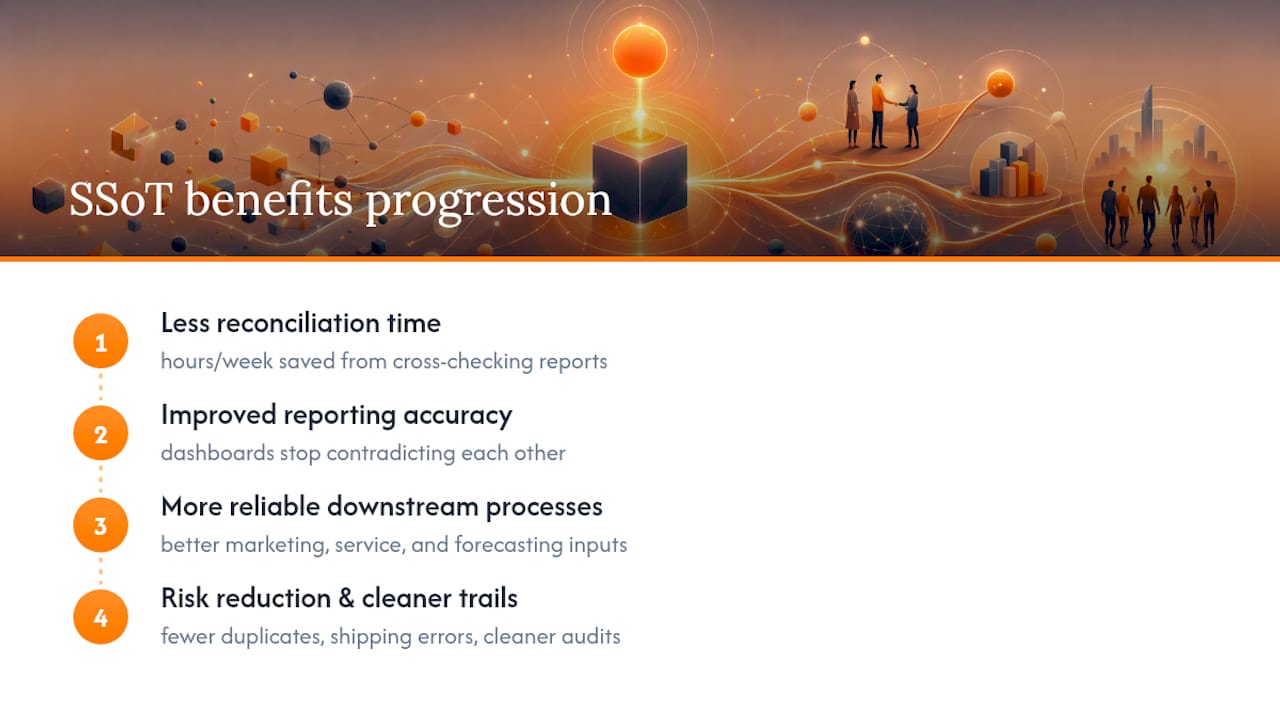
    Reconciliation time drops first. Teams that used to spend hours each week cross-checking CRM figures against finance reports get that time back once one governed customer record exists. Reporting accuracy improves next, since dashboards built on a golden record stop contradicting each other in the same meeting.

    There’s a compounding effect too. Once customer data is trusted, downstream processes, like marketing segmentation, service response times, and inventory forecasting, get more reliable inputs without extra manual cleanup. Gartner’s maturity model frames this as organizations moving from reactive firefighting toward treating master data as a strategic asset, and that shift tends to show up first in operational speed rather than in a single headline metric.

    Diagram of business impact benefits from working single source of truth

    The risk-reduction side matters just as much. Fewer duplicate customer records mean fewer embarrassing double-contacts, fewer shipping errors from mismatched product data, and cleaner audit trails when a regulator or investor asks where a number came from. None of this requires enterprise scale to matter. A ten-person operations team drowning in three conflicting spreadsheets for the same client list feels this pain just as acutely as a 500-person company, often more, because they don’t have a data team to paper over the gap manually.

    What Do Real SSoT Rollouts Look Like Across Industries?

    Retail and e-commerce operations frequently start with product data as their pilot domain, since price and inventory mismatches between an online store and a physical POS system create customer-facing problems fast: refunds, overselling, mismatched promotions. Consolidating product records into one governed source, then syndicating that to both channels, tends to be the highest-visibility win available.

    Hand scanning barcode on retail shelf

    Service businesses, from clinics to consultancies, more often start with the customer domain. A client’s appointment history, billing status, and contact preferences living in three disconnected tools (a scheduling app, an invoicing tool, and email) creates exactly the kind of friction an SSoT pilot is designed to fix. Event-driven businesses face a related but distinct challenge: registration, attendance, and follow-up communication all need to reference the same attendee record, which is where an event-oriented architecture, like the kind behind Flowlab’s EventFlow registration system, becomes relevant as a practical example of event-based data consistency.

    Supply chain and logistics operations tend to gravitate toward MDM hub patterns because they’re reconciling product and vendor data across multiple external partners, not just internal systems. What connects these examples isn’t the industry. It’s that every successful case started with the domain causing the most visible pain, not the domain that seemed most technically interesting to unify first.

    Why Does Scaling an SSoT Across Departments Get Harder?

    The first domain is almost always the easiest. Every domain after that adds friction that compounds rather than adds linearly.

    Different departments often define the same term differently, which sounds trivial until it derails a rollout. What sales calls an “active customer” and what finance calls an “active account” may not match, and reconciling that definition takes more negotiation than any technical build. Ownership conflicts multiply too: once product data and customer data both feed a shared dashboard, disputes over whose golden record takes precedence during a mismatch become political as much as technical.

    Legacy and vendor system constraints stack up as you add domains. The third or fourth system you integrate might not expose the clean API your first two did, forcing a workaround that adds fragility exactly where you need reliability. Workday’s framing of SSoT as a governed layer above underlying storage helps here: you don’t need every system physically merged, just consistently governed, which reduces (though doesn’t eliminate) this pressure.

    Cost and maintenance overhead grow with each domain too, since more reconciliation jobs, more lineage tracking, and more stewards all need coordinating. The organizations that scale successfully tend to treat each new domain as its own smaller pilot rather than bolting it onto the existing structure and hoping it holds.

    Why the Big-Bang SSoT Project Usually Fails

    Most SSoT advice online still frames this as a data migration project: pick a platform, move everything, done. That framing is backwards, and it’s why so many ambitious rollouts stall six months in with nothing live.

    The organizations that actually get value treat SSoT as governance plus integration, not physical consolidation. You’re not building a new database to replace everything. You’re deciding which system wins when two disagree, then building the plumbing to enforce that decision. That’s a very different, and much cheaper, project.

    The domain choice matters more than the technology choice. Teams get seduced by MDM platform demos before they’ve even agreed who owns the customer record internally. Fix the ownership question first. The technology decision gets easier once you know what you’re actually governing.

    If there’s one piece of conventional wisdom worth pushing back on, it’s the assumption that smaller businesses need to wait until they’re “big enough” for an SSoT. The pain of conflicting records hits a ten-person team just as hard as a 500-person one, and starting with a single high-friction domain costs far less than most owners assume.

    Get a Clear Picture of Your Data Setup Before You Build Anything

    If you’re an SME operations lead trying to figure out whether you actually need an integration layer, a lightweight MDM approach, or just better connections between the tools you already have, the honest answer is usually cheaper and smaller than the platform sales pitches suggest.

    Flowlab

    Flowlab starts with a complimentary app fit review: we look at where your customer or product data actually lives, where it conflicts, and whether adapting an existing system (like an ERP integration or a ready-built tool) solves it faster than a custom build. No jargon, no pressure to commit before you know the real scope. If a small adaptation gets you 80% of the value, that’s what we’ll recommend. If your situation genuinely needs a custom build, we’ll scope that clearly too. Start with a complimentary app fit review to see which path fits your operation before spending on either.

    Frequently Asked Questions

    What is a single source of truth in simple terms?
    It’s the one governed record an organization trusts for a specific type of data, like customer contact details, so every system references the same accurate answer instead of conflicting versions.

    Is a data warehouse the same as a single source of truth?
    Not quite. A data warehouse usually functions as a “single version of the truth” for reporting, giving consistent numbers for dashboards, but it typically doesn’t control live operational updates the way an operational SSoT does.

    Do small businesses actually need master data management software?
    Not always. Many SMEs get more value from an integration-first approach, building a canonical model for one domain and connecting it through APIs, than from licensing a full enterprise MDM platform.

    Which domain should we tackle first when building an SSoT?
    Start wherever conflicting records currently cause the most operational pain, commonly customer data or product data, since both tend to touch multiple departments and show ROI quickly.

    How long does a typical SSoT pilot take?
    Timelines vary by domain complexity, but a focused single-domain pilot, canonical model, identity resolution, and a syndicated golden record, is designed to be measured in weeks, not the multi-year timelines associated with enterprise-wide data migrations.

    Sources

    Written using BabyLoveGrowth

  • Software Maintenance Planning: A Practical Guide for Teams

    Software Maintenance Planning: A Practical Guide for Teams

    A software maintenance plan is a single operational playbook that guarantees defined uptime and recovery targets by combining scheduled preventive work with on-demand corrective processes. The goal is measurable: a specific mean time to repair (MTTR), a target uptime percentage, and an error budget your team agrees not to exceed. Every credible plan organizes work around four maintenance types.

    • Corrective: fixing defects after they surface
    • Preventive: scheduled work that stops failures before they happen
    • Adaptive: changes forced by external shifts (OS updates, API changes, compliance rules)
    • Perfective: improvements that make the system faster, cleaner, or easier to extend

    The ISO/IEC/IEEE 14764 standard formalizes this classification and gives teams a shared vocabulary for scoping maintenance work. Companies like Flowlab build this structure into SME app support from day one, rather than bolting it on after the first outage.

    Key Takeaways

    A maintenance plan works only when preventive and perfective tasks have protected calendar time separate from the corrective ticket queue.

    Point Details
    Classify before scheduling Sort work into corrective, preventive, adaptive, and perfective before assigning calendar slots.
    Set SLA targets from audit data Derive MTTR and error budget goals from your actual current performance, not industry averages.
    Protect preventive capacity Cap corrective work at a fixed share of weekly hours so scheduled tasks don’t get crowded out.
    Budget by cost driver Weigh coverage hours, complexity, and SLA strictness before choosing in-house, outsourced, or hybrid sourcing.
    Start with an audit like Flowlab’s Flowlab’s complimentary app fit review turns operational gaps into a prioritized, budgeted maintenance plan for SME apps.

    Table of Contents

    What Are the Four Types of Software Maintenance?

    Each maintenance type has a different trigger, a different cost profile, and a different place on your calendar. Confusing them is how teams end up permanently reactive.

    Diagram comparing four software maintenance types

    Corrective maintenance responds to bugs, crashes, and data errors reported by users or caught by monitoring. It’s unscheduled by nature. You budget capacity for it, but you can’t put it on a calendar because you don’t know when it will strike.

    Preventive maintenance is scheduled: dependency updates, security patching, database index rebuilds, log rotation, capacity checks. These get calendar slots precisely because skipping them creates future corrective work.

    Adaptive maintenance reacts to the outside world. A payment gateway changes its API, a mobile OS drops support for an old SDK, a new data privacy rule takes effect. It’s not optional, and it’s rarely urgent until suddenly it is.

    Perfective maintenance improves what already works: refactoring a slow query, simplifying a tangled module, adding a feature users keep requesting. According to Software Engineering Authority’s breakdown of maintenance workflows, this category consistently loses out to firefighting unless someone actively protects time for it.

    The most common planning mistake is letting corrective work eat every available hour, which starves preventive and perfective tasks and guarantees more corrective work next quarter.

    Pro Tip: Cap corrective work at a fixed share of weekly engineering capacity (many teams use 40%) and defend the remainder for scheduled preventive and perfective tasks, even when the backlog of bug tickets looks tempting to clear first.

    How Do You Build a Software Maintenance Plan?

    A maintenance plan is a document, not a mindset. Clutch’s maintenance plan framework breaks the process into five stages that turn scattered knowledge into something your whole team can execute against.

    1. Audit everything first. Inventory the codebase, third-party dependencies, integration points, test coverage percentage, and every known open incident. A thorough audit also captures onboarding documentation and a risk register that ties technical weak points to actual business impact, not just code smell.
    2. Set goals and KPIs. Pick concrete SLA targets: MTTR, mean time between failures (MTBF), and an error budget expressed as allowable downtime minutes per month. These numbers come directly from what the audit revealed about current performance, not from an arbitrary industry benchmark.
    3. Design the cadence. Decide what happens daily, weekly, monthly, and quarterly, and define a change approval workflow so nobody pushes a database migration without sign-off.
    4. Set documentation standards. Every change needs a changelog entry, a version control tag, and a documented rollback procedure. Undocumented changes are the single biggest reason incident response takes longer than it should.
    5. Schedule a review cycle. Revisit the plan itself, not just the code, on a quarterly basis. Priorities shift, dependencies age, and a plan written eighteen months ago rarely matches today’s risk profile.

    Following the SWEBOK maintenance guidance, the strongest teams build this planning into the development phase itself, rather than waiting until launch to think about what happens after.

    How Do You Set Maintenance Schedules and SLAs?

    Cadence design is where good intentions turn into actual reliability. Daily tasks cover log review and backup verification. Weekly work includes dependency vulnerability scans and performance spot checks. Monthly cycles handle patch rollouts and capacity planning reviews. Quarterly and annual work covers major version upgrades, architecture reviews, and disaster recovery drills.

    • Daily: backup verification, error log triage
    • Weekly: dependency scans, performance checks
    • Monthly: patch deployment, capacity review
    • Quarterly: architecture review, load testing
    • Annual: disaster recovery drills, full security audit

    SLA targets come straight from audit data, not guesswork. If your current MTTR is 6 hours and the business can tolerate 4, that gap defines your investment priority. Escalation paths matter just as much as the targets themselves: define who gets paged first, who gets pulled in at the 30-minute mark if the issue isn’t resolved, and which incidents justify waking someone up at 2 a.m. versus waiting for business hours.

    Who Should Own Maintenance Work on Your Team?

    Ownership gaps are why maintenance plans fail even when the document itself looks solid. A ticket queue alone doesn’t produce planned preventive outcomes. Someone has to own the architecture, not just the backlog.

    • Incident commander: coordinates response during active outages, makes the call decisions during a crisis
    • On-call engineer: first responder for corrective issues within the coverage window
    • Platform owner: holds architecture decisions and protects time for preventive and perfective work
    • Product liaison: translates business priorities into maintenance backlog items

    Budget team capacity explicitly. If preventive and perfective work always loses to the next fire, assign it a fixed weekly block that support tickets cannot touch. Coordination between the support desk and engineering works best when there’s a clear handoff rule: support triages and escalates, engineering fixes and reports back into the same tracking system.

    What Should You Monitor for Predictive Maintenance?

    Binary checks (is it up or down) tell you almost nothing until it’s too late. Leading indicators (rising latency, growing memory use, slowing query times) give you a warning window measured in days, not seconds.

    • Application performance monitoring (APM) tools track response times and transaction traces
    • Logging and observability platforms centralize errors across services
    • Vulnerability scanners flag outdated dependencies before attackers find them
    • Patch management systems track what’s deployed where
    • CI/CD integration catches regressions before they reach production

    Shifting from calendar-based preventive tasks to data-triggered interventions, an approach some practitioner guidance on maintenance planning calls telemetry-driven maintenance, cuts wasted effort on components that don’t actually need attention yet.

    Pro Tip: Set alert thresholds based on trend direction, not just absolute values. A server at 70% memory usage that’s climbing steadily is a bigger risk than one sitting flat at 85%.

    Server rack alert light blinking

    What Drives Software Maintenance Costs?

    Cost varies enormously by application type. ScienceSoft’s cost analysis puts cloud application maintenance at 30 to 60 percent of total cost of ownership, while complex on-premises systems can run 70 to 90 percent. Coverage hours, system complexity, SLA strictness, the number of integrations, and documentation quality all push that number up or down.

    • Coverage window (business hours versus 24/7)
    • System complexity and number of integrations
    • SLA strictness (tighter MTTR costs more)
    • Documentation quality (poor docs mean slower fixes)

    Sourcing models split three ways. In-house teams give you full control but carry fixed salary costs regardless of workload. Outsourced maintenance shifts cost to a variable model, usually priced per hour or per retained block of hours. Hybrid models keep architecture ownership internal while outsourcing routine patching and monitoring.

    Run a replacement analysis when maintenance costs trend upward for two or more consecutive review cycles against a flat or shrinking feature output, a signal worth tracking against the cost thresholds in your plan.

    How Should Your Plan Handle Incident Response?

    Every maintenance plan needs an incident flow that doesn’t depend on memory. When something breaks, the sequence should run the same way every time:

    1. Detect through monitoring alerts or user reports
    2. Triage to assess severity and assign an owner
    3. Communicate status to affected stakeholders on a fixed cadence
    4. Resolve the immediate issue, even with a temporary fix
    5. Post-mortem to document root cause, timeline, and contributing factors

    The post-mortem is where corrective incidents convert into preventive work. Record the artifacts (logs, timeline, decisions made under pressure) and turn each recurring root cause into a scheduled backlog item. Skip this step and you’ll keep fixing the same failure every few months.

    When Should You Refactor, Rewrite, or Replace?

    Technical debt hides until it’s expensive. Surface it during the audit by tracking test coverage percentage, code complexity scores, and the frequency of repeat bugs in the same modules.

    • Rising maintenance cost against flat feature velocity signals refactor territory
    • Recurrent outages in the same subsystem signal a deeper rewrite may be cheaper long-term
    • Test coverage below 50% on critical paths makes any change riskier than it should be

    Schedule debt remediation as its own backlog category, not as a rider on feature work. Teams that only touch legacy code while shipping features tend to patch around problems rather than fix them.

    Pro Tip: Tie replacement decisions to a cost threshold agreed on in advance. Deciding “if maintenance exceeds X for two straight quarters, we evaluate replacement” during a calm planning session beats deciding it during a crisis.

    How Does Flowlab Apply This to SME Apps?

    Flowlab runs this exact sequence for small business clients: audit first, plan second, execution third. A complimentary app fit review maps your current workflow gaps before any development conversation starts. This way, the maintenance plan that follows is scoped to what your business actually needs rather than a generic template.

    • Audit findings translate directly into a prioritized, budgeted maintenance schedule
    • Ready-made products like queue and pricing tools come with built-in update paths you can test firsthand
    • Retail and F&B operators get maintenance plans that account for POS and integration dependencies specific to their retail app development needs

    For SMEs running lean, this keeps maintenance spend proportional to actual risk instead of a flat retainer that assumes every system needs the same level of attention.

    A Practical Note From Ronald

    Most SMEs don’t fail at maintenance because they lack tools. They fail because nobody owns the schedule, so every week becomes reactive by default. A five-line preventive checklist, actually followed, beats an elaborate plan nobody executes.

    Where to Learn More About Maintenance Standards

    For deeper technical detail, consult ISO/IEC/IEEE 14764 for formal process definitions, the SWEBOK maintenance chapter for lifecycle guidance, ScienceSoft’s cost breakdown for budgeting ranges, and Software Engineering Authority for workflow and team-structure patterns.

    A Maintenance-Ready Path for SME Apps

    Flowlab gives you a fixed-scope alternative to open-ended maintenance retainers: a free app fit review that tells you exactly what needs ongoing attention before you commit to anything. Instead of guessing at monthly support costs, you get a scoped plan tied to your actual application, whether that’s a custom build or an adapted product like a queue management or pricing tool.

    Flowlab

    If you’re running a queue-dependent operation, you can try the complete queue journey firsthand before deciding whether a ready-made product or a custom build fits your workflow better. Retailers and F&B operators facing constant pricing updates can see the right product answer, right when staff need it in action, with maintenance built into the product rather than treated as an afterthought. Start with a free app fit review and get a clear maintenance scope before you spend a dollar on development.

    Frequently Asked Questions

    What is the main goal of a software maintenance plan?
    The primary goal is guaranteeing measurable reliability, usually expressed as uptime percentage, MTTR, and an error budget, by balancing scheduled preventive work against on-demand corrective fixes.

    How often should a maintenance plan be reviewed?
    Quarterly reviews work for most teams. Review more often if you’re scaling quickly, changing vendors, or seeing SLA targets slip repeatedly.

    What’s the difference between preventive and corrective maintenance?
    Preventive maintenance is scheduled work meant to stop failures before they occur. Corrective maintenance is unscheduled work responding to a failure that already happened.

    Should small businesses outsource software maintenance?
    It depends on system complexity and how tightly integrated the app is with daily operations. A hybrid model, keeping architecture decisions in-house while outsourcing routine patching, often gives SMEs the best balance of cost and control.

    How do I know when it’s time to replace legacy software instead of maintaining it?
    Watch for maintenance costs trending upward across two or more review cycles alongside flat or declining feature output. That pattern is the clearest signal a replacement analysis is overdue.

    Sources

    Written with BabyLoveGrowth to build your link profile