
For most Singapore SMEs, the fastest practical route is a ready or lightly adapted inventory product, tested through a small pilot, rather than a custom build from scratch. This suits retailers, multi-location sellers and service businesses that track consumables. Before signing with any vendor, check whether their platform is InvoiceNow-ready, since that affects how smoothly invoicing connects to your accounting later.
TL;DR:
- Retailers should prioritize point of sale stock updates, while service businesses should link attendance to consumable use; teams managing several outlets need live stock syncing.
- Test barcode or phone scanning, accounting and sales connections, data export, and support coverage with your own product list before signing a contract.
- Businesses registered for GST should verify vendors on IMDA’s accredited provider list, test invoice transmission, and confirm ERP connections use an accredited access point.
- Cloud subscriptions span low tens to a few hundred Singapore dollars monthly; budget setup, hardware, integrations, and training separately, and check grant eligibility.
- Define the pilot around one site, product line, or till, then track stock accuracy, reconciliation time, or manual corrections before expanding.
Table of Contents
- What to choose right now: recommended products and your next step
- Essential features Singapore SMEs must check when evaluating inventory software
- Singapore-specific requirements: InvoiceNow, GST and grant support
- What inventory software typically costs in Singapore and how to budget
- Decision checklist: questions to ask vendors and how to score proposals
- Why FlowLab’s approach helps Singapore SMEs choose well
- Practical perspective: ready products versus custom builds
- How FlowLab can help: a complimentary app fit review
- FAQ
- Sources
What to choose right now: recommended products and your next step
Different SME profiles need different starting points, and matching the product to the operation saves months of back-and-forth with vendors.
Retailers running one or more storefronts generally do best with a point of sale system that tracks stock as it sells. POSFlow is built for exactly this: a point of sale that keeps the whole operation in view, so stock counts, sales and basic reporting sit in one place instead of three spreadsheets.
Businesses juggling queues across counters, service bays or multiple outlets need something different: a way to keep operations synchronised without a full ERP rollout. QueueFlow keeps every queue moving and keeps everyone informed, which matters as much for stock replenishment timing as it does for customer flow.
Service businesses that burn through consumables, clinics, salons, workshops, often need attendance and usage linked together so stock draws match staff and client activity. PresenceFlow handles attendance that is simple to record and easy to see, giving owners a practical way to tie headcount to material use without manual reconciliation.
The case for starting with a ready or adapted product rather than commissioning a bespoke system from day one is straightforward:
- A ready product gets you operating within days, not months, so you learn your real requirements from use rather than guesswork.
- Adaptation costs less than a full custom build because the foundation already exists and only the workflow-specific pieces change.
- Running a small pilot first reveals integration gaps (accounting sync, barcode scanning, multi-location sync) before you commit budget to a wider rollout.
- You keep the option to move to a custom build later if the pilot shows the ready product cannot flex to a genuinely unusual workflow.
If you are unsure which path fits, the practical next step is a short pilot on one site or one product line, paired with a complimentary app fit review that maps your actual workflow against the ready, adapted and custom options before you spend anything.
Essential features Singapore SMEs must check when evaluating inventory software
Feature lists in vendor brochures tend to look similar. What actually separates a system that works day to day from one that creates extra admin is how it handles a handful of specific jobs.
- Real-time tracking across locations: stock counts should update the moment a sale or transfer happens, not at end of day, especially if you run more than one outlet or a warehouse plus storefront.
- Barcode or QR scanning: look for support for standard barcode formats and, if your team is on the move, rugged or phone-based mobile scanning rather than dedicated handheld units only.
- POS and accounting integration: the system should connect to whatever you already use for sales and bookkeeping, and should be InvoiceNow-ready or connect to an accredited access point, since GST-registered businesses will need this for invoice transmission to IRAS under the IMDA/IRAS InvoiceNow brochure.
- Automated reorder and supplier management: reorder points, purchase order generation and a basic audit trail save hours each month once stock lines grow past a few dozen SKUs.
- Reporting built for decisions, not decoration: stock turnover, shrinkage and slow-moving lines matter more to an SME owner than a dashboard full of charts nobody checks.
- Local support and data export: confirm response times for support based in or covering Singapore, and check you can export your own data cleanly if you ever switch systems.
Before scanning a single barcode, map out how your team currently counts stock by hand. Our barcode inventory tracking guide walks through what to fix first, since a scanning system layered over a messy manual process just digitises the mess.
Pro Tip: Ask any vendor for a live demo using your own product list rather than their sample data. Mismatched units, categories or SKU formats surface immediately and tell you more than a sales deck ever will.
Onboarding time deserves equal weight to feature count. A system with every feature you could want but a six-week setup queue costs you more in lost momentum than a simpler tool you can run next week.
Singapore-specific requirements: InvoiceNow, GST and grant support
GST-registered businesses in Singapore are moving towards a requirement to use InvoiceNow-Ready Solutions to transmit invoice data to IRAS, so this is one of the first questions to put to any inventory or POS vendor. InvoiceNow runs on the international Peppol standard, and a large number of businesses in Singapore are already on the network, according to the IMDA/IRAS InvoiceNow brochure, which gives a sense of how mainstream the standard has become among local SMEs.
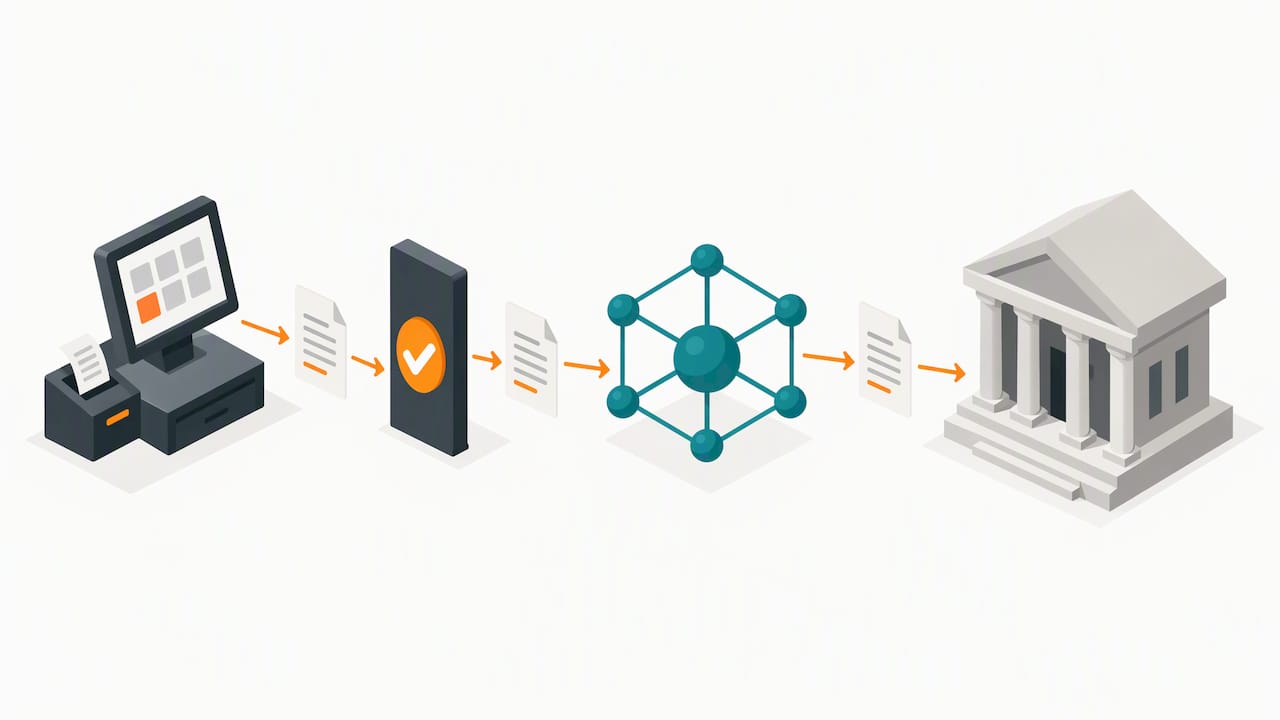
The rollout is phased, and the IRAS FAQ on the GST InvoiceNow requirement sets out which businesses are affected and when. The same guidance notes that free or low-cost InvoiceNow-ready solution packages exist for SMEs, so cost should not be the reason to delay checking readiness.
Practical steps to work through before you sign a contract:
- Check the vendor against the IMDA list of accredited InvoiceNow-Ready Solution Providers rather than taking a sales claim at face value.
- If you run or plan to run an ERP system, confirm you will engage an IMDA-accredited Access Point Provider to handle the connection, as the IRAS FAQ recommends.
- Ask what support or grant funding applies to your adoption cost, since IRAS references free-of-charge packages and support specifically aimed at easing SME adoption.
- Test an actual invoice submission in a sandbox or pilot before relying on the system for live GST filing.
If you are weighing whether a grant can offset part of the setup cost, our note on PSG grant eligibility checks walks through what Singapore SMEs need to confirm before funding is approved.
What inventory software typically costs in Singapore and how to budget
Pricing varies more by deployment choice than by brand. Cloud-based SMB inventory systems commonly run from low tens to a few hundred Singapore dollars per month depending on the features and number of users included, while enterprise editions cost considerably more and usually require a custom quote rather than a published rate.
Product listings such as Cin7 Core on Capterra illustrate this pattern: a visible monthly subscription for smaller teams, with higher starting prices once you move into enterprise-grade deployment, plus separate line items for the features that extend beyond basic stock counts.
Four cost areas worth budgeting for beyond the headline subscription:
- Implementation and setup: migrating existing stock data and configuring categories, suppliers and locations usually takes longer than vendors estimate at the sales stage.
- Hardware: barcode scanners, label printers and POS terminals add a one-off cost on top of any software fee, particularly for retailers opening a second location.
- Custom integrations: connecting to a specific accounting package, e-commerce platform or InvoiceNow access point can carry its own setup fee depending on complexity.
- Grant support: checking eligibility for Singapore SME grants before committing can shift the real cost of adoption meaningfully, so this is worth confirming early rather than after signing.
The safest way to budget is to treat the first month as a pilot rather than a full commitment. Running one site, one product line or one till on the new system for a few weeks surfaces integration costs and training time before you scale spending to the whole operation.
Decision checklist: questions to ask vendors and how to score proposals
A short, structured conversation with each vendor saves far more time than comparing brochures side by side. Work through these questions in order:
- Is the platform InvoiceNow-ready, or does it connect to an IMDA-accredited Access Point Provider for GST invoice transmission?
- Which systems does it integrate with already: your POS, your accounting software, your e-commerce storefront?
- How long does onboarding actually take, from contract signing to your team using it for real transactions?
- What does support look like day to day: response times, whether support is based in Singapore, and what happens when something breaks mid-sale?
- Can you export your data in a usable format if you decide to switch systems later?
Score each proposal against five criteria: operational fit, total cost including hardware and setup, ease of integration with what you already run, quality and locality of support, and InvoiceNow or GST compliance readiness. A vendor that scores well on four but fails compliance readiness is a bigger risk than one slightly pricier but fully compliant.
Deciding between adapting an existing product and commissioning a custom build usually comes down to how unusual your workflow genuinely is.
Pro Tip: Set a pilot scope before you start, not during it: pick one metric (stock accuracy after a week, time saved on reconciliation, number of manual corrections needed) so you know objectively whether the pilot succeeded.
For a concrete pilot structure, our guide on syncing inventory across locations sets out how a one-site trial typically runs before wider rollout.
Why FlowLab’s approach helps Singapore SMEs choose well
We built our process around a simple observation: most SME owners researching inventory software are not short of options, they are short of a clear way to compare them against their own operation. Our app development for Singapore SMEs page sets out the workflow-first review we run before recommending anything, ready, adapted or custom.
That review typically covers:
- Where stock information currently lives (paper, spreadsheet, a POS that does not talk to your accounts) and what breaks first under growth.
- Which product lines map closest to the workflow you already run, and what would need adapting.
- Whether a custom build is genuinely warranted, which in our experience is less often than owners expect going in.
- A realistic cost direction before any development work starts, so there are no surprises partway through.
We have also written up practical first steps in posts on barcode inventory tracking and inventory tracking basics, both aimed at the same question: what should an SME actually do in week one, before any software decision locks in.
Practical perspective: ready products versus custom builds
The received wisdom in software sales is that custom-built systems are always the “proper” solution and ready products are a compromise. In our experience advising Singapore SMEs, that logic runs backwards more often than not.
A ready product configured well handles the vast majority of SME inventory needs at a fraction of the cost and timeline of a custom build. Custom work earns its cost only when a workflow is genuinely unusual, not simply unfamiliar to the vendor’s standard setup.
The rule of thumb we apply during an app fit review is simple: pilot small on a ready or adapted product first, and let the pilot tell you whether the gap that remains is worth paying to close. Most owners discover the gap is smaller, and cheaper to adapt, than they assumed before trying it.
— Ronald
How FlowLab can help: a complimentary app fit review
If you recognise your business in any of the profiles above, the practical next step is not another vendor demo, it is a conversation about your actual workflow before any product is proposed.

We map your current stock process against the products most likely to fit:
- Retailers checking out customers and tracking shelf stock in the same motion tend to fit POSFlow.
- Operations juggling queues, counters or multiple service points tend to fit QueueFlow.
- Service businesses linking attendance to consumable use tend to fit PresenceFlow.
Our complimentary app fit review looks at your current process, identifies the most economical route, whether that is a ready product, a light adaptation, or a custom build, and gives you a clear cost direction before any development begins, with your information kept confidential throughout.
If pricing and valuation are part of your stock challenge, for example when reselling or sourcing stock across marketplaces, PriceXPoint’s pricing intelligence tool is worth a look alongside your inventory setup.
Book an app fit review with FlowLab and find out which route fits your operation before you spend on any platform.
FAQ
What are the top inventory management approaches for SMEs?
Most Singapore SMEs do best starting with a ready or lightly adapted product matched to their operation, such as a POS-linked system for retail or an attendance-linked system for consumable-heavy service businesses, rather than jumping straight to a custom build. A short pilot confirms fit before wider rollout.
Which type of software is best for tracking inventory?
The best fit depends on how your business sells: retailers generally need point-of-sale-integrated stock tracking, while multi-location or queue-heavy operations need tools that sync stock across sites in real time. Checking InvoiceNow readiness alongside core features matters for any GST-registered business, per the IMDA/IRAS InvoiceNow brochure.
Can small inventory software setups work for very small operations?
Yes, a single-location pilot using a ready product can suit a very small operation, provided it covers basic stock counts, barcode scanning and a simple sales connection. Scaling features up later is usually easier than migrating off an over-built system early on.
Is Zoho Inventory free to use?
Zoho Inventory offers a free tier aimed at very low transaction volumes, with paid tiers required once order counts, warehouses or integrations grow. Check current plan limits directly with the vendor, since free-tier caps change and are not fixed figures to rely on for planning.