
Choose a document-first workspace when your team’s main job is writing, planning and sharing knowledge. Choose a relational database when your work is really about structured records, links between them and automation. When your processes are specific enough that neither general tool fits without constant workarounds, a custom app tends to save more time and money than forcing a fit.
TL;DR:
- Teams managing complex, linked records and automation should prioritize relational database tools to handle filtering, rollups, and scalable workflows efficiently.
- Document-first workspaces excel for browsing, storytelling, and informal knowledge sharing but become cumbersome when querying large structured data sets.
- Heavy automations, multi-record dependencies, and frequent data syncing often justify moving toward purpose-built or custom applications to reduce manual work and improve reliability.
- Cost considerations should include automation limits, seat-based pricing, and data volume, especially for teams with thousands of linked records or high automation use.
- Migrating data requires careful testing of relationship rebuilds, as linked records and nested structures rarely transfer seamlessly with simple exports.
Table of Contents
- Document-first workspace or relational database: what’s actually different
- Views, automations, templates and the features that decide day-to-day fit
- Which approach fits your team’s day-to-day work
- What pricing and data growth mean for your total cost
- A short checklist before you sync, export or migrate anything
- When a purpose-built app beats a general tool
- What years of tool-hopping teams tend to get wrong
- Getting the right fit without the guesswork
- Sources
- FAQ
Document-first workspace or relational database: what’s actually different
The two tools solve different problems, which is why comparing them feature by feature misses the point. A document-first workspace is built around pages and blocks: you write a page, nest sub-pages inside it, and drop in text, images or simple tables as blocks. It behaves like a flexible notebook that can hold almost anything, which makes it excellent for onboarding guides, meeting notes and internal wikis.
A relational database is built around tables and linked records. Each row is a record with defined fields, and records in one table can link to records in another, so a “client” can connect to their “orders” and each order to its “invoices”. This structure is what makes filtering, sorting, rollups and automations reliable at scale.
The practical differences show up fast:
- A document-first tool makes information easy to read and browse but hard to query at scale, because relationships between pages are informal.
- A relational database makes structured querying and automation straightforward but turns long-form writing into an awkward, boxed-in experience.
- Search and discoverability favour documents for context and stories, and favour databases for exact filters like “all open orders over $500.”
G2’s comparison of the two categories shows document-first tools scoring highly for templates and ease of use, while database-first tools rate stronger for analytics and structured workflows. That split isn’t a quality gap, it’s a difference in what each architecture was designed to do. A small agency logging project notes will feel at home in a document model; a supply team tracking hundreds of orders with rollup totals will hit friction almost immediately.
Views, automations, templates and the features that decide day-to-day fit
Feature checklists rarely tell you which tool actually works for your team. What matters is how each feature behaves under real use.
Views and interfaces. Database-first tools let you build multiple views (grid, calendar, Kanban, gallery) over the same underlying data, so a sales lead and an operations manager can see the same records shaped for their own job. Document-first tools offer views too, but they sit on top of a page structure that wasn’t designed for heavy filtering, so complex views tend to feel improvised.
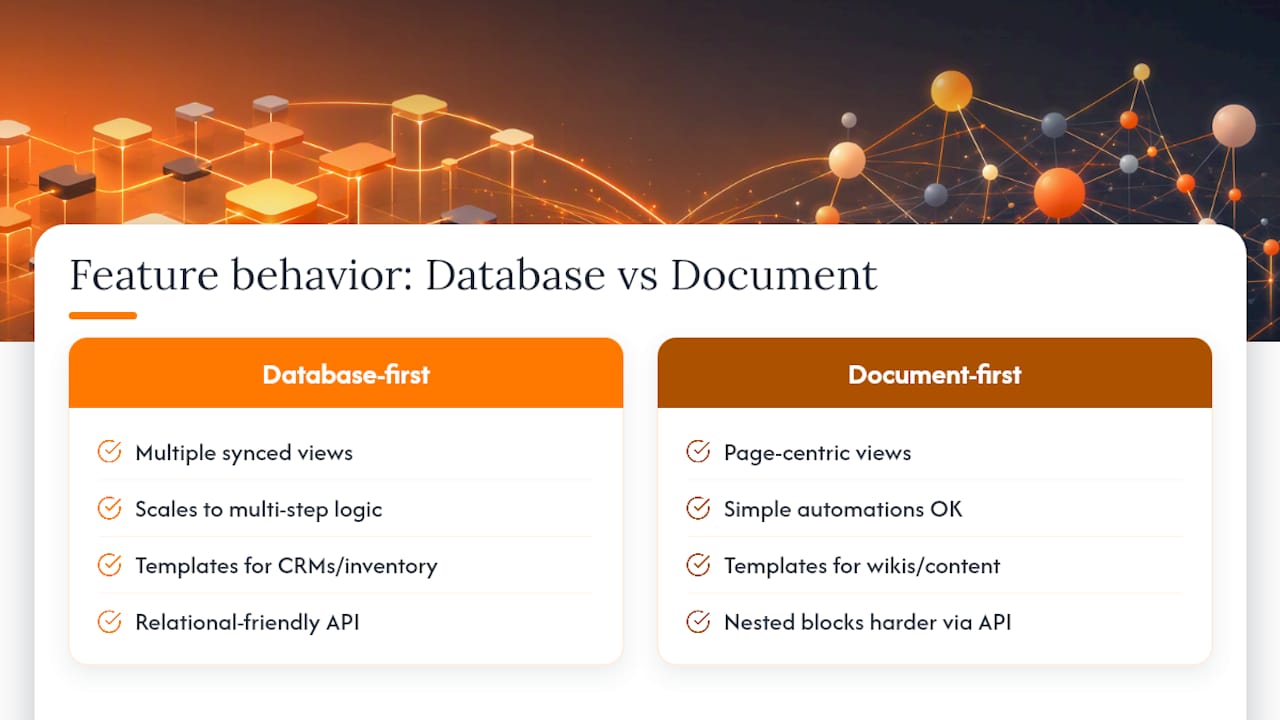
Automations. Both tools support triggers and multi-step automations, but the ceiling differs. Zapier’s comparison frames it plainly: one tool is a supercharged document editor with collaboration at its core, the other a supercharged spreadsheet built for structured data and automation. For simple reminders or status changes, either works. For multi-step, conditional logic tied to hundreds of records, the database-first tool holds up better.
Templates and community support. Templates shorten time-to-value, and both ecosystems have large public template libraries. Document-first templates dominate for wikis, personal planning and content calendars. Database-first templates dominate for CRMs, inventory trackers and event logistics, areas where the underlying data model matters more than the page layout.
API and integrations. Engineering and ops teams care about API maturity because it determines how reliably external systems can read and write data. A relational structure maps more naturally to an API because records and fields are already discrete objects; documents and nested blocks are harder to expose cleanly through an API.
Permissions and version history. Regulated or audit-heavy teams need granular permissions and a reliable history of who changed what. Both tools offer permissions and version history, but the depth and audit trail quality vary by plan tier, so check this against your compliance needs before committing.
Mobile and offline behaviour. Frontline and fieldwork teams need mobile apps that work without a strong connection. Neither category was originally built for offline-first fieldwork, which is one reason operations teams handling attendance or queue data often outgrow general tools and move towards dedicated apps.
Pro Tip: Before comparing feature lists, list the three tasks your team does every day and test each tool against those tasks specifically, not against a generic demo.
Which approach fits your team’s day-to-day work
Most teams already know their dominant workflow. Matching it to the right approach avoids months of forcing a tool to do a job it wasn’t built for.
- Solo founders and freelancers usually do best with a document-first hub: one place for notes, plans and client details that doubles as a daily dashboard.
- Small creative or startup teams often start with docs for briefs and specs, then add lightweight tracking; the trigger to migrate is usually when a spreadsheet inside a page starts needing filters and rollups.
- Operations, supply chain and events teams benefit from a relational structure from day one, since their work is inherently about linked records, statuses and automations across many items.
- Product and engineering teams lean towards database-first tools or dedicated systems because API integrations and structured datasets matter more than page layout.
- Teams that outgrow both usually combine them: a document tool as the source of truth for context and a database for structured records, connected by integrations, which The Digital Project Manager’s comparison notes is now common among mature teams that need both jobs done well.
None of these paths is permanent. A hybrid stack is often the pragmatic middle step before a team’s workflow becomes specific enough to justify a purpose-built app, particularly in operations-heavy contexts like queue management or event check-ins where FlowLab’s EventFlow and PresenceFlow were built for exactly that gap.
What pricing and data growth mean for your total cost
Both categories use seat-based pricing, which means costs scale with headcount rather than usage alone. That’s manageable for small teams but becomes expensive once you add automation-heavy plans or per-seat premium tiers across dozens of staff.
- Seat-based billing means adding staff, not adding data, is often what pushes a team into a pricier tier.
- Automations, especially multi-step or high-frequency ones, are frequently gated behind higher plans, so a workflow that “just works” in testing can trigger real usage costs at scale.
- Record and row limits create a performance ceiling: heavy relational datasets with thousands of linked records and frequent rollups strain database-first tools more than lighter, list-style data.
- Export, middleware and rebuild work to keep two tools in sync is a hidden cost that rarely appears in a pricing page.
Teams with thousands of linked records, frequent rollups or extensive automations tend to find database-first platforms more robust, according to practitioner comparisons of project database performance, while lighter workflows usually see faster adoption with a document-first hub. That threshold is a useful gut check: if you’re already counting thousands of linked records or building automation chains just to keep data in sync, you’re near the point where a bespoke build starts to look cheaper over a year than a growing subscription and a patchwork of integrations.
A short checklist before you sync, export or migrate anything
Migrating structured data between tools looks simple until you try it. Linked records, rollups and nested pages rarely survive a straightforward CSV or JSON export intact, because the destination tool has to guess how to rebuild relationships that were implicit in the source.
- Test a small export first: move one table or one page tree, not your whole workspace, and check what breaks.
- Expect to lose or rebuild linked records and nested page structures manually, since migration guides and practitioner reports consistently flag this as the main pitfall.
- Prefer native sync where it exists; reach for middleware like Zapier or Make only when no native option covers the workflow, since each middleware hop adds a point of failure.
- Run a pre-migration performance check on your largest table or database to confirm the destination tool handles that volume smoothly before you commit.
Pro Tip: Before any migration, export a sample of your most complex records, the ones with the most links and rollups, and rebuild them manually in the destination tool to see exactly what work is involved before you commit the whole dataset.
When the checklist above turns into a running list of manual workarounds, that’s usually the signal to commission a proper integration or a dedicated app rather than keep patching the sync.
When a purpose-built app beats a general tool
Off-the-shelf tools start to strain in predictable ways: workflows that need conditional logic across several linked tables, teams re-entering the same data in two systems, or automations that break every time a template changes. Practitioner write-ups on project databases note that database-first tools handle many-to-many relationships and rollups well up to a point, but heavy customisation eventually pushes teams towards dedicated software.
FlowLab starts from the workflow, not the software. Before recommending anything, we look at how a business actually operates day to day, then offer one of three routes: a ready-made product like QueueFlow for queue management or PresenceFlow for attendance tracking, an adapted version of an existing product, or a fully custom build when the workflow is genuinely unique.
Signs that a tailored app is worth the conversation:
- Your team maintains the same data in two or more tools just to keep everyone informed.
- Automations frequently break or need manual fixes after small changes to templates or fields.
- Frontline staff need reliable mobile capture (queue status, attendance, stock counts) that general tools handle poorly offline.
- Reporting requires manual exports and spreadsheet rebuilding every cycle because native views can’t show what you need.
Understanding a client’s operational challenge before recommending a fix is what separates a workable solution from an expensive guess.
If any of that sounds familiar, a complimentary app fit review is the fastest way to find out whether a ready product, an adaptation, or a custom build makes sense, and roughly what it would cost, before anyone commits to anything.
What years of tool-hopping teams tend to get wrong
The pattern is consistent across the teams we talk to: they start with a document-first hub because it’s flexible and easy to adopt, then bolt on a database tool once tracking needs grow, then eventually hit a wall where both tools need constant manual syncing to stay accurate. By that point, the “free” flexibility of general software has quietly become the most expensive part of the stack.
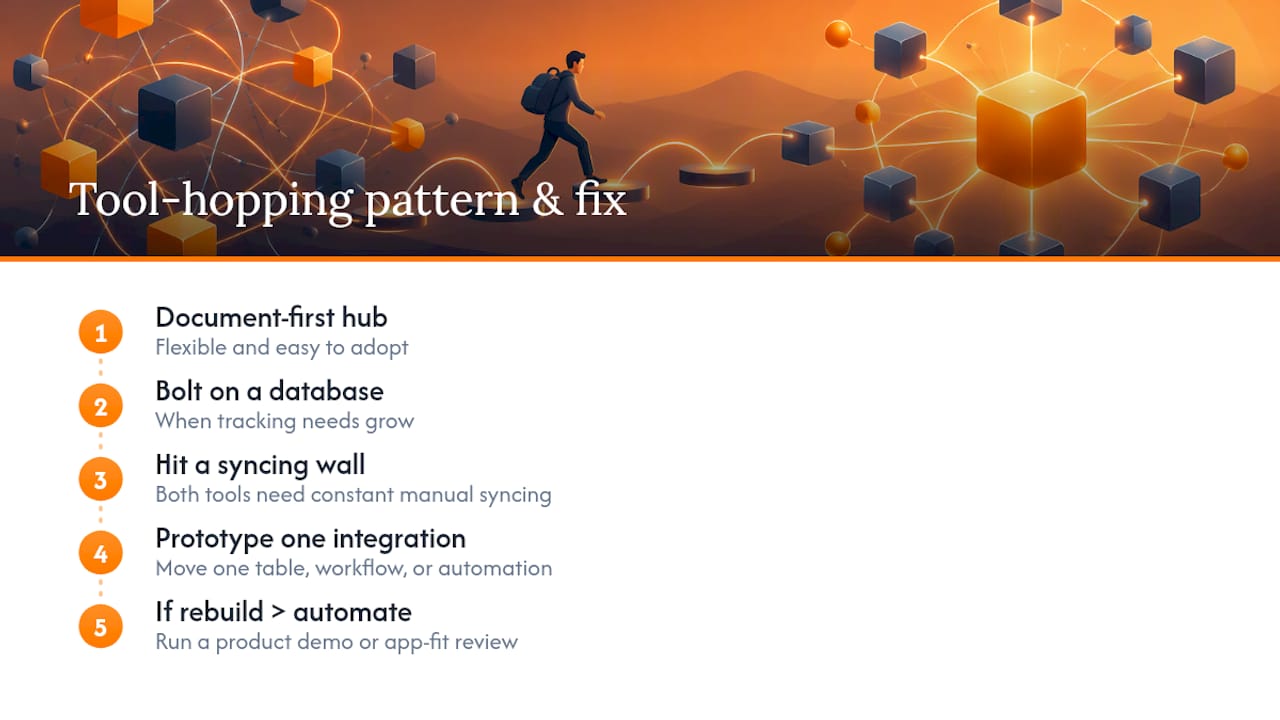
My advice is to prototype the riskiest integration before attempting a full migration. Move one table, one workflow, or one automation chain first, and see what actually breaks. That small test tells you more about total cost than any pricing page.
If that prototype reveals more rebuilding than automating, it’s worth looking at a product demo or an app fit review before sinking more time into patchwork fixes.
— Ronald
Getting the right fit without the guesswork
If your team is somewhere between “outgrowing a general tool” and “not sure a custom build is worth it,” a workflow-first review can provide a clear view of whether a ready product, an adapted one, or a custom app is the most cost-conscious route for your business.

A few practical starting points:
- See a working sales flow end to end with POSFlow’s demo.
- Watch queue management in action through the complete queue journey demo.
- Explore attendance tracking as a live operating view with PresenceFlow’s demo.
If your current stack of documents, databases and workarounds is starting to cost more time than it saves, book a complimentary app fit review and get clarity on cost and scope before you decide anything.
Sources
- Compare Airtable and Notion | G2
- Airtable vs. Notion: Which is best? | Zapier
- Airtable vs Notion: Comparison & Expert Reviews For 2026 | The Digital Project Manager
- Airtable vs Notion for project databases 2026 | Tech Stack Daily
FAQ
Why are people moving away from Notion?
Teams tend to move away from a document-first tool when their data grows too structured for pages and blocks to handle cleanly, particularly once they need heavy filtering, rollups or many-to-many relationships. Practitioner comparisons note this shift usually happens when automation and reporting needs outgrow a document model, not because the tool itself is flawed.
What are the downsides of using Airtable?
A relational database tool can feel restrictive for long-form writing, wikis or nested notes, since its structure favours records and fields over free-form content. Costs can also climb quickly once automations and seat counts increase, which is a pattern noted in expert pricing comparisons.
Is there anything better than Airtable?
There’s no single tool that beats a relational database tool for every use case; the right choice depends on whether your work is document-heavy, data-heavy, or specific enough to need a custom build. For workflows that no general tool fits well, a purpose-built app, such as those FlowLab develops for SMEs, is often more cost-effective long-term than stretching a general platform.
Is Notion better than Airtable for teams?
Neither is universally better: a document-first tool suits teams whose main job is writing and sharing knowledge, while a relational database suits teams managing structured records and automations. G2’s category comparison shows each scoring higher in the areas it was built for, which is why many mature teams end up using both together.