
The best small business CRM depends on how you actually work, not how many features a vendor lists. If your business runs on operations (a counter, a queue, a booking calendar, an event list), a workflow-first tailored app usually beats a generic CRM. If you only need to track contacts and a sales pipeline, a simple entry-level CRM is the faster, cheaper route. Read the checklist below before you commit to either.
TL;DR:
- Tailored workflow apps are more effective than generic CRMs for small businesses with operational needs like queues, POS, or event management.
- Rolling out a solution based on actual daily tasks and limited integrations reduces onboarding time and ongoing maintenance costs.
- Flat-fee pricing structures generally stay more predictable and economical as team size grows compared to per-user subscription models.
- Core features should include contact history, pipeline management, activity logging, and basic reporting; additional automation features often provide limited value.
- Starting with operational tools aligned to current workflows ensures faster ROI than selecting a CRM primarily designed for sales or marketing purposes.
Table of Contents
- Why a workflow-first approach often beats a generic CRM
- A decision checklist: off-the-shelf CRM or a tailored workflow app
- Which CRM features actually earn their place
- How to compare costs fairly and avoid the per-user trap
- Deployment steps and integration priorities for a smooth go-live
- How FlowLab helps small businesses choose and deploy the right tool
- What the checklist misses: operations first, sales software second
- Ready to find the right fit for your business
- Background reading on CRM options and reviews
- Sources
- FAQ
Why a workflow-first approach often beats a generic CRM
A generic CRM asks you to fit your business into its screens. A workflow-first approach starts the other way round: it looks at what your team does all day, then builds or adapts software around that. For a small business, this matters more than feature count, because every hour spent configuring fields you do not need is an hour not spent serving customers.
Workflow-first thinking treats “CRM” as a description of a job, not a category of software. The job might be logging enquiries and assigning follow-up, running a till, managing a walk-in queue, or checking prices on the shop floor. When you match the tool to the job directly, onboarding shrinks and subscription costs stop creeping upward as your team grows.
A product family built around this idea typically offers specialized solutions, each addressing one operational job rather than trying to be everything at once:
- LeadsFlow captures enquiries and assigns an owner and next action to each one, which is the core job most people mean when they say “CRM”.
- POSFlow runs point-of-sale transactions while keeping stock, staff and sales data in one place.
- QueueFlow manages customer flow and service queues so nobody waits without knowing why.
- PriceFlow gives staff a fast, accurate price lookup at the point of the conversation.
- EventFlow handles event registration from sign-up through to check-in.
- PresenceFlow tracks attendance for staff, members or visitors.
A retail counter typically needs POSFlow paired with PriceFlow for fast lookups during busy periods. An appointment-based business, a clinic or a salon, tends to get the most value from QueueFlow alone, since the main friction point is customer flow rather than sales tracking. An events organiser usually needs EventFlow for registration and PresenceFlow on the day itself, run as a short combination rather than a single all-purpose platform.
The immediate benefits of this approach show up quickly:
- Faster onboarding, because staff only see screens relevant to their job.
- A single data source, so a customer’s history does not live in three disconnected apps.
- Tailored user screens that match how your team already talks about the work, not generic CRM terminology.
Pro Tip: When you watch a demo, ask to see your own busiest scenario, not the vendor’s showcase example. A five-minute walkthrough of your actual counter or booking flow tells you more than a full feature tour.
A decision checklist: off-the-shelf CRM or a tailored workflow app
Before comparing prices or reading reviews, work through this checklist in order. Each step narrows the decision, and skipping one usually leads to buying the wrong type of tool.
- Match your primary workflow to a solution type. Lead generation and follow-up point towards a CRM or LeadsFlow; counter sales point towards a POS-led app; appointment or service delivery points towards a queue or booking tool; events point towards registration software.
- Check your technical capacity. A small team without dedicated IT time benefits from a solution that deploys with minimal training. PCMag’s hands-on review of Bigin by Zoho notes that entry-level CRMs with strong user experience are easier for small teams to deploy and maintain without extra IT staff.
- List the integrations you actually use, not the ones a vendor mentions in passing: accounting software, your existing POS, a shared calendar, email, and payment links. Every integration you do not need is a future maintenance cost.
- Estimate the true cost, including licences, integration work, onboarding time and ongoing maintenance, rather than the headline monthly price alone. A predictable, flat fee structure tends to suit small teams better than a per-seat model that grows with headcount.
- Ask vendors direct questions: where is data stored, do they use subcontractors, what does migration support look like, and is there a rollback plan if the rollout does not go to plan. A vendor that answers these clearly in one conversation is usually easier to work with long after launch.
Different businesses will land in different places after this checklist. A team choosing between HubSpot, Pipedrive and Bigin by Zoho for pure sales tracking is solving a different problem to a retailer that needs its till, stock and staff data in one screen. Neither is wrong, but conflating the two leads to buying software that does half a job well and the other half not at all.
Which CRM features actually earn their place
Small businesses tend to overpay for features they will never open and underpay for the few that save real time. Start with what should be non-negotiable.
- Contact and company records with a clear history: every past interaction visible in one place.
- A deal or job pipeline that shows what stage each enquiry or sale is at, and who owns it.
- Activity logging so calls, messages and visits are recorded without manual notes.
- Basic reporting on pipeline volume and conversion, without needing a data analyst to read it.
Beyond that baseline, a few automations are worth requesting early rather than adding later: automatic follow-up reminders, booking confirmations sent without staff intervention, and simple two-step workflows that qualify a lead before it reaches a person. Integrations that save genuine manual work include accounting software, your existing POS, a shared calendar, email, and payment links, since these are the connections that would otherwise mean retyping the same information twice.
Some features are commonly oversold. AI writing assistants and advanced custom scripting sound impressive in a demo but rarely change day-to-day outcomes for a small team. PCMag’s analysis notes that AI features earn their keep when they add genuine analytical capability, such as forecasting or churn detection, rather than surface-level writing help that usually needs heavy editing anyway. If a feature does not map to a task your team does weekly, it can wait.
How to compare costs fairly and avoid the per-user trap
Pricing structure changes the maths more than the headline number does. Per-user licences look affordable at five people and expensive at fifteen, because the fee scales with headcount rather than with the work being done. Flat-fee or module-based pricing keeps costs predictable as your team grows, which matters more for a small business than shaving a few pounds off the entry tier.
Before signing anything, check for hidden costs that rarely appear on the pricing page:
- Onboarding fees charged separately from the subscription.
- Integration costs for connecting accounting, POS or calendar tools.
- Storage or record limits that force an upgrade sooner than expected.
- Automation caps that throttle workflows once you exceed a set volume.
- Premium support tiers that put faster response times behind an extra fee.
As a simple illustration, a per-user CRM pricing model causes costs to increase proportionally with team size, making total subscription fees grow as more users are added. A tailored flat-fee app avoids that scaling entirely, since the fee is tied to the build, not the headcount.
Per-user pricing compounds with growth, and reviews highlight onboarding and support as decisive cost factors, since low headline pricing often hides expensive add-ons or limited support hours. A flat-fee or capped-user structure tends to become the cheaper option as a team expands, though the exact break-even point depends on growth speed and the specific plans compared.
Deployment steps and integration priorities for a smooth go-live
A rushed go-live is where most CRM projects lose time, not the software itself. Follow this order:
- Export existing data from spreadsheets, old systems or paper records before anything else.
- Map fields between your old data and the new system so nothing gets lost in translation.
- Set up core integrations first: accounting, POS and calendar, since these carry the most manual work if left disconnected.
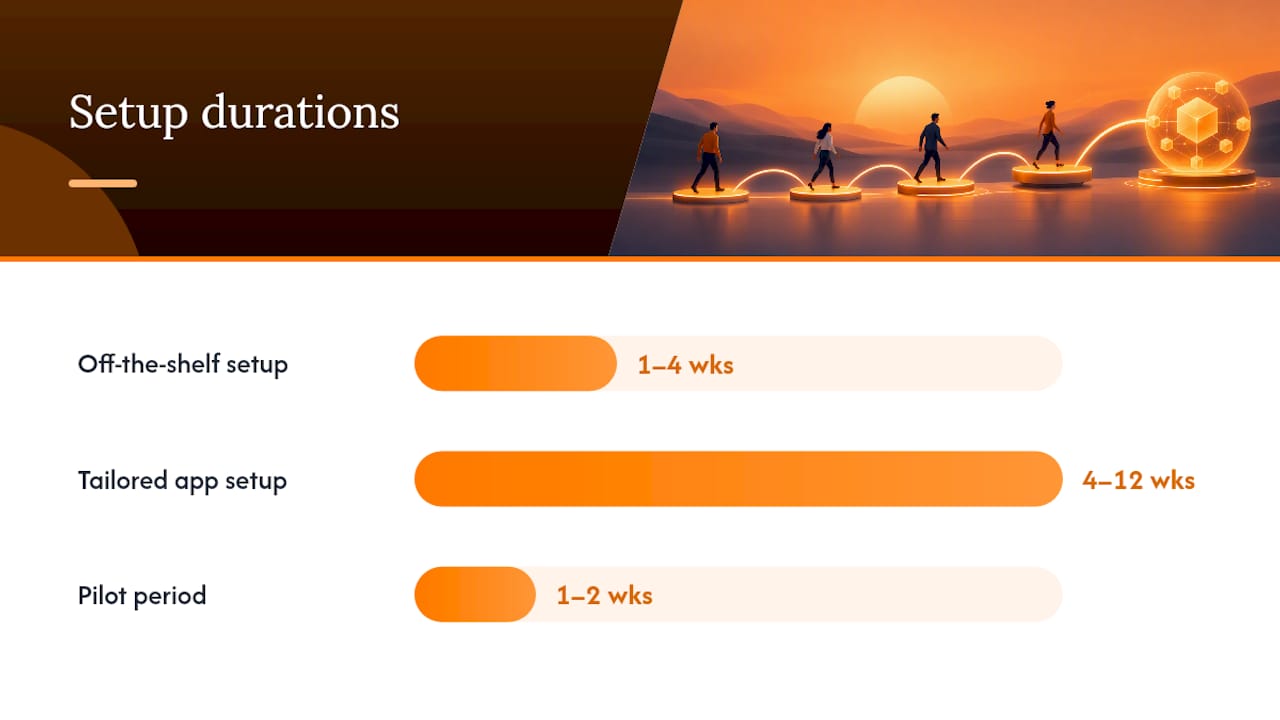
- Pilot with a small team for one to two weeks before a full rollout.
- Roll out to the whole business once the pilot group confirms the workflow feels natural.
Off-the-shelf CRM setup typically takes one to four weeks. A tailored small app, built or adapted to your specific workflow, usually takes four to twelve weeks depending on scope. Common pitfalls include duplicate records from a messy import, field mismatches between old and new systems, API limits on integrations you did not test in advance, and training gaps when staff are handed a new tool without a proper walkthrough.
Pro Tip: Run a staged rollout with one department or one till first, and keep a rollback plan ready in case the pilot surfaces a problem you did not anticipate.
How FlowLab helps small businesses choose and deploy the right tool
FlowLab starts every enquiry with a workflow-first review before recommending anything, which means the conversation begins with your operational problem rather than a product pitch. The complimentary app fit review looks at what your team does day to day and identifies the most economical route, whether that is a ready product, an adapted one, or a custom build, along with an early cost direction before any commitment.
Product demos, including a walkthrough of LeadsFlow for lead capture and follow-up ownership, are built around a business’s real scenarios rather than a generic showcase. Confidentiality is respected throughout the process, and guidance is given in plain terms without technical jargon or pressure to commit.
In an app fit review, expect a short conversation about your current workflow, a look at where time is being lost, and a clear answer on whether a ready product, an adaptation, or a custom build fits best, along with what that would cost.
What the checklist misses: operations first, sales software second
Most CRM advice treats the software as a sales tool first and an operations tool second, and that ordering is backwards for a lot of small businesses. If your biggest daily friction is a queue at the counter or a lead that nobody followed up on, the pipeline view is not the problem you need solved first. The tool that fixes the actual bottleneck usually looks nothing like a traditional CRM.
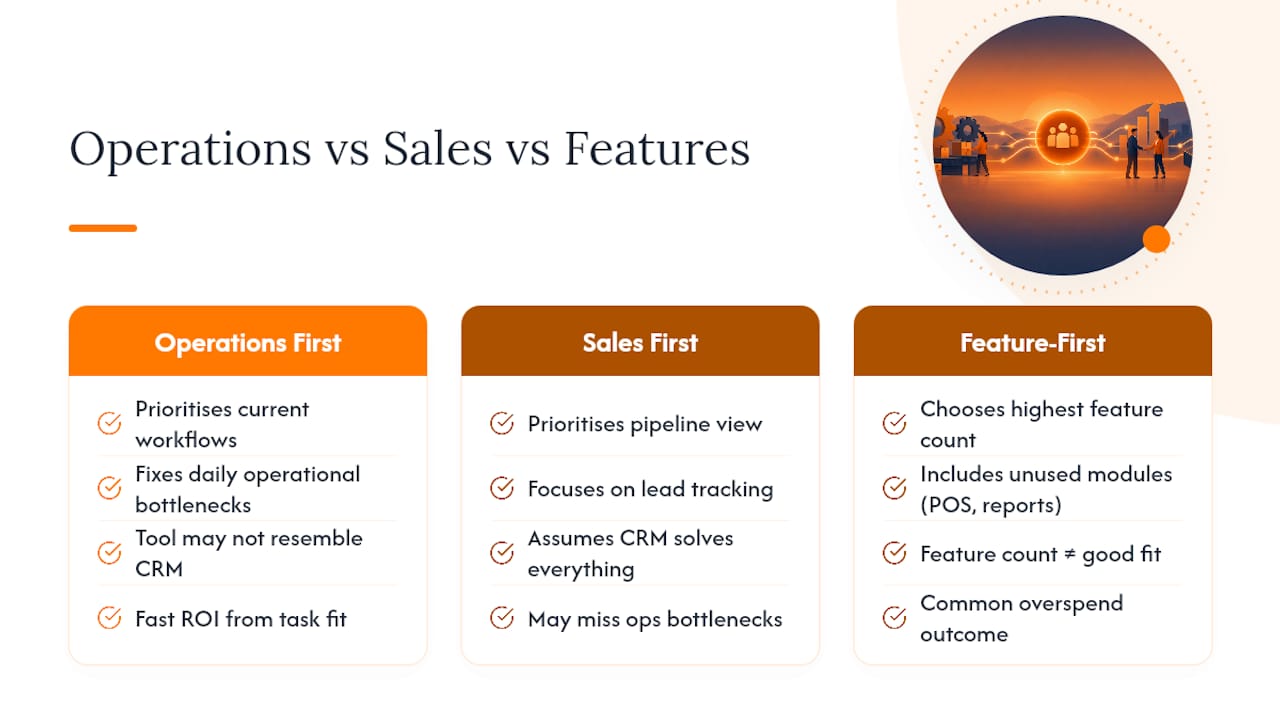
The conventional advice of “pick the CRM with the most features” also falls short because feature count rarely correlates with fit. A business that needs queue management gains little from an advanced reporting suite it will never open, while a business that needs lead tracking gains little from a POS module it will never touch. Buying broad instead of buying precise is the most common overspend I see in this space.
Prioritise the workflow you actually run today, not the one a vendor’s marketing describes. Fast return on investment comes from matching the tool to the task, not from acquiring the most capable platform on the market.
— Ronald
Ready to find the right fit for your business
If the checklist above points you towards an operational tool rather than a sales pipeline, that gap can often be closed by an app development approach that starts with a complimentary app fit review to identify the most economical option for your specific workflow, whether that is a ready product, an adaptation, or a custom build.

- Running a counter or retail floor: see POSFlow or try a sample transaction demo.
- Managing walk-in customers or appointments: see QueueFlow or run through the complete queue journey.
- Chasing enquiries and follow-up: see LeadsFlow, where every enquiry gets an owner and a next move.
A first conversation is typically a short scoping call, with cost direction given early and confidentiality respected throughout. Book a demo to see how your own workflow would look in practice.
Background reading on CRM options and reviews
For readers comparing generic CRMs directly, PCMag’s small business CRM roundup and its Apptivo review cover hands-on testing and pricing trade-offs. For planning marketing automation alongside a CRM, this marketing automation checklist is a useful companion.
Sources
FAQ
What is the best CRM for a small business?
The best CRM depends on your primary workflow: marketing-heavy teams often suit HubSpot, pipeline-focused teams favour Pipedrive, and very small teams may prefer Bigin by Zoho. Businesses whose main job is operational, such as running a counter or a queue, are often better served by a tailored workflow app than a generic CRM.
What is the best CRM software for small businesses with limited IT support?
Entry-level CRMs with strong user experience, such as Bigin by Zoho, are easier for small teams to deploy and maintain without dedicated IT staff. For businesses where the core need is operational rather than contact management, a tailored app that requires no ongoing configuration can reduce that burden further.
Will CRM be replaced by AI?
AI is being added to CRM platforms as a feature rather than a replacement for the underlying system. It tends to add real value in analytical tasks like forecasting or churn detection, while surface-level features like writing assistants often need heavy editing before use.
Is there a free CRM for small businesses?
Some CRM providers offer a free plan or tier, and PCMag notes that HubSpot offers a robust free plan suited to marketing-heavy teams. Free plans typically cap users, records or automations, so check those limits against your actual team size before relying on one long term.