
For most small and medium businesses, the right starting point is a no-code hosted tool for quick wins, a visual low-code platform when data transforms get complex, a self-hosted option when data control or volume matters, and a bespoke internal app when the process is genuinely unique to the business. The choice depends less on which tool looks impressive and more on what the process actually needs. This guide sets out the criteria, the costs, and the implementation steps, plus where a tailored FlowLab build fits in.
TL;DR:
- Smaller businesses benefit most from no-code hosted platforms for quick automation wins, while complex workflows are better suited for visual low-code tools.
- Self-hosted platforms provide cost efficiency at high volume or with sensitive data, but require technical expertise to manage and maintain.
- Validation of a tool should focus on integration ease, data residency, support, and observability, rather than just feature lists or price estimates.
- AI tools add decision-making capabilities through agents, retrieval-augmented generation, and summarisation, but increase complexity and cost, requiring careful governance.
- Conducting a workflow-first review before implementation prevents automation failures caused by unmapped processes, overlooked exceptions, or poor process documentation.
Table of Contents
- Which workflow tool fits your business need?
- What are the main workflow tool categories?
- How do you evaluate a workflow tool before buying?
- What does workflow automation actually cost?
- How do you roll out a workflow tool without it failing?
- When does a tailored app make more sense than an off-the-shelf platform?
- Where do workflow tools show up in daily operations?
- How does AI actually change what a workflow can do?
- How do the top workflow tool categories compare?
- Can workflow tools grow and adapt with your business?
- How easy are workflow tools actually to use day to day?
- What do successful workflow automation rollouts look like?
- What actually works versus what sounds good on a slide
- Get a workflow-first review instead of a guessing game
- Sources
- FAQ
Which workflow tool fits your business need?
Not every automation problem calls for the same fix. A restaurant chasing table bookings has a different job to do than a logistics firm tracking inventory across five warehouses, and the tools that suit each rarely overlap.
Here’s how the main categories map to common buyer situations:
- Quick automations (email alerts, form routing, simple CRM syncs): a no-code hosted platform is usually the fastest route. Costs are typically billed per task or per run, so budgets stay predictable at low volume but can climb quickly once you scale past a few thousand actions a month.
- Complex, multi-step workflows (data transforms, conditional branching, multiple app integrations): a visual low-code platform tends to handle this better, because it lets non-developers build genuinely intricate logic without writing code. Billing here is usually per operation rather than per task, which changes the economics once a workflow has many small steps.
- High-volume or data-sensitive processes (financial records, health data, anything with residency requirements): a self-hosted or fair-code platform gives you control over where data lives and how it’s processed. You pay for hosting and infrastructure instead of per-action fees, which becomes cheaper at scale but requires someone with the technical skill to run it.
- Genuinely unique processes (a workflow no off-the-shelf tool models well): a bespoke internal app is often the only sensible answer. Costs are project-based rather than subscription-based, and the return depends entirely on how well the process was understood before a single line of code was written.
A useful rule for choosing between these: pick whichever pilot can prove measurable return on investment within four to eight weeks. If a no-code tool can demonstrate time saved or errors reduced in that window, it earns the right to scale. If it can’t, that’s usually a sign the process needs mapping properly before any tool touches it. Visual low-code platforms often hit the pragmatic sweet spot for SMEs weighing capability against ease of use, while self-hosted options earn their complexity only when data residency or volume genuinely demands it.
What are the main workflow tool categories?
Workflow software splits into a handful of distinct categories, and each one carries its own relationship with artificial intelligence, cost structure, and control trade-off.
No-code hosted platforms connect apps through pre-built triggers and actions, with no server management required. AI features here usually show up as add-on steps: summarising an email before it’s routed, or classifying a support ticket automatically. You’re renting convenience, and the cost tends to follow usage per task.
Visual low-code platforms give you a canvas to build multi-step logic with branching, loops, and data transforms, still without traditional coding. AI capabilities go further in this category, often including agent-style modules that can call a language model mid-workflow to draft content or make a routing decision. Billing is typically per operation, meaning a workflow with many small steps costs more than one with fewer, heavier steps.
Self-hosted or fair-code platforms run on your own infrastructure, giving you full control over where data sits and how it moves. This matters enormously for businesses handling regulated data or operating at volumes where per-task fees would be ruinous. AI here often means you choose your own model provider, which shifts cost from the platform’s markup to raw API usage. The trade-off is that someone on your team, or a contracted partner, needs the technical skill to maintain it.
Robotic process automation (RPA) tools automate interactions with existing software interfaces, particularly legacy systems that lack modern APIs. RPA tools remain relevant for processes tied to legacy user interfaces, and they’re normally deployed alongside a workflow platform rather than instead of one.
AI-agent platforms are the newest category, built around autonomous or semi-autonomous agents that can plan multi-step tasks, retrieve information via retrieval-augmented generation (RAG), and hand off decisions to a human when confidence is low. These sit at the more experimental end for most SMEs, useful for research-heavy or document-heavy processes, but they demand clearer governance because an agent making a wrong call can cascade errors faster than a simple trigger-action automation would.
Bespoke or internal apps are built specifically around one business’s workflow, with no generic template underneath. AI can be embedded precisely where it adds value, a queue prediction model, a demand forecast, rather than bolted on as a generic feature. The cost sits in development rather than subscription, and the payoff is a tool that fits the process instead of forcing the process to fit the tool.
The practical difference between these categories often comes down to three questions: how technical is your team, how sensitive is your data, and how much volume are you actually running? Make, Zapier and n8n illustrate this trade-off well: one prioritises integration breadth and simplicity, another gives you visual power for complex logic, and the third trades ease of use for full data control. None of the three is objectively “best.” Each wins for a different combination of skill, sensitivity, and scale.
How do you evaluate a workflow tool before buying?
The mistake most SMEs make isn’t picking the wrong tool. It’s asking the wrong questions before they pick anything. A shortlist looks impressive on a spreadsheet, but the details that actually determine whether a tool survives contact with your business rarely show up in a feature comparison chart.
Run through this checklist before you sign anything:
- Integrations. Does the tool connect natively to the systems you already run, or will you need custom connectors? A tool that “supports” your CRM through a generic webhook is a different proposition to one with a maintained native integration.
- Pricing model. Is it billed per task, per operation, per user, or on infrastructure? This single detail determines whether costs stay flat or spike as you grow.
- Data residency. Where does your data physically sit, and does that satisfy any regulatory or client confidentiality requirement you’re under?
- Skill requirement. Can your current team maintain this, or does it depend on one person who might leave?
- Service level and observability. What’s the actual uptime commitment, and can you see logs, retries, and failure alerts, or are you flying blind when something breaks?
- Security and compliance posture. Does the vendor publish clear data handling policies, and do they align with your industry’s obligations?
When you’re speaking to a vendor, or briefing an internal team, ask these directly rather than accepting a generic sales deck: How are AI calls billed, per request, per token, or bundled into a flat fee? What happens to your data if a workflow fails midway through processing? Can you export your workflow logic if you decide to leave? Who gets alerted when an automation silently stops working, and how fast?
The biggest red flag isn’t a high price. It’s a vendor who can’t answer the observability question. If nobody can tell you what happens when a step fails at 2am, you’re buying a tool that will eventually cost you a client, an order, or an invoice, quietly, and probably before anyone notices.
The governance point matters just as much as the tool itself. Poor process documentation and weak governance are the primary reasons automation projects fail, not the software chosen. Automating a broken process just makes the breakage faster and harder to trace. Before you evaluate a single vendor, map the process as it actually runs today, including the exceptions and workarounds nobody wrote down, because those are usually where automation quietly falls apart.
Pro Tip: Ask any vendor for a workflow that failed and how their platform surfaced it. A confident, specific answer tells you more about reliability than any uptime percentage on their pricing page.
If you’re commissioning an internal build rather than buying a platform, the same questions apply, just redirected at your own team or contracted developer. Who owns the process once it’s live? What’s the plan if the person who built it moves on? A guide to choosing an app developer covers the specific questions worth asking when the “vendor” is a development partner rather than a subscription product.
What does workflow automation actually cost?
Pricing across workflow tools tends to fall into five broad billing shapes, and knowing which one you’re being sold changes how you forecast cost as you grow.
- Per-task or per-run pricing: you pay for each individual automation execution. Predictable at low volume, expensive fast once you’re running thousands of tasks monthly.
- Per-operation pricing: each step inside a workflow counts separately, so a ten-step workflow costs more to run than a two-step one, even at identical execution frequency.
- Per-user pricing: cost scales with how many people need access to build or monitor workflows, common on platforms aimed at teams rather than individual operators.
- Infrastructure or hosting costs: relevant for self-hosted platforms, where you’re paying for server capacity rather than usage, cheaper at high volume but requires someone to manage it.
- Model or API costs: any workflow calling a language model incurs a separate cost layer, usually billed per token or per request, on top of the platform’s own fee.
The volume breakpoint is the detail most SMEs miss during a trial. A tool that looks cheap at 500 monthly actions can become the most expensive option in the category once you cross a few thousand, because per-task and per-operation pricing compounds with scale in a way flat infrastructure costs don’t. Billing units differ meaningfully across platforms, and that difference is exactly where hidden costs tend to surface, maintenance time, monitoring dashboards, and the infrastructure needed to keep a self-hosted setup patched and running.
A worked example. A retail SME running 3,000 order-confirmation automations a month on a per-task platform charged around a fraction of a cent per task might pay a manageable monthly fee at that volume. Push the same business to 30,000 tasks during a seasonal peak, and that fee can multiply tenfold overnight, precisely when cash flow is already stretched by stock purchasing. A self-hosted equivalent, run on a fixed monthly server cost, would barely notice the spike.
In numbers: ERP systems remain the primary automation tool for a significant portion of surveyed companies, while only a smaller share use dedicated workflow systems, and roughly 55% of the Swiss SMEs surveyed had integrated AI into internal processes by 2024, mostly still as pilot projects rather than full production use. That gap between pilot and production is exactly where cost surprises tend to appear, because pilot-stage pricing rarely reflects what full rollout actually costs.
How do you roll out a workflow tool without it failing?
Most failed automation projects don’t fail because the tool was wrong. They fail because nobody mapped the process properly before switching it on, and the tool faithfully automated a mess.
- Map the process as it runs today. Include every exception, workaround, and manual override, not just the happy path. This is the single step most teams skip and the one governance research consistently points to as the main cause of failure.
- Identify the quick wins. Look for repetitive, high-frequency, low-exception tasks first. These prove value fast and build internal confidence for bigger changes later.
- Simplify before you automate. If a step exists only because of a workaround from three reorganisations ago, cut it. Automating an unnecessary step just makes it permanent.
- Run a pilot on one process. Choose something with clear inputs, clear outputs, and a low exception rate, so you can measure results cleanly rather than arguing about edge cases.
- Measure against a real baseline. Track time saved, error rate, and cost per transaction before and after, not just whether the automation “works.”
- Scale only what the pilot proves. Expand to adjacent processes once the numbers hold up, rather than rolling out everywhere at once.
Assign clear ownership before you start: a process owner who understands the business logic, an operations contact who fields day-to-day issues, and someone responsible for monitoring and change control when the underlying systems update. Without that structure, a workflow that runs perfectly for six months can break silently the day a connected app changes its API, and nobody notices until a customer complains.
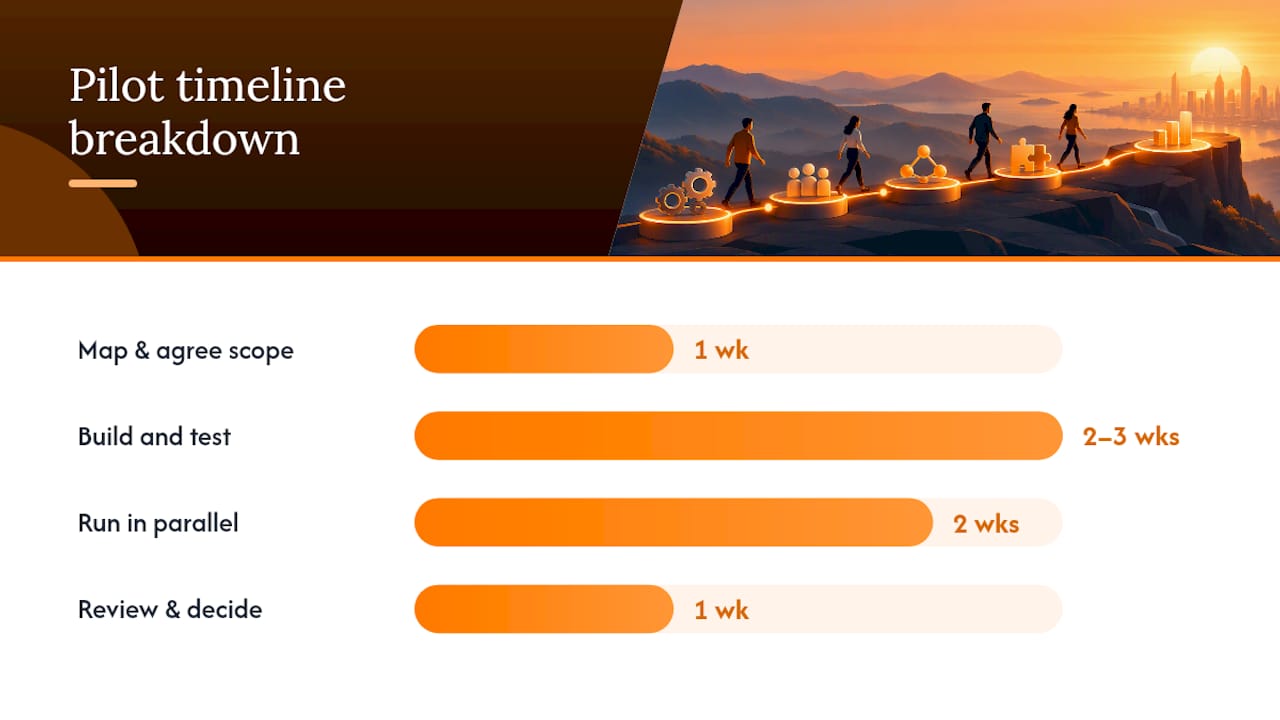
A realistic pilot timeline runs six to eight weeks: roughly a week to map and agree scope, two to three weeks to build and test, two weeks running in parallel with the old process to catch discrepancies, and a final week to review results and decide on scaling. Rushing this compresses the part where problems actually surface.
Pro Tip: Run the pilot in parallel with the existing manual process for at least two weeks rather than switching over immediately. The discrepancies you catch during that overlap are almost always cheaper to fix than the ones you discover after the manual process has already been shut down.
The most common pitfall is treating the pilot as a formality rather than a real test. If a pilot conveniently “passes” without anyone stress testing the exception cases, you’ve learned nothing, and you’ll find out the hard way once volume rises. The second most common pitfall is skipping observability: build in logging and alerts from day one, not after the first silent failure costs you a client. Structured, well-documented automation projects tend to show measurable time savings precisely because the mapping and monitoring work happened before the automation went live, not after.
When does a tailored app make more sense than an off-the-shelf platform?
Some workflows fit neatly into a generic platform. Others don’t, and forcing them to often means paying for features you don’t need while missing the one feature you actually do.
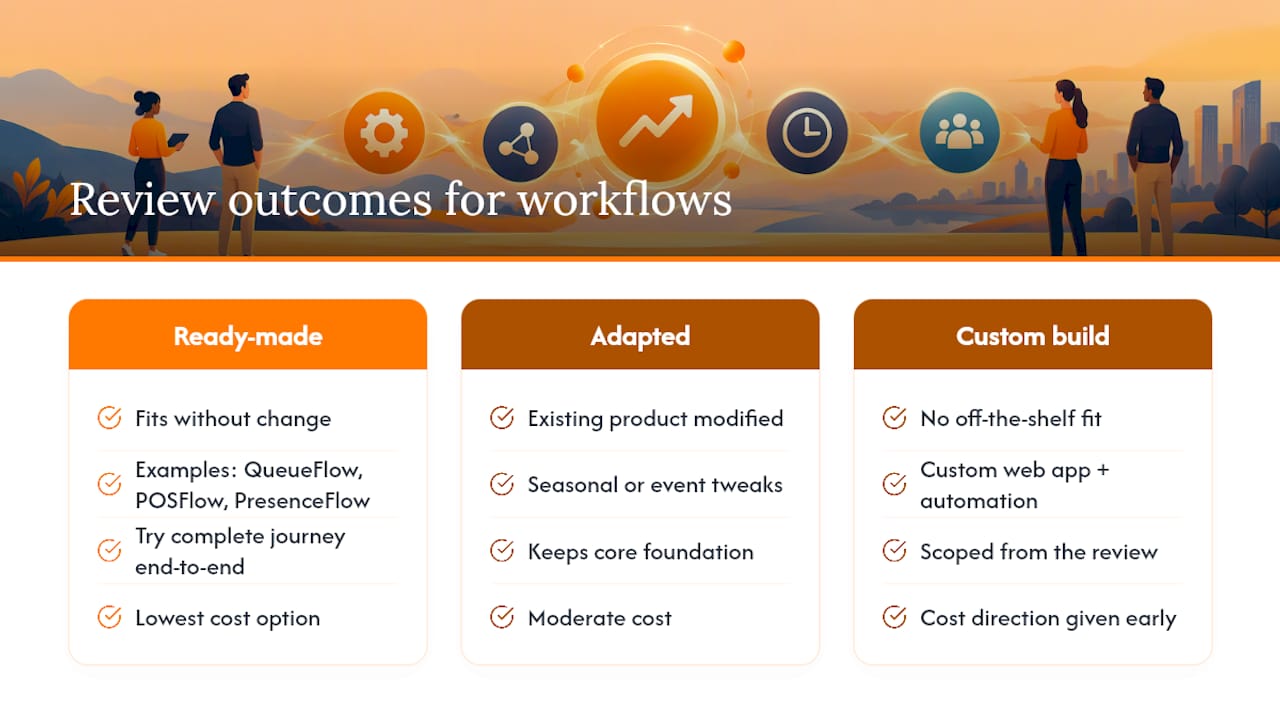
Some app developers start every engagement with a workflow-first review rather than a product pitch, looking at how a process actually runs before recommending anything. Such reviews may be complimentary and can result in one of three outcomes: a ready-made product that already fits, an adapted version of an existing foundation, or a fully custom build when nothing off-the-shelf comes close.
For queue-heavy operations, from clinics to service counters, QueueFlow keeps every queue moving and keeps everyone informed, giving staff a live view of who’s waiting and customers a realistic estimate instead of a guess. Retailers running seasonal sales or pop-up events can run a sample sale from product to payment using POSFlow, seeing the full transaction flow before committing to a build. Businesses running conferences, workshops, or ticketed events can turn attendance into a live operating view with PresenceFlow, replacing a clipboard sign-in sheet with something a manager can actually check mid-event. For anyone still deciding, it’s worth trying the complete queue journey end to end rather than reading a feature list.
The point of the fit review isn’t to steer every client toward a custom build. It’s to work out the most economical route honestly, before any development cost is committed, so an SME isn’t paying custom-build prices for a problem a ready-made product already solves. Where a business genuinely needs something no existing product covers, custom web apps and workflow automation get scoped from that same review, with cost direction given early rather than after the brief has ballooned.
Where do workflow tools show up in daily operations?
The categories above sound abstract until you see where they actually land inside a real business day.
Marketing teams lean on no-code hosted tools to route new leads from a form into a CRM, trigger a welcome email sequence, and flag hot prospects to sales, often within minutes of a form submission rather than at the end of the day. CRM operations benefit from visual low-code workflows that enrich a contact record automatically, pulling company data from an external source before a salesperson even opens the file.
Back-office operations tend to be where self-hosted platforms earn their keep, reconciling invoices, syncing inventory counts across systems, and flagging anomalies without exposing sensitive financial data to a third-party cloud. Event attendance management is a category of its own: a live check-in system that updates a dashboard in real time does more for an event manager than any spreadsheet ever could, because it shows who’s actually in the room right now, not who registered three weeks ago.
Queue management in clinics, government service counters, and busy retail stores solves a different problem again, less about moving data and more about moving people, with real-time updates that reduce the frustration of not knowing how long a wait will last. Retail point-of-sale workflows tie everything together at the transaction level: stock deduction, payment processing, and receipt generation happening in one motion rather than three separate manual steps.
Each of these use cases rewards a different category of tool, which is exactly why a single platform choice for the whole business rarely works as well as choosing per process.
How does AI actually change what a workflow can do?
AI doesn’t replace the workflow. It adds a layer of judgement to steps that used to require a human to read, decide, and act.
Agents are the most visible change: instead of a fixed if-this-then-that rule, an agent can evaluate a situation, choose from several possible actions, and only escalate to a human when confidence is genuinely low. That’s a meaningful shift from traditional automation, which could only follow rules someone had already anticipated.
Retrieval-augmented generation (RAG) lets a workflow pull relevant information from your own documents or database before generating a response, rather than relying purely on a model’s general training. A support workflow using RAG can answer a customer query using your actual returns policy document, not a generic guess at what a returns policy usually says.
Summarisation is the quieter but arguably more useful capability for most SMEs: condensing a long email thread, a meeting transcript, or a stack of customer feedback into something a manager can read in thirty seconds instead of thirty minutes.
The practical trade-off is that every one of these capabilities adds a cost layer, model or API charges, and a new failure mode, since an agent making a wrong call or a RAG system pulling outdated information can create errors a simple rule-based workflow never would. The ZHAW study’s finding that most Swiss SME AI adoption is still at pilot stage reflects exactly this caution: businesses are testing where AI adds judgement before trusting it with decisions that matter.
How do the top workflow tool categories compare?
No single category wins on every measure, which is why the comparison needs to happen on axes rather than a simple ranking.
| Category | Strongest at | Weakest at |
|---|---|---|
| No-code hosted | Speed to first automation, ease of use | Cost at high volume, limited complex logic |
| Visual low-code | Complex branching logic, still no-code | Per-operation billing adds up with many steps |
| Self-hosted / fair-code | Data control, cost efficiency at scale | Requires technical skill to maintain |
| RPA | Legacy systems without APIs | Brittle when interfaces change |
| AI-agent platforms | Judgement-based tasks, unstructured input | Newer, less predictable, needs governance |
| Bespoke apps | Exact fit to a unique process | Higher upfront cost, longer lead time |
The honest takeaway is that most SMEs end up running two or three of these categories simultaneously, a no-code tool for marketing, a self-hosted platform for sensitive back-office data, and perhaps one bespoke app for the process that never quite fit anything else. Treating this as a single tool decision rather than a per-process one is where most comparison shopping goes wrong.
Can workflow tools grow and adapt with your business?
Scalability means different things depending on which category you started with, and that difference catches a lot of growing businesses off guard.
No-code hosted platforms scale in terms of features fairly well, but scale in terms of cost poorly, because per-task pricing compounds directly with growth. A business that doubled its order volume can find its automation bill more than doubling, since higher volume often pushes into a steeper pricing tier.
Visual low-code platforms handle growing complexity better than growing raw volume, letting you add branches and conditions to an existing workflow without rebuilding it, but per-operation billing means a workflow that grows more sophisticated also grows more expensive to run, even at flat volume.
Self-hosted platforms scale in the opposite direction: the upfront setup and maintenance burden is higher, but marginal cost per additional automation run drops close to zero once the infrastructure is in place. This is why self-hosted options become genuinely economical mainly at higher volumes, not from day one.
Bespoke apps scale exactly as far as they were designed to, which is both their strength and their limit. A well-scoped custom build anticipates growth in the brief, adding capacity or new features as a planned extension rather than a rebuild. A poorly scoped one becomes the bottleneck it was built to solve. This is precisely why the initial workflow review matters more than the build itself.
How easy are workflow tools actually to use day to day?
Ease of use isn’t a single dial. It splits into ease of building a workflow and ease of living with it once it’s running, and the two rarely move together.
No-code hosted platforms genuinely deliver on their promise for building: a non-technical team member can connect two apps and have something working within an hour. Living with it day to day is usually just as easy, provided nothing breaks. When something does break, the support experience varies wildly, and this is exactly the kind of signal worth checking through independent review sources like G2 before committing, since satisfaction scores there often reflect real support experiences rather than marketing claims.
Visual low-code platforms take longer to learn, since branching logic and data mapping require more patience than a simple trigger-action setup, but reward that investment with workflows that handle real complexity without needing a developer.
Self-hosted platforms are the honest outlier here: they’re rarely “easy” in the way the other categories are marketed, and that’s by design. You’re trading ease of use for control, and any vendor or internal team promising both usually isn’t being straight with you.
Bespoke apps sit wherever the development team places the dial, which is precisely why the brief matters. An app built without input from the people who’ll use it daily tends to be technically sound and practically painful. One built around actual daily habits tends to disappear into the background, in the best possible way.
What do successful workflow automation rollouts look like?
The pattern across genuinely successful rollouts is less about the tool chosen and more about the discipline applied before choosing it.
A retail business running seasonal sales typically sees the clearest wins from point-of-sale automation, because the process, scan, charge, receipt, is already well defined and has almost no ambiguous exception cases. That clarity is exactly what makes it a strong pilot candidate: clean inputs, clean outputs, and a result that’s easy to measure in saved minutes per transaction.
Event-heavy businesses, conference organisers, training providers, membership associations, tend to see the fastest return from attendance automation, because manual sign-in sheets create a specific, painful, and easily quantified problem: nobody knows who’s actually present until someone counts by hand.
Service businesses with unpredictable footfall, clinics, government counters, walk-in retail, see the clearest gains from queue automation, not because it saves time on any single transaction, but because it removes the single biggest source of customer frustration: not knowing how long the wait will be.
Content and research-heavy teams that adopted structured AI-assisted workflows reported meaningfully faster research cycles, a pattern consistent with the broader finding that AI adds most value on judgement-heavy, information-dense tasks rather than simple repetitive ones. What connects all of these cases isn’t the specific tool. It’s that each one started with a process that was already well understood before anyone automated it.
What actually works versus what sounds good on a slide
The gap between AI automation ambition and AI automation reality is wider than most vendor pitches admit. Every platform now claims agent capabilities and intelligent automation, but the businesses getting genuine value are the ones that mapped their process properly first and treated AI as one tool within that process, not a replacement for understanding it.
The honest advice is to resist the urge to buy the most capable platform available. A visual low-code tool that your team actually understands beats a sophisticated AI-agent platform nobody on staff can debug at 11pm when it silently stops working. Save the ambitious platform for the process where the complexity genuinely earns it.
The decision between a platform and a bespoke app usually comes down to one honest question: does this process look like fifty other businesses’ version of the same process, or is it actually yours? If it’s generic, a platform will serve it well and cheaply. If it’s genuinely specific to how your business operates, and most SMEs have at least one such process, a tailored build tends to outperform a platform stretched to fit, even though it costs more upfront. The mistake is applying the wrong answer to the wrong process, not choosing platforms or bespoke builds in general.
— Ronald
Get a workflow-first review instead of a guessing game
Some app developers offer an alternative to picking a generic platform and hoping it fits. Rather than starting with a product pitch, enquiries may begin with a workflow-first review that looks at how your process actually runs, then recommends the most economical route: a ready-made product, an adapted version of an existing foundation, or a fully custom build, whichever genuinely costs least for the outcome needed.

That review is complimentary and confidential, and it gives you early cost direction before any development commitment, no technical brief required on your side. If your business runs queues, QueueFlow and its full demo journey are worth trying first. If retail transactions are the bottleneck, the POSFlow demo shows the whole sale process end to end. For events and attendance, PresenceFlow turns a sign-in sheet into a live view anyone can check. And if none of the ready-made products quite fit, SME business automation services cover the custom route from the same initial review.
Book a free app fit review and find out, before you spend a cent, which route actually costs the least for your process.
Sources
A handful of sources are worth keeping close if you want to dig deeper into the evidence behind these recommendations.
- ZHAW Business Process Management study 2025
- n8n vs. Make vs. Zapier im Vergleich | DLM Magazin
- Werkzeuge im Vergleich: Make, n8n und Zapier | AI Hub
FAQ
What is the best tool for workflow automation?
There isn’t one universal answer. It depends on your process: no-code hosted tools suit quick, low-volume automations; visual low-code platforms handle complex branching logic well; self-hosted platforms suit high-volume or data-sensitive work; and bespoke apps fit processes unique enough that no off-the-shelf product covers them. Flowlab’s workflow-first review helps identify which category actually fits before you commit to any of them.
What are some good workflow tools for small businesses?
Good options fall into distinct categories rather than a single ranking: no-code hosted platforms for speed, visual low-code tools for complexity, and self-hosted or fair-code platforms where data control matters. Practitioner comparisons show each philosophy suits a different combination of skill level, data sensitivity, and volume, so the “good” choice depends on which of those three matters most to your business.
What is a good alternative to a generic automation platform?
For businesses whose process doesn’t fit neatly into an off-the-shelf platform, a bespoke internal app or an adapted existing product tends to work better than forcing a generic tool to comply. Flowlab’s product lines, including queue management, point-of-sale, and attendance tracking, exist specifically for businesses that found generic platforms didn’t match how they actually operate.
What are the top AI automation approaches for SMEs?
The most relevant categories for SMEs are agent-based workflows that make judgement calls, retrieval-augmented generation for answering queries from your own documents, and summarisation for condensing long communications. Around 55% of surveyed Swiss SMEs had adopted AI internally by 2024, though mostly as pilot projects rather than full production rollouts, which reflects how new and cautious this adoption still is.
How much do workflow automation tools cost?
Costs typically follow one of five shapes: per task, per operation, per user, infrastructure and hosting, or model and API usage layered on top. Billing units vary significantly between platforms, and the cheapest option at low volume is often not the cheapest at scale, so it’s worth modelling your expected volume before comparing prices. Flowlab’s own services and product lines don’t carry published prices; current costs are available directly through a fit review.