
For most SME goals, a progressive web app (PWA) is often the pragmatic choice because it uses one codebase, usually enabling faster launch and lower running cost. Native development earns its keep when your product depends on heavy performance, deep hardware access or background processing that a browser cannot reach. The right call depends on your users’ goals, your budget and which device features the job actually needs, which is exactly what the framework below helps you work out.
TL;DR:
- On iOS, a PWA must be added to the Home Screen before push notifications or badges work, and permission must follow a user action.
- Choose native when retention or revenue depends on NFC, Bluetooth pairing, continuous background location, heavy processing, or app store purchases, not hypothetical future features.
- A PWA requires HTTPS, a manifest, and a registered Service Worker for installation; browser limits rule out continuous background work and long sync jobs.
- Native adds store review and platform specific testing, so confirm app store discovery or monetization early; changing that assumption after development can make fixes expensive.
Table of Contents
- PWA vs native: a head-to-head comparison of capabilities
- When a PWA is the pragmatic choice for your business
- When native development genuinely pays for itself
- Service Workers, installability, push and badging: what to know
- Cost, team effort and realistic timelines
- A decision framework you can apply this week
- How we help SMEs weigh this decision
- What SMEs usually get wrong about this choice
- Try the approach before you commit to a build
- FAQ
- Sources
PWA vs native: a head-to-head comparison of capabilities
Before picking a direction, it helps to see the trade-offs side by side rather than by vendor marketing. The table below uses generic labels because the differences come from the platform, not from any particular supplier.
A PWA is a website designed to behave like an app: installable, capable of working offline with limitations, and able to send push notifications on most platforms where supported. A native app is built separately for each operating system, using that system’s own tools, which gives it direct access to everything the device offers.
- Codebase: PWAs ship one codebase across devices; native apps typically need separate iOS and Android builds.
- Distribution: PWAs install from a browser prompt or a direct link; native apps mostly go through app stores and their review process.
- Updates: PWAs update instantly from the server; native apps need a build, store review and user download.
- Performance: Native apps typically perform better for graphics-heavy or compute-heavy tasks; PWAs can suffice for many common business applications.
- Hardware access: Native apps reach deeper into Bluetooth, NFC and sensors; PWAs cover camera, location and basic storage.
- Offline support: Both can work offline, but PWAs rely on Service Workers running on a separate thread, while native apps use OS-level storage APIs that are often simpler for heavy data work.
- Push and badging: Both support push notifications; on iOS, a PWA must first be added to the Home Screen before push or badges work at all.
- Discoverability: Native apps benefit from app-store search; PWAs benefit from normal web search and shareable links.
The iOS caveat matters more than it looks. A PWA that performs well on Android or desktop can feel incomplete on an iPhone until the user manually adds it to their Home Screen, which affects onboarding design and first-use expectations.
When a PWA is the pragmatic choice for your business
A PWA often makes sense when the goal is broad reach, speed to market, and manageable running costs, rather than deep device integration. For most SMEs testing or running a customer-facing product, that describes the majority of use cases.
- Marketing funnels and landing experiences benefit from fast load times, easy sharing and no install friction.
- Catalogue commerce and simple ordering flows work well because customers can browse and buy without downloading anything first.
- Content delivery, bookings and customer portals suit a PWA because updates roll out instantly without waiting on app-store review.
- Internal tools accessible through a browser, such as rosters, stock checks or basic reporting, avoid the cost of maintaining two native codebases for staff-only use.
The benefits compound: one codebase means one team maintaining one set of bugs, updates happen server-side without resubmission, and the content stays linkable and indexable by search engines, which native apps cannot offer.
The limitations are real but narrow. Access to hardware beyond camera, location and basic storage stays partial, and the iOS Home Screen requirement for push and badging means your onboarding flow has to explain that extra step rather than assume it. For catalogue browsing, bookings or internal dashboards, those limits rarely change the outcome.
When native development genuinely pays for itself
Native still wins decisively in a specific set of situations, and recognising them early avoids wasted rebuild costs later.
- Performance-sensitive products, such as apps with real-time graphics, complex animation or heavy data processing, run noticeably better on native frameworks.
- Heavy background processing, like continuous location tracking, fitness logging or long-running sync jobs, needs OS-level background access that browsers deliberately restrict to protect battery life.
- Deep hardware access, including NFC payments, Bluetooth peripheral pairing or specialised sensors, is only reliably available through native APIs.
- App-store monetisation strategies, where in-app purchase mechanics or store discoverability are central to revenue, require a store presence a PWA cannot fully replicate.
- Polished platform-specific UI, where users expect native gestures, haptics and animation fidelity as a baseline, favours a dedicated build.
The threshold usually comes down to volume and stakes. If a feature that only native can deliver drives a meaningful share of retention or revenue, the extra cost of separate iOS and Android builds is justified. If it is a nice-to-have used by a small fraction of users, it rarely is.
Service Workers, installability, push and badging: what to know
The technical detail behind “PWA” is mostly one piece of technology: the Service Worker. It runs in a separate thread from your main app, cannot touch the page’s content directly, and acts as a proxy between your app, the browser and the network. That separation is what allows offline caching, background sync and push handling, but it also means debugging a Service Worker is a different discipline from debugging the page itself.
A few practical constraints shape every PWA project:
- HTTPS is mandatory in production; only localhost is exempt during development, which trips up teams deploying internal tools to an intranet without a TLS certificate.
- Background tasks are deliberately limited. Background Sync suits short tasks, while Background Fetch and Periodic Background Sync come with permission prompts and browser-imposed limits on frequency, which protects battery life but rules out continuous background work.
- Installability requires a manifest. A Web App Manifest plus a registered Service Worker over HTTPS is what triggers the browser’s install prompt, though availability still varies by browser.
iOS deserves its own note. Since iOS and iPadOS 16.4, web push for Home Screen web apps works, but only after the user adds the web app to their Home Screen and grants permission in direct response to a user action. The same release window brought a Badging API for Home Screen web apps, letting a PWA show a badge count once notification permission is granted. These are real improvements, but they still trail native in long-running background tasks and certain sensor access.
Pro Tip: Design your install prompt as an explicit, well-timed ask rather than an afterthought. On iOS particularly, push and badging simply will not work until the user has added the app to their Home Screen.
Cost, team effort and realistic timelines
Budget conversations go smoother when the cost shape is clear from the start rather than negotiated mid-project.
- Codebase cost: a single PWA codebase generally costs less to build and maintain than two separate native builds for iOS and Android.
- Time to market: PWAs tend to launch faster because there is no app-store review cycle gating the first release.
- QA and approval: native builds add store review time and platform-specific testing on top of standard QA, which stretches the schedule.
- Staffing: one PWA team can usually cover both desktop and mobile users; native typically needs iOS and Android specialists, or one team working twice.
- Ongoing costs: hosting and push infrastructure are the main recurring PWA costs; native adds app-store commissions and periodic OS-version compatibility work.
None of this makes native wrong, it simply means the extra spend should map to a feature native alone can deliver, not to a general preference for “an app”.
A decision framework you can apply this week
Run your project through this checklist before committing to either route:
- Define the user goal. Is it browsing, transacting or something that needs continuous background activity?
- List the required device APIs. NFC, Bluetooth and advanced sensors point towards native; camera, location and storage are fine on a PWA.
- Assess performance needs. Heavy graphics or real-time processing favour native; everyday business workflows rarely do.
- Set budget and timeline honestly. A single-codebase PWA suits a tighter budget and a faster launch.
- Decide your distribution strategy. Need app-store presence for discovery or monetisation? That points to native.
Three quick profiles: a marketing MVP testing demand almost always suits a PWA. An internal operations tool for staff, like scheduling or stock tracking, usually suits a PWA too, since nobody needs an app-store listing for a staff login screen. A device-integrated product, say one relying on Bluetooth hardware pairing, needs native from day one.
Red flags that should push you towards native: a core feature depends on background location tracking, NFC payments or sustained offline data sync beyond what Background Sync supports.
Pro Tip: Scope the first release around what a PWA can deliver, then treat a later native build as an optional upgrade once usage data justifies the extra cost, rather than guessing up front.
How we help SMEs weigh this decision
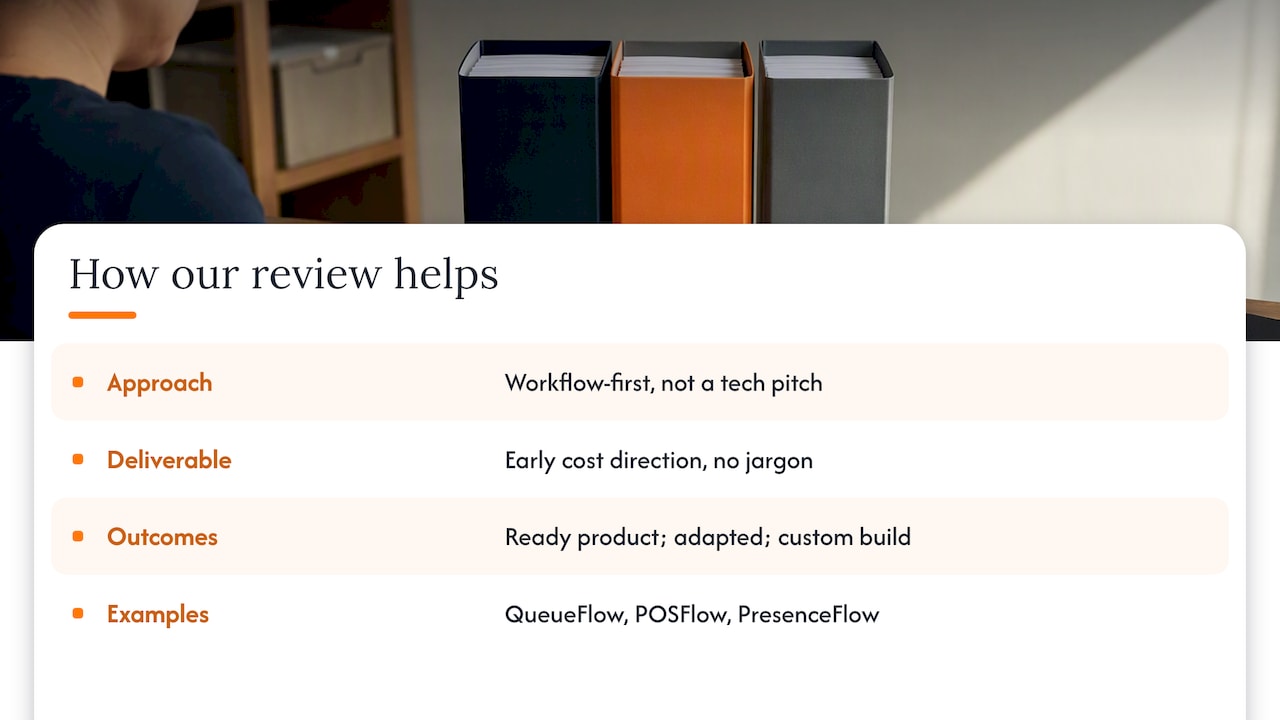
We start every engagement with a workflow-first review rather than a technology pitch, because the right answer depends on what your business actually needs to run smoothly, not on which platform sounds more impressive. Our complimentary app fit review looks at your operations before we recommend a ready product, an adapted one, or a custom build, so you get early cost direction without technical jargon or pressure to commit.
Several of our own product lines are deliberately built as web-first tools where that approach suits the job: QueueFlow for queue and service flow, POSFlow for point-of-sale, and PresenceFlow for attendance tracking all demonstrate where a browser-based approach serves SME operations well. The review is kept confidential and focused on the simplest suitable solution for your actual workflow.
What SMEs usually get wrong about this choice
The most common mistake we see is over-engineering for a device feature that only a small fraction of users will ever touch. Teams commit to a full native build because “the app might need Bluetooth someday”, then spend months building for a scenario that never materialises.
The second mistake is skipping an early test of distribution assumptions. If your growth plan depends on app-store discovery, confirm that early, rather than after the build is finished and the shortfall is expensive to fix.
Both mistakes trace back to the same fix: run the decision framework before you write a single line of code, not after.
— Ronald
Try the approach before you commit to a build
A low-risk way to judge whether a web-first approach fits your operations is to see one running. Our POSFlow demo walks through a sample sale from product to payment, and our QueueFlow demo takes you through the complete queue journey from check-in to being served. Our PresenceFlow demo turns attendance into a live operating view you can watch update in real time.

- Explore the POSFlow, QueueFlow and PresenceFlow demos to see a web-first approach in practice.
- Request a complimentary app fit review through our services page to get clear, jargon-free direction on cost before you commit to either route.
FAQ
Why is PWA not popular compared with native apps?
PWAs are widely used for browsing, content and commerce, but awareness lags because they install quietly from a browser rather than through an app store listing people actively search. The iOS requirement to add a PWA to the Home Screen before push notifications or badging work also means the experience can feel incomplete compared with a store-downloaded app.
Is a PWA still relevant in 2026?
Yes. Browser support for Service Workers and installability continues to mature, and platform updates such as iOS web push and badging have closed much of the gap with native for everyday business use cases like commerce, bookings and internal tools.
Will PWAs replace native apps entirely?
Unlikely. PWAs cover most reach-and-speed goals well, but native apps remain necessary for heavy background processing, deep hardware access such as NFC or Bluetooth, and app-store monetisation strategies that a browser-based app cannot fully support.
What are the main disadvantages of a PWA?
The biggest limits are partial hardware access, background task restrictions designed to protect battery life, and the iOS requirement to add the app to the Home Screen before push notifications or badging function. For businesses whose product does not depend on those features, these limits rarely affect the outcome.
How much does it typically cost to build a PWA versus a native app?
A PWA generally costs less because one codebase serves every platform, while native usually needs separate iOS and Android builds plus app-store review cycles that extend both cost and timeline. An app fit review can provide early cost direction specific to your project before committing to either approach.
Sources
- Offline and background operation – Progressive Web Apps | MDN
- Web Push for Web Apps on iOS and iPadOS | WebKit