
Choose Pipedrive when your business lives and dies by pipeline speed, with a small, sales-only team. Choose HubSpot when marketing and customer service need to sit in the same system as sales. The trade-off is straightforward: HubSpot buys you scope and native integration; Pipedrive buys you simplicity and a lower total cost. If neither fits cleanly, a tailored workflow build from a firm like Flowlab can outperform both.
TL;DR:
- Pipedrive offers a lower-cost, fast-setup sales pipeline tool ideal for small, quota-driven sales teams, with predictable seat-based pricing.
- HubSpot provides an all-in-one customer platform with native marketing, customer service, and deeper attribution reporting, suitable for marketing-heavy operations.
- Costs for both CRMs escalate quickly when integrating additional contacts, advanced features, or scaling team size, emphasizing the importance of projecting future expenses.
- For workflows outside basic pipeline management, custom solutions from developers like Flowlab often outperform standard CRMs in efficiency and cost over three years.
- Migration involves detailed data auditing, association mapping, and testing API integrations, typically requiring weeks of preparation for a smooth transition.
Table of Contents
- Pipedrive vs HubSpot at a glance
- How do Pipedrive and HubSpot compare on features that matter?
- What does Pipedrive vs HubSpot pricing actually cost?
- Which CRM approach fits your business profile?
- What does migrating between CRMs actually involve?
- When a bespoke workflow beats buying another platform
- Why Flowlab might fit better than either platform
- Sources
- FAQ
Pipedrive vs HubSpot at a glance
Every CRM decision eventually collapses into one question: are you buying a sales tool, or a customer platform? Pipedrive and HubSpot answer that question differently, and the difference explains almost every complaint you’ll read about either one.
A sales-first CRM is built around the pipeline. It tracks deals, stages, activities, and follow-ups, and it deliberately keeps everything else thin. An all-in-one customer platform wraps sales, marketing, customer service, and content tools into a single data model, so a contact record carries their email opens, support tickets, and deal history in one place.
That structural difference shows up immediately once you start comparing pipedrive vs hubspot on the things that matter to a small team: setup time, pricing shape, and how much of the platform you’ll actually use.
Sales-first CRM: strengths and limits
- Faster to configure. Most sales teams are entering deals within a day, not a week.
- Pricing tends to scale predictably by seat, with fewer surprise tier jumps.
- Marketing and service features are minimal or absent, so you’ll often need a second tool.
- Reporting is solid for pipeline metrics but shallower for multi-channel attribution.
All-in-one platform: strengths and limits
- One login, one contact record, one source of truth across marketing, sales, and service.
- A genuine free CRM tier exists, which lowers the barrier for very early-stage teams.
- The learning curve is steeper. New hires often need structured onboarding to use it well.
- Costs climb quickly once you add marketing automation, more contacts, or advanced reporting.
Businesses with a lean, quota-driven sales function tend to prefer the sales-first route. Businesses running content marketing, email nurture sequences, and a support desk alongside sales usually find the all-in-one platform pays for itself in reduced tool-switching, provided the budget stretches that far.
How do Pipedrive and HubSpot compare on features that matter?
The headline decision is philosophy. The real decision happens in the details: how deep each tool goes on pipeline management, automation, reporting, AI, integrations, and security. Here’s where the two approaches genuinely diverge, and where the gap is smaller than the marketing suggests.
| Axis | Best for | Pricing (entry/scaling) | Ease of use / onboarding | AI & automation | Integrations marketplace | Reporting & analytics | Support & onboarding effort | Data residency / compliance |
|---|---|---|---|---|---|---|---|---|
| Sales-first CRM | Lean sales teams, short cycles | Lower entry, scales by seat | Days, minimal training | Deal-focused AI, next-step suggestions | Smaller marketplace, strong core integrations | Strong pipeline forecasting | Light support needs, self-serve friendly | EU hosting options typically available |
| All-in-one platform | Sales + marketing + service together | Free tier, paid tiers scale with contacts and features | Weeks, benefits from structured onboarding | Broader AI across content, email, and service | Large app ecosystem, extensive native connectors | Deeper multi-channel and revenue attribution | Higher effort to configure fully, more support tiers | EU hosting options typically available |
Pipeline and sales workflow
A sales-first CRM is purpose-built for one job: moving deals through stages without friction. Activity reminders, deal rotting alerts, and visual pipelines are the default view, not a bolt-on. An all-in-one platform reaches rough parity here for basic deal tracking, but its pipeline view often feels like one module among many rather than the product’s centre of gravity. If your sales team lives in the pipeline eight hours a day, that difference in focus is felt daily, not just at setup.
Marketing and automation: native versus add-on
This is where the categories split hardest. Platforms built for consolidation include email campaigns, landing pages, and marketing automation as native, first-party features that share data with sales automatically. A sales-first CRM typically treats marketing as someone else’s job. That’s not a flaw so much as a design choice, but it has real cost implications. Independent 2026 reviews note that businesses choosing a sales-first tool for pipeline velocity commonly pair it with a separate marketing tool or middleware, which adds a second subscription and a second admin to manage. Whether that’s cheaper than the platform’s marketing tier depends entirely on how much marketing automation you actually need.
Reporting depth and forecasting
Sales-first CRMs report well on what they know: pipeline value, conversion rates by stage, and rep activity. That’s often all a small sales team needs. All-in-one platforms go further, connecting marketing source data to closed revenue, which matters once you need to answer “which campaign actually generated pipeline?” If your board or investors ask for full-funnel attribution, a sales-only tool will leave a visible gap that spreadsheets have to fill.
AI features in 2026: scope differences
AI has become one of the sharper differentiators between the two approaches. Sales-focused AI tends to target the immediate task: summarising a call, suggesting the next best action, or flagging a deal at risk. Zapier’s 2026 comparison points out that broader platform AI extends further, assisting with content generation, email personalisation, and service ticket triage, because it has marketing and support data to draw on. For a sales-only team, the narrower AI is often more immediately useful precisely because it doesn’t need to be told what department it’s working in.
Pro Tip: Don’t judge AI features from a demo. Ask to trial the AI on your own messy, real deal data for a week. Polished demo data hides how often these tools produce generic, unusable suggestions.
Integrations and the role of middleware
Marketplace size favours the all-in-one platform by a wide margin, with deep native connectors to accounting, e-commerce, and support tools. Sales-first CRMs have smaller marketplaces but usually cover the essentials: email, calendar, and the most common accounting and e-commerce platforms. Where a native connector doesn’t exist, middleware such as Zapier, Make, or n8n fills the gap, at the cost of another moving part to maintain.
Security, permissions, and data residency
Both categories offer role-based permissions, two-factor authentication, and enterprise-grade security certifications at their higher tiers. Data residency deserves specific attention if you handle EU customer data: both platforms commonly offer EU-based hosting, such as Frankfurt data centres, alongside GDPR-aligned contractual terms. Don’t assume this is automatic on every plan. Always confirm hosting region and data processing terms in writing before you commit, because entry-tier plans sometimes default to a different region than the one you expect.
What does Pipedrive vs HubSpot pricing actually cost?
List prices are the least useful number in this decision. What matters is what you’re paying once seats, contacts, and features scale, because that’s where budgets get blown.
Free tiers and trials are not the same thing, and confusing them causes real planning mistakes. A permanent free tier stays free indefinitely with limited features. A trial gives you full features for a fixed window and then requires payment. G2’s comparison data shows Pipedrive entry pricing starts at about USD 14 per user per month with only a 14-day trial and no permanent free plan, while HubSpot provides a permanent free CRM tier and paid plans beginning near USD 18 to 20 per user per month. A free tier looks attractive for a team of two, but it’s rarely built to run a real sales operation for long. Contact limits, seat caps, and locked reporting features tend to force an upgrade sooner than the marketing implies.
Costs scale on three axes that rarely appear together in headline pricing: seats, contact volume, and feature tier. Adding a tenth sales rep is predictable. Crossing a marketing contact threshold, or needing custom reporting that only exists two tiers up, is where budgets get surprised.
Onboarding fees are the other quiet cost. They rarely matter for a five-person sales team self-onboarding over a weekend. They become material once you need data migration, custom field mapping, or workflow builds that require a paid implementation package, which can run into thousands of pounds before a single deal is logged in the new system.
Here’s an illustrative 12 to 36 month comparison for two common scenarios:
- Lean sales team (5 users, no marketing needs): A sales-first CRM at entry pricing, scaling only with headcount, typically stays the lower-cost path across three years, since there’s no pressure to buy a marketing tier you won’t use.
- Sales plus inbound marketing (5 to 15 users, growing contact list): An all-in-one platform’s paid marketing tier often costs more per month than a sales-first tool plus a bolt-on email service, but it saves the integration overhead and keeps attribution data in one place.
- Rapid headcount growth (doubling within 18 months): Whichever platform you pick, model the cost at your projected headcount, not your current one. Seat-based pricing compounds fast, and a tool that looked affordable at five users can look very different at twenty.
Which CRM approach fits your business profile?
Ten minutes of honest scoring against four criteria will get you further than another week of vendor demos. Score your business on team size, sales cycle length, marketing ambition, and in-house IT capacity, and the right category usually becomes obvious.
Team size matters because small teams absorb complexity badly. A five-person sales team rarely has the spare capacity to configure a broad platform properly, whereas a fifteen-person operation with a dedicated ops hire can extract real value from one.
Sales cycle length shapes how much you need from automation. Short, transactional cycles reward speed and simplicity. Long, multi-stakeholder cycles benefit from a platform that can track marketing touches across months, not just the final sales conversation.
Marketing ambition is the biggest single fork in the road. If you run regular email campaigns, gated content, or lead scoring, native marketing tools stop being a nice-to-have.
In-house IT capacity determines how much platform complexity you can safely take on. Without someone who owns the CRM as part of their job, a broad platform’s advanced features often go unused while you keep paying for them.
Three profiles come up repeatedly among SME buyers:
- The lean sales team. Under ten people, short sales cycles, no dedicated marketing function. A sales-first CRM matches this profile closely: fast setup, predictable pricing, minimal training overhead.
- Sales plus inbound marketing. A growing team running content and email alongside sales, wanting one system to show the full funnel. This is the clearest case for an all-in-one platform, provided the budget for the marketing tier is accounted for upfront.
- Complex operations needing custom workflows. Businesses whose real bottleneck isn’t the CRM category at all, it’s a workflow that neither approach handles natively: multi-location scheduling, custom approval chains, or integration with a legacy operational system. This profile often outgrows both categories and does better with a bespoke build.
Pro Tip: During any trial, don’t just test the features you already know you need. Try to break the tool with your messiest real scenario, a deal with three decision-makers, a contact who’s both a customer and a partner, a discount that needs manager approval. That’s where the category gap actually shows up.
Before signing anything, validate: can you export your full contact history without a paid add-on? Does the reporting tier you’ll actually use match the plan you’re pricing? And does the mobile app support the specific action your field team does most often, whether that’s logging a call or updating a deal stage from a car park?
What does migrating between CRMs actually involve?
Migration is where good intentions meet messy data, and it’s the step most buyers underestimate. A realistic migration follows a consistent sequence, and skipping steps is the single biggest cause of a rocky launch.
- Audit and clean your existing data first. De-duplication before migration is far easier than after; duplicate contacts and companies multiply once automation rules start acting on them.
- Map associations, not just fields. Deals link to contacts, contacts link to companies, and activity history needs to travel with them. Losing these associations is the most common complaint in post-migration reviews.
- Decide on native connectors versus middleware early. G2’s product comparisons note that onboarding time and reporting depth vary enough between platforms that this choice should happen before, not after, you commit to a plan.
- Test API behaviour before going live. HubSpot began enforcing admin-configured validation rules on all API write paths in 2026, meaning integrations that worked previously can start returning validation errors if they don’t conform. Always check a vendor’s current developer changelog before migrating live data through an integration.
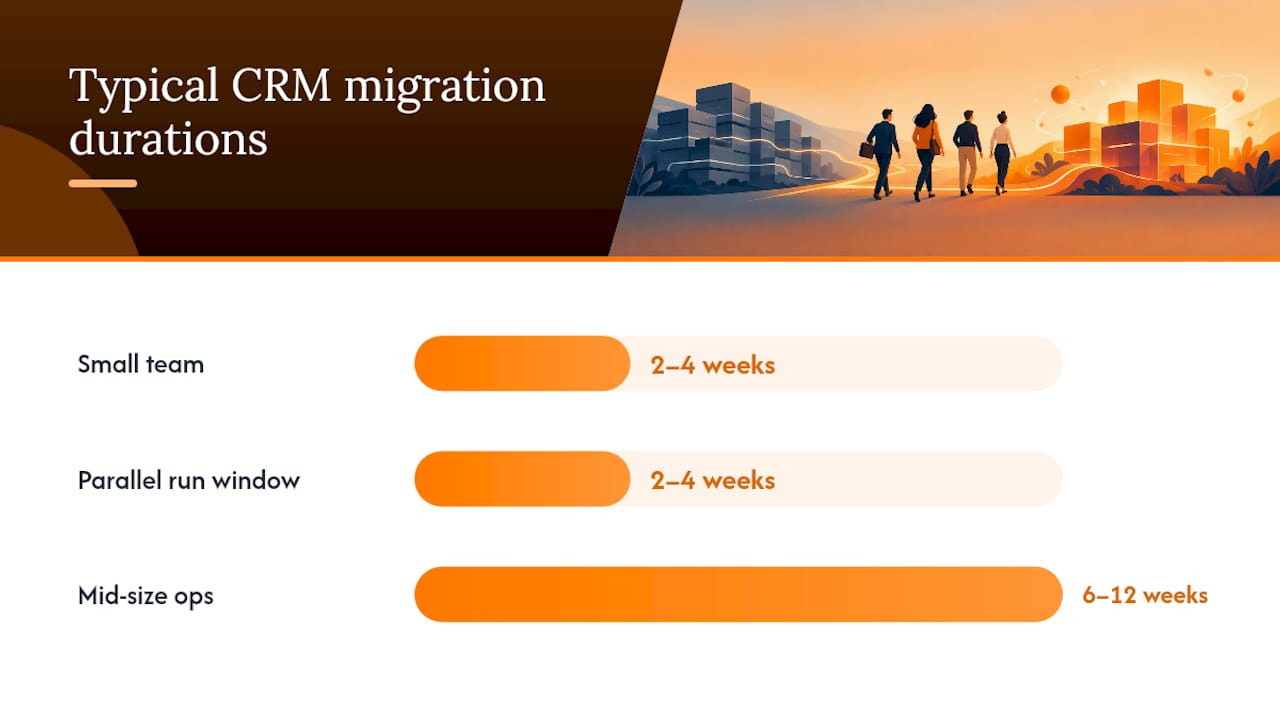
- Run parallel systems for a defined window, typically two to four weeks for a small team, before fully retiring the old CRM.
A small team migration with clean data commonly takes two to four weeks from decision to full adoption. Mid-size operations with multiple data sources, custom fields, and several integrations should budget six to twelve weeks, plus a proper implementation partner if the internal team lacks CRM migration experience.
Before hiring an integrator, ask directly: have they handled a migration of your data volume before, how do they handle association mapping, and what’s their rollback plan if the migration goes wrong midway?
When a bespoke workflow beats buying another platform
Here’s what the pipedrive vs hubspot debate tends to miss: for a meaningful share of SMEs, the real bottleneck was never which CRM to buy. It was a workflow that doesn’t map cleanly onto either category, and no amount of configuration fixes that.
Consider a business where the sales process depends on a queue system, an event registration flow, or a point-of-sale integration that feeds leads back into follow-up. Neither a sales-first CRM nor an all-in-one platform is built around those operational realities, they’re built around a generic pipeline. Forcing a walk-in retail lead or an event attendee through a generic deal stage often creates more admin than it saves.
This is the gap such tailored workflow developers aim to close. Where a buyer’s job is genuinely “give every enquiry an owner and a next move,” a tool like LeadsFlow is built around that exact workflow rather than a generic deal object. Where the job is running a sample sale from product to payment, POSFlow handles that operational reality directly. And where the job is turning event or site attendance into a live operating view rather than a static contact list, PresenceFlow addresses that need without forcing it into a CRM’s contact record.
The honest test is simple: if your team’s real friction is pipeline visibility, buy a pipeline tool. If the friction is a specific operational process that generic software keeps fighting you on, a tailored build usually costs less over three years than paying for platform features you’ll configure once and never fully use. Flowlab’s SME business automation approach starts by reviewing which case you’re actually in, before recommending anything.
That review costs nothing and takes far less time than a CRM trial.
— Ronald
Why Flowlab might fit better than either platform
Not every SME’s problem is “which CRM.” Sometimes the problem is a workflow neither Pipedrive nor HubSpot was built to handle cleanly, and buying more software just adds another system to reconcile. Some firms start with an app fit review, looking at your actual operational bottleneck before recommending a ready product, an adapted one, or a custom build, whichever is genuinely the most economical route for you.

If your real need is giving every enquiry an owner and a next move, LeadsFlow’s demo shows that workflow in action rather than a generic pipeline view. If it’s turning attendance data into a live operating view for events or premises, the PresenceFlow demo walks through exactly that. And if the friction sits at the point of sale, POSFlow’s demo runs a sample sale from product through to payment so you can see the fit before committing to anything.
Every conversation starts confidentially, with clear scope and cost direction before any development begins. If you’re unsure whether your business needs a CRM at all or a tighter, purpose-built tool, book a demo and find out which route is actually cheaper for you.
Sources
- HubSpot Sales Hub vs Pipedrive comparison | G2
- Pipedrive vs. HubSpot: Which CRM is best? 2026 · Zapier
FAQ
Is Pipedrive cheaper than HubSpot?
At entry level, yes: Pipedrive starts at roughly $14 per user per month against HubSpot’s paid entry tiers around $18 to $20 per seat. HubSpot does offer a permanent free CRM tier that Pipedrive doesn’t, so the cheaper option depends on whether you need paid features from day one.
What are the disadvantages of using Pipedrive?
Pipedrive’s main limitation is scope: marketing automation, content tools, and service features are minimal or require third-party add-ons. Teams that need full-funnel marketing and sales data in one place often outgrow it and end up running a second tool alongside it.
Who is HubSpot’s biggest competitor?
In the sales-first category, Pipedrive is the most commonly compared alternative due to its focus on pipeline management and lower entry cost. For SMEs whose real need is a specific operational workflow rather than a broader platform, a tailored build such as those from Flowlab is a practical alternative to consider.
Is Pipedrive a good CRM?
Pipedrive is a strong choice for teams that need fast setup and a clear, visual pipeline without a steep learning curve. G2 rates it higher for ease of use than broader platforms, though it’s not the right fit if marketing automation is a core requirement.
How much does Flowlab charge for a custom CRM alternative?
Pricing depends on scope, since Flowlab builds ready, adapted, or fully custom solutions depending on the workflow involved. Current guidance and next steps are available through a free app fit review rather than a fixed published price.