
Post go-live support is the structured hypercare period that protects business continuity and drives adoption once an ERP or HCM system goes live. The immediate priority is not technical, it is organisational: assign accountable business owners for each workstream and agree a triage and escalation path before go-live, not after the first ticket lands.
TL;DR:
- Clear ownership, decision rights, and accountability must be established before go-live to ensure effective hypercare management and ongoing support.
- Daily monitored KPIs like ticket volume and resolution times provide an objective basis to determine when hypercare can safely end.
- Using ready-made apps tailored to specific workflows can reduce hypercare risks for SMEs by limiting customization and simplifying support.
- Structural issues such as unclear ownership and untriaged data problems are the main causes of hypercare failure, not technical complexity.
- A straightforward, prioritized app fit review helps SMEs identify suitable solutions that minimize hypercare effort and resource demands.
Table of Contents
- What does post go-live support actually cover?
- Hypercare checklist by workstream
- How do you run post go-live support in practice?
- How do you know when hypercare can end?
- Handing over to steady-state support
- Why ready-made apps reduce hypercare risk for SMEs
- Where hypercare plans usually go wrong
- How Flowlab can support your post-go-live period
- Sources
- FAQ
What does post go-live support actually cover?
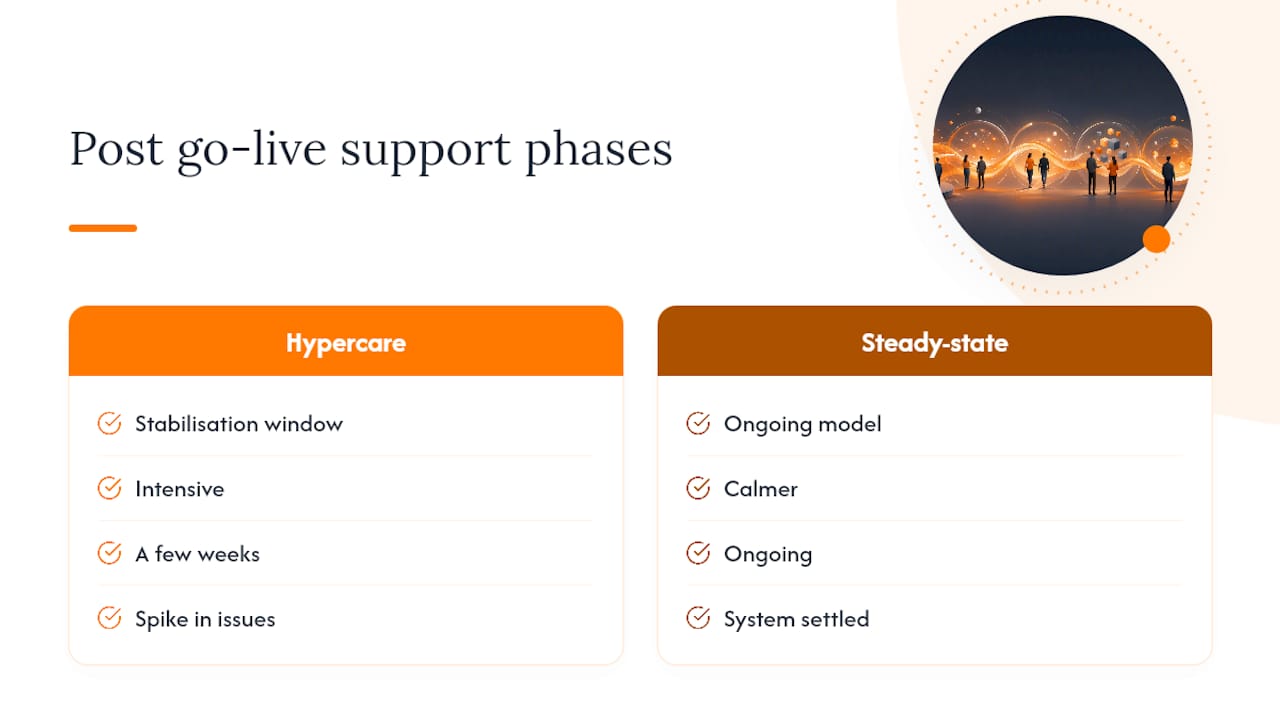
Post go-live support splits into two distinct phases, and mixing them up is where most plans go wrong. Hypercare is the intensive stabilisation window immediately after go-live, typically a few weeks, where teams expect a spike in issues and staff accordingly. Steady-state support is the calmer, ongoing model that follows once the system settles.
A workable plan needs six core components: active monitoring of transactions and integrations, a triage process with defined severity levels, visible super-users or floor support for end users, accessible documentation and configuration records, structured training refreshers, and a clear line to vendor support. Miss any one of these and the gaps show up as duplicated tickets, undocumented workarounds, or a vendor SLA nobody remembers agreeing to.
The rationale is straightforward. New systems fail quietly before they fail loudly, through bad data entry, missed integration jobs, or users reverting to spreadsheets because nobody showed them the new report. Treating hypercare as a genuine business stabilisation effort rather than a technical support queue keeps leadership focused on operational risk, not just bug counts.
Hypercare checklist by workstream
Generic “check for errors” instructions do not help a finance manager decide whether an issue is a five-minute fix or a reason to halt processing. Breaking hypercare into workstreams gives each business owner a short, specific list they can run daily.
- Finance: opening balances reconcile, invoice postings match source documents, tax codes calculate correctly, period-close tasks complete on schedule.
- Order-to-cash: order entry accuracy, pricing and discount logic, credit limit checks, invoice-to-shipment matching.
- Procure-to-pay: purchase order approval routing, three-way matching, vendor payment terms applied correctly, goods receipt timing.
- Supply chain: inventory movements post correctly, stock levels match physical counts, transfer orders complete, demand planning feeds are current.
- Data and reporting: report output matches expected totals, dashboards refresh on schedule, historical data migrated without gaps.
- Security and technical operations: integration jobs run to completion, role-based access works as designed, batch jobs finish within their window.
Converting a detected issue into a business severity level matters more than the technical fix itself. A failed integration job is a technical problem; a failed integration job that stops warehouse staff picking orders is a Severity 1 business problem. Grade every issue by its effect on revenue, compliance, or customer experience, not by how hard it is to code.
Each workstream needs one named, accountable business owner, not a shared inbox. Finance owns finance checks; the warehouse manager owns supply chain checks. That ownership model, run through daily reviews with business-led issue prioritisation, is what keeps hypercare from drifting into an unmanaged ticket pile.
Pro Tip: Give each workstream owner a one-page checklist they can complete in under ten minutes each morning. If it takes longer, the checklist is trying to do too much.
How do you run post go-live support in practice?
A hypercare plan works best as a sequence, not a wish list. This order reflects what typically needs to happen first, second, and last across a four-to-six week stabilisation window.
- Assign ownership and decision rights for each workstream before go-live day, not during week one.
- Set up triage, severity levels and escalation so everyone knows what counts as urgent and who decides.
- Deploy visible floor support and super-users who can answer questions in person rather than through a queue.
- Publish documentation and configuration records somewhere every support person can reach without asking permission.
- Capture feedback and enhancement requests in one place, with a simple rule for what gets fixed now versus later.
- Confirm vendor SLAs, budget and named contacts so an escalation does not stall while someone hunts for a contract.
- Map major business cycles against the hypercare window, since overlapping peaks like month-end close or payroll runs create resourcing conflicts.
- Schedule refresher training and job aids once users have had a week to discover what they actually forgot.
- Run daily stand-ups with a shared dashboard so decisions do not wait for a weekly steering meeting.
- Define measurable exit criteria and prepare the handover pack before anyone assumes hypercare is winding down.
Skipping step one is the most common failure. Without named owners, steps two through ten have no one accountable to run them.
How do you know when hypercare can end?
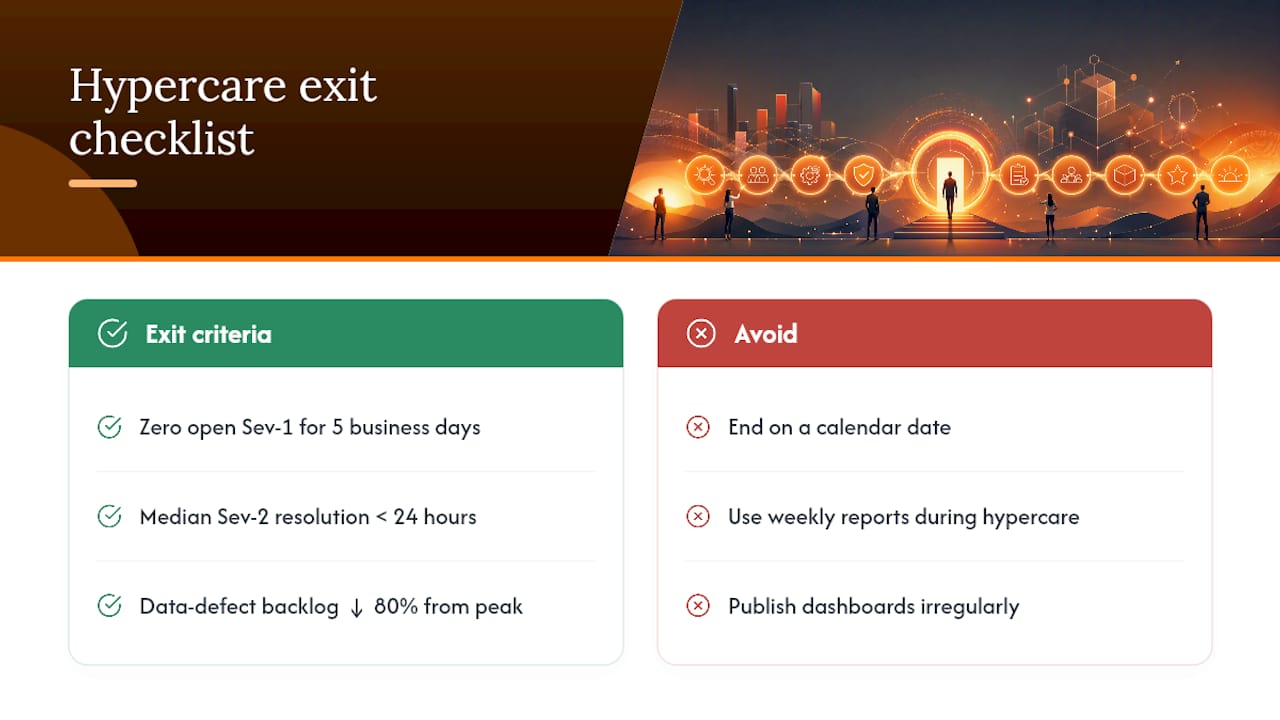
Ending hypercare on a calendar date instead of evidence is a common mistake, and it usually means closing support before the business is actually stable. A small set of KPIs, tracked daily, gives leaders a defensible basis for the decision: ticket volume by severity, median time-to-resolution, transaction error rates, and the size of the outstanding data-defect backlog.
A daily dashboard beats a weekly report every time during hypercare. The strongest dashboards show three things at a glance: open high-severity items, the trend line on overall stabilisation (improving, flat, or worsening), and where decisions are currently stuck. Publishing this daily avoids the trap of looking like there is oversight when nobody is actually reviewing the numbers.
Exit criteria should read as concrete thresholds, not vague reassurance. Reasonable examples: zero open Severity 1 issues for five consecutive business days, median resolution time under 24 hours for Severity 2 issues, and the data-defect backlog reduced by 80% from its hypercare peak. When a system meets those, steady-state support can take over.
Handing over to steady-state support
Handover works only when three roles are defined before hypercare ends: a release owner who manages future updates, a data owner responsible for ongoing data quality, and business process owners who continue the workstream checks at a lower frequency. Without these named roles, support tends to freeze at whatever state it reached on the last day of hypercare, and the system stops evolving with the business.
Enhancement requests logged during hypercare need a prioritisation rule, not just a backlog. A simple scoring approach weighing business impact against effort keeps the list honest and stops the loudest voice winning by default.
Capture lessons learned while memories are fresh, ideally within a week of hypercare closing. A short, living playbook covering what broke, what worked, and what the next project should do differently pays for itself the moment a second rollout begins. Vendors sometimes formalise this as tiered lifecycle support plans, worth understanding even if you manage most of this in-house.
Why ready-made apps reduce hypercare risk for SMEs
Large-scale ERP and HCM hypercare frameworks were built with enterprise IT teams in mind, and most small and medium enterprises do not have that bench strength. A workflow-first app-fit review can help solve that mismatch: before recommending a build, it identifies whether an existing workflow foundation already handles the problem, which cuts the scope of anything that needs stabilising later.
Ready or adapted products like EventFlow, POSFlow, and LeadsFlow carry fewer custom configuration points than a bespoke build, which means fewer places for hypercare defects to hide. A short scoped engagement typically covers monitoring during the first weeks, quick fixes for anything that surfaces, targeted training for the people actually using the system, and documentation that survives staff turnover.
Where hypercare plans usually go wrong
The recurring failure is not technical, it is structural: unclear ownership, teams that route everything through one central ticket queue, and data issues left untriaged until they multiply. A single data triage owner with turnaround targets catches this early, since data defects take far longer to resolve than functional bugs once they are left unmanaged.
Three quick wins fix most of this: a daily ten-minute executive snapshot, a named data triage owner from day one, and floor support people can actually see and approach.
— Ronald
How Flowlab can support your post-go-live period
If your team is heading into go-live without the internal capacity to run daily workstream reviews, a complimentary app fit review is the fastest way to find out what that will actually cost you, both in effort and budget.

An advantage for SMEs is straightforward: instead of quoting a custom build before understanding the problem, the workflow-first review scopes the real risk first, often surfacing a ready-made or adapted product that closes the gap with far less hypercare effort than a bespoke system would need. For retail teams, POSFlow or QueueFlow can stand in for custom point-of-sale or queue logic with minimal configuration risk. For pricing-sensitive operations, PriceFlow offers the same shortcut, and sales teams chasing leads can look at LeadsFlow before committing to a custom CRM build.
Book a product demo, or start with the free app-fit review on the Flowlab site to get clear, cost-conscious direction to prepare your hypercare support plan.
Sources
For a fuller checklist approach, Panorama Consulting’s ERP hypercare checklist and TechTarget’s 10 steps for HCM post-go-live support cover workstream structure and vendor lifecycle planning in more depth than fits here.
- Your ERP hypercare checklist and post-go-live support plan
- 10 steps to support your HCM system post-go-live
- Go Live Checklist For Software Projects: Before & After Launch (+Template)
- Post go-live support in ERP implementations | Ensure success
- From Go‑Live to business value: how HCM services support your entire SAP SuccessFactors journey
FAQ
What is post go-live support?
Post go-live support is the structured period of monitoring, issue resolution, and training that follows a system launch, designed to stabilise operations and drive adoption. It typically runs as an intensive “hypercare” phase for several weeks before transitioning to steady-state support, with active monitoring and clear escalation paths as its backbone.
What is the customer support process during hypercare?
The process centres on triage: issues are logged, graded by business severity, and routed to the accountable workstream owner rather than a generic queue. Floor support and super-users typically handle simple questions on the spot, while higher-severity issues escalate to named vendor contacts under agreed SLAs.
Why is 24/7 customer support important after go-live?
Round-the-clock coverage matters most in the early hypercare weeks because global operations, night-shift processing, or overnight batch jobs can surface issues outside normal working hours. Missing an overnight integration failure until the next morning can cascade into a full day of bad data, which is why many teams stagger coverage rather than relying on a single daytime shift.
What does “Go Live” mean in an SAP context?
“Go Live” marks the moment an SAP system (or any ERP/HCM platform) moves from testing into live production use by end users. It is the trigger point for hypercare to begin, since SAP SuccessFactors and similar vendors structure their own support plans around this milestone.
How long should hypercare last?
There is no fixed universal length, but most hypercare periods run between two and six weeks depending on system complexity and business cycle overlaps. The right answer comes from evidence, not the calendar: hypercare should end when exit criteria such as resolved Severity 1 backlogs and stable error rates are actually met.