
Seven feature groups separate a queue management system that works from one that just looks good in a demo: virtual queuing, self-service check-in, real-time dashboards, automated notifications, appointment blending, smart routing, and analytics with proper integrations. Notifications and real-time dashboards typically deliver the fastest operational payoff, because they reduce perceived wait time without touching headcount. Industry benchmarks from sources like Qmatic confirm this pattern across enterprise deployments, and it’s the same principle FlowLab applies when scoping queue tools for smaller operators.
TL;DR:
- Virtual queuing and real-time dashboards provide the quickest operational improvements by reducing perceived wait times without increasing staff.
- Automated notifications and live wait estimates significantly boost customer satisfaction, especially when they update dynamically during the wait.
- Centralized dashboards, smart routing, and role-based access are essential for management to avoid inefficiencies and streamline staff workflows.
- Deployment options must include offline functionality for kiosks and displays to prevent system failures during internet outages, especially for multi-location systems.
- Measuring KPIs like abandonment rate, queue depth, and customer satisfaction in real time enables proactive management and reduces staff overtime.
Table of Contents
- Customer-facing features to test in a demo
- Management and staff-facing features to demand
- Technology, deployment choices and integrations to verify
- Analytics and KPIs every manager should track
- How to evaluate and choose a queue management solution
- FlowLab’s approach to fitting the right system
- Supporting different queue types in one system
- What actually pays off first
- See it running before you commit to anything
- Sources
- FAQ
Customer-facing features to test in a demo
What customers actually experience during a queue often has little to do with the software’s back end. It has everything to do with whether they can join remotely, understand what’s happening, and trust the wait estimate on screen.
Virtual and remote queuing lets customers join a line via QR code, a web link, or a ticketless app without standing anywhere, a process streamlined by specialized AI automation and customer-facing AI agents. These suits retail counters, clinics, and government service points where footfall varies sharply through the day. A busy pharmacy at lunchtime needs this more than a quiet boutique with two staff and steady traffic, so match the feature to your actual demand pattern rather than adopting it because a competitor has it.
Self-service kiosks and mobile-first join flows need testing for more than speed. Check language options, screen-reader compatibility, and whether someone unfamiliar with touchscreens can complete the process without staff help. A kiosk that only works smoothly in English, on a bright display, in a quiet room, will fail exactly the customers who need it most.
Automated notifications across SMS, email, in-app alerts, and WhatsApp change how people feel about waiting, even when the wait itself doesn’t shorten. Perceived wait time often matters more to satisfaction scores than measured wait time, which means a well-timed “you’re next in 10 minutes” message can outperform an actual five-minute reduction in service time.
When testing a demo, look for:
- Notification timing templates (arrival confirmation, position updates, “your turn now”)
- Appointment scheduling that blends cleanly with walk-in arrivals in one shared queue
- Estimated wait displays that update live rather than showing a static average
- On-hold content options (screens, audio, or app messages) during longer waits
- Multi-language support across kiosk, SMS, and app touchpoints
Pro Tip: Ask the vendor to simulate a 30% spike in walk-ins during the demo. Systems that handle appointment blending well will re-sequence the queue without confusing either the scheduled or walk-in customers; weaker systems will visibly stumble.
Management and staff-facing features to demand
Customers see the front end. Managers live in the back end, and that’s where most queue management failures actually originate. If the dashboard is cluttered or routing logic is rigid, staff end up working around the system rather than with it.
Insist on the following before signing anything:
- Centralised dashboards showing live queue depth, average wait, and staff status across every branch from one screen, not five logins.
- Smart routing and service categorisation that can send a simple enquiry to a fast lane while directing complex cases to a senior agent, automatically, based on rules you set.
- Priority lane configuration for elderly customers, appointments, or VIP tiers, with the ability to override manually when a case doesn’t fit the rule.
- Staff allocation and recall controls, so a manager can pull someone from a quiet counter to a busy one without walking the floor.
- Role-based access, so front-line staff see only what they need while managers get full visibility and configuration rights.
- Agent notes and handover fields, letting one staff member flag context for the next person serving that customer, cutting repeat questions and rework.
The difference between a system that reduces manager workload and one that adds to it usually comes down to how much configuration happens without a support ticket. If every routing tweak needs a call to the vendor, the tool isn’t actually serving your operation.
Technology, deployment choices and integrations to verify
Deployment model affects uptime, cost, and how much control you retain. Cloud-based systems are the norm for most SMEs because they need no server room and scale with subscription tiers, but confirm what happens during an internet outage. A properly built system should keep local kiosks and displays functioning offline and sync data once connectivity returns; a poorly built one simply stops.
Hybrid and on-premise options still suit organisations with strict data residency rules or unreliable local connectivity, though they carry higher upfront hardware and maintenance costs.
Before committing, check:
- Hardware requirements: kiosk tablets, ticket printers, and display screens, along with their expected lifecycle (most kiosk tablets need replacing every three to five years)
- API availability for pulling queue data into your own reporting tools
- Single sign-on (SSO) support if staff already use one login across multiple systems
- Native integration with your CRM, POS, or calendar software, and what export formats (CSV, JSON) are available on request
- Data residency and storage location, particularly relevant if you handle regulated customer information
Enterprise buyers evaluating multi-location rollouts should specifically test failover behaviour and how the platform orchestrates queues across branches, a point emphasised in guidance on evaluating enterprise queue management systems. A single-branch café doesn’t need multi-site orchestration. A five-branch clinic network does, and paying for it only where it’s needed keeps the project affordable.
Analytics and KPIs every manager should track
Eight KPIs determine whether a queue is actually performing: average wait time, average service time, abandonment rate, queue depth, throughput, staff utilisation, service level, and satisfaction linked to wait time. Miss any one of these and you’re managing on partial information.
Review cadence matters as much as the metric itself:
- Real time: abandonment rate and queue depth, so staff can react within the hour
- Daily: average wait and service time, to catch a bad day before it becomes a bad week
- Weekly: staff utilisation and service level, feeding roster decisions
- Monthly or quarterly: satisfaction trends and throughput, for planning and budget conversations
A well-run queue analytics setup typically reduces staff overtime by giving managers advance warning of demand spikes rather than reacting after a queue has already backed up, according to operational insight from vendors managing enterprise deployments.
Common pitfalls include treating average wait as the only number that matters (ignoring abandonment, which is often the more honest signal of customer frustration) and pulling reports monthly when a queue crisis needs same-day visibility. Reliable KPIs depend entirely on accurate timestamps at join, serve-start, and serve-end. Manual token systems usually can’t provide that granularity, which is one reason digital queue tracking outperforms paper tickets even in low-tech environments.
How to evaluate and choose a queue management solution
A structured evaluation beats a feature checklist ticked off in isolation. Work through this order:
- Map your daily volumes first. A ten-customer boutique and a 400-visit clinic need entirely different systems, regardless of what a vendor’s brochure claims.
- Run the demo under peak load, not a quiet showroom scenario. Ask to see the system handle a queue spike and a scheduled appointment arriving at the same time.
- Test the exports. Request a CSV of raw timestamps during the demo and check whether the KPI calculations match what the dashboard shows.
- Confirm integration points with your existing CRM, POS, or booking calendar before, not after, signing.
- Read the support SLA carefully. Ask what response time applies if a kiosk goes offline during business hours.
Walk away if a vendor can’t produce join and serve-end timestamps on request, if pricing stays vague past a first conversation, or if the mobile join flow feels clunky on your own phone during the demo.
Pro Tip: Before signing an enterprise contract, request the raw timestamp logs from a short pilot and recalculate the KPIs yourself. It’s a five-minute check that often reveals gaps a sales deck never mentions.
FlowLab’s approach to fitting the right system
FlowLab doesn’t start by pitching software. It starts by mapping the operational problem, then recommending a ready-made product, an adapted foundation, or a custom build depending on what the workflow actually needs.
That approach shows up in two products:
- QueueFlow, a ready-to-adapt queue management foundation for SMEs that need core features without enterprise pricing.
- EventFlow, sharing similar check-in and join logic for businesses running registration-heavy events.
- A complimentary app fit review that clarifies costs and the simplest suitable solution before any commitment is made.
Adapting an existing foundation like QueueFlow suits most single-branch or small-network operators. Bespoke work only makes sense when routing logic or integrations are genuinely unusual.
Supporting different queue types in one system
Not every business runs a single line, and a queue system worth buying needs to handle more than one structure without forcing a workaround.
Single-line queues suit small counters and clinics with one or two service points; simplicity here beats complexity every time. Multiple parallel lines fit larger retail floors or bank branches where several counters serve different transaction types simultaneously, and the system needs to route customers to the shortest genuinely relevant line rather than the shortest line overall. Priority queues matter for healthcare, government services, and any business serving elderly or vulnerable customers who need faster access without disrupting the standard flow.
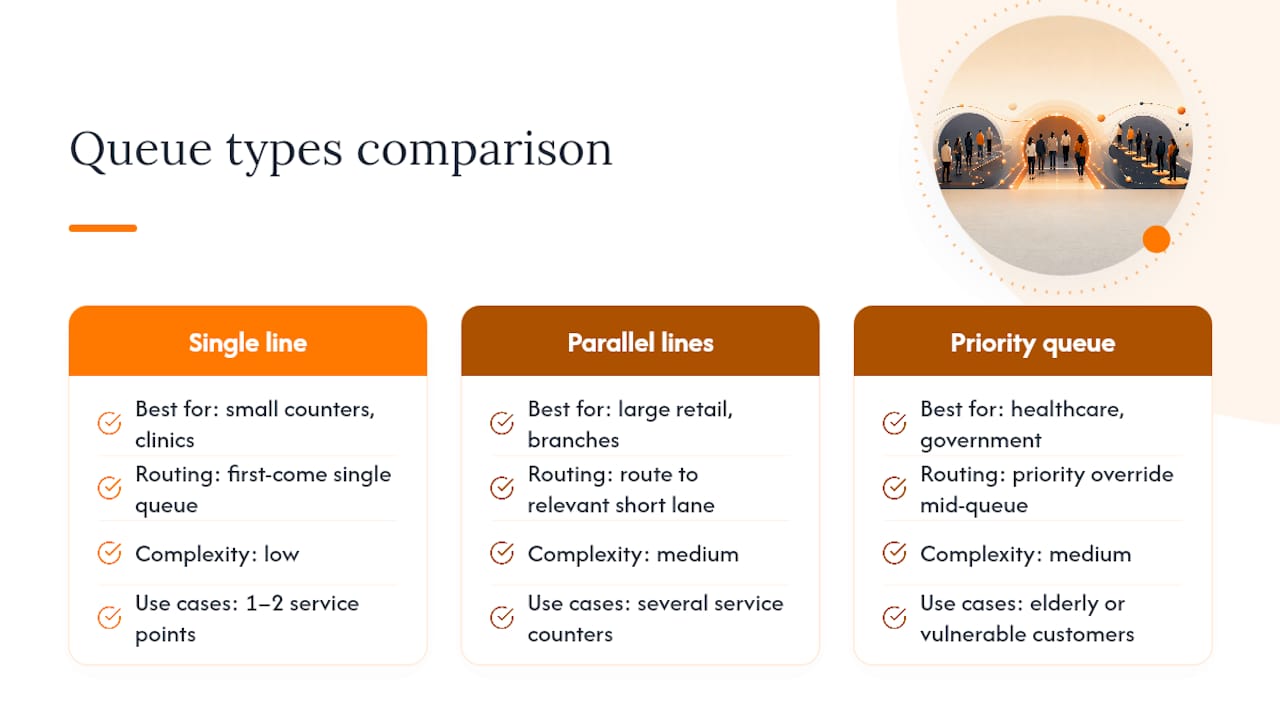
The strongest systems let you run all three structures at once: a general line, several service-specific lanes, and a priority override, without the configuration turning into a mess of exceptions. Test this directly in a demo by asking the vendor to create a priority customer mid-queue and watch how cleanly the system re-sequences everyone else. Accessibility features deserve the same scrutiny as priority handling. Screen-reader support on kiosks, audio announcements for visually impaired customers, and large-text display options aren’t add-ons, they’re what makes a queue system usable by the full range of people who’ll actually stand in front of it.
Security matters here too. Queue data often includes names, phone numbers, and sometimes appointment reasons, so check how the system stores that information, who can access it, and whether it’s purged after a reasonable retention period.
What actually pays off first
At single-branch scale, notifications and accurate wait displays return value fastest, since they cost little and cut perceived wait immediately. Multi-branch operators see bigger wins from routing and staff analytics. Pilot for two to four weeks and measure abandonment before committing.
— Ronald
See it running before you commit to anything
Reading feature lists only gets you so far. FlowLab’s answer to that is straightforward: a live QueueFlow demo that shows virtual queuing, notifications, and dashboard reporting working together on your own scenario, not a generic showroom script.

Instead of guessing which features your operation genuinely needs, FlowLab starts with a complimentary app fit review: a conversation about your actual daily volumes, staff structure, and existing systems, followed by an honest answer on whether a ready-made product like QueueFlow fits, or whether an adapted build makes more sense. There’s no technical brief required and no pressure to commit on the spot. If integrations with a CRM or booking calendar matter to your setup, that’s covered in the same conversation. Book a QueueFlow demo or request the fit review, and get a clear cost picture before deciding anything.
Sources
- 8 Queue KPIs Every Business Should Track
- How to Measure Queue Management Success: Key Metrics and KPIs | VeloxHub
FAQ
What are the key features of a queuing system?
The core features are virtual queuing, self-service check-in, real-time dashboards, automated notifications, appointment blending, smart routing, and analytics with integrations. The strongest systems also support multiple queue types and accessibility options within a single platform.
What are the top queue management systems?
Rather than one fixed list, the right system depends on your scale: enterprise platforms like Qmatic’s Orchestra suit large multi-site networks, while SMEs often get better value from adapted, right-sized products such as FlowLab’s QueueFlow.
What is queue management?
Queue management is the practice of organising, tracking, and optimising how customers wait for service, using software to reduce wait time, distribute staff efficiently, and improve the customer experience through visibility and communication.
What are the elements of queuing theory relevant to business systems?
Queuing theory generally considers arrival rate, service rate, number of service points, queue discipline (the order customers are served), system capacity, and customer behaviour such as abandonment. Definitions vary slightly by source, but these six elements drive most of the KPIs discussed in queue analytics.
How often should I review queue management KPIs?
Abandonment rate and queue depth need real-time monitoring, average wait and service time suit daily review, staff utilisation and service level work well weekly, and satisfaction trends belong in monthly or quarterly planning.