
Small, fast-moving teams tend to do better with Notion, while larger or regulated teams usually get more value from Confluence’s structure and admin controls. The exception is a growing team that starts flexible and later needs enforced governance, which is worth piloting on Confluence early. If you’re unsure, run the checklist below before committing either way.
TL;DR:
- Notion offers faster onboarding but requires manual governance setup, while Confluence enforces structure automatically through spaces and permissions.
- Teams using Atlassian products benefit from Confluence’s integrations and audit trails, especially in regulated industries, whereas Notion excels in small, flexible workflows.
- Using unregulated Notion workspaces without strict naming conventions can lead to clutter and faster degradation compared to Confluence spaces with enforced structure.
- Migration and governance costs are often more significant than platform price differences, with content cleanup and rule setting taking weeks regardless of the choice.
- Teams with workflows beyond typical documentation, such as queue management or event registration, should consider custom internal apps instead of general-purpose platforms.
Table of Contents
- Side-by-side trade-offs to decide fit
- Concrete feature differences that change outcomes
- How pricing shapes the decision and what to budget for
- Practical checklist: deciding, piloting and migrating with low disruption
- Choosing a platform versus building a tailored internal app
- How we can help if a bespoke app makes more sense
- FAQ
- Sources
Side-by-side trade-offs to decide fit
The two platforms solve the same basic problem, documentation and knowledge sharing, but they start from opposite assumptions. Notion assumes your team will build its own structure as it goes. Confluence assumes you want structure imposed from day one. Neither assumption is wrong, but picking the one that matches how your team already works saves months of rework later.
On the G2 comparison page, Notion has a higher overall rating from a substantially larger number of reviews compared to Confluence. Reviewers consistently tie Notion’s score to ease of use and tie Confluence’s lower score to a steeper learning curve, though Confluence still earns strong marks for enterprise collaboration and integrations.
A few trade-offs matter more than the headline score:
- Onboarding is faster with Notion, but that speed comes at the cost of governance that someone has to build manually.
- Confluence’s spaces and permissions enforce consistency automatically, which reduces the admin burden once the team grows past a handful of contributors.
- Notion’s databases make cross-linking information easy, but without naming conventions and ownership rules, workspaces drift into clutter.
- Confluence’s search and page history are built for audit trails, which matters more to engineering and regulated teams than to a five-person startup.
- Integration depth tends to favour Confluence for teams already inside the Atlassian ecosystem, while Notion’s API suits smaller, lighter integrations.
Practitioner guidance from Seibert Products echoes this: Notion suits lightweight, intuitive collaboration, while Confluence suits secure, enterprise-scale documentation. The decision rarely comes down to features alone. It comes down to whether your team can live with self-imposed structure or needs it enforced.
Concrete feature differences that change outcomes
The features that look similar on a comparison chart behave quite differently once a team is using them daily.
- Pages and spaces versus flexible pages and databases. Confluence organises content into spaces with a fixed hierarchy, which keeps large teams consistent but can feel rigid for fast-changing projects. Notion’s pages and databases let you build your own structure, which is faster to set up but easier to let sprawl.
- Collaboration patterns. Both tools support comments and mentions, but Confluence’s ownership model, built around spaces and permission groups, suits teams that need clear accountability for who can edit what. Notion’s editing controls are lighter, which works well for small teams but can create confusion in larger ones without clear rules.
- Automation and integrations. Confluence’s marketplace and Atlassian ecosystem give it an edge for teams already using Jira or Bitbucket. Notion’s API and bot integrations suit smaller, more bespoke automations rather than enterprise-wide workflows.
- Search, history and audit trails. Confluence’s version history and audit logging are built with compliance in mind, which matters for regulated industries. Notion’s search has improved, including Notion AI features reviewers cite for rapid content creation, but it was not built with audit requirements as a priority.
Pro Tip: Test both tools with your messiest existing document, not your cleanest one. It reveals how each platform handles real-world disorder.
These differences translate directly into maintenance labour. A Notion workspace without enforced naming and ownership rules degrades faster than a Confluence space with the same number of contributors, simply because Confluence’s structure does some of that enforcement automatically.
How pricing shapes the decision and what to budget for
Headline prices rarely tell the full story. The real cost shows up in admin add-ons, migration time and the governance work needed to keep either tool usable at scale.
- Free tiers work well for very small teams testing the waters, but both platforms restrict features like permissions, guest access or page history once you need them most.
- Per-user pricing adds up quickly for larger teams, and enterprise add-ons such as single sign-on and audit logs are often priced separately rather than included.
- Migration and governance cost real time, not just money: expect to spend weeks cleaning up content structure and agreeing naming conventions, regardless of which tool you choose.
- Before signing anything, ask vendors directly: what counts as an active user for billing, is SSO included or extra, and what happens to your data export if you leave.
If a bespoke internal tool starts looking more cost-effective than ongoing platform fees, our pricing guide for SME app projects walks through what a custom build typically costs compared with platform subscriptions over time.
Practical checklist: deciding, piloting and migrating with low disruption
A platform switch succeeds or fails on the groundwork you do before anyone touches the migrate button.
- Define your pilot. Pick one team, a realistic set of use cases and two or three measurable success criteria, such as time to find a document or number of duplicate pages created.
- Set governance rules first. Agree naming conventions, page ownership and an archive policy before a single page gets migrated, not after.
- Export cleanly. Pull content out of your current tool in its native export format and review it for orphaned pages or outdated content before moving anything.
- Stage the import. Move a small, representative slice first, then check formatting, links and permissions before committing to the full migration.
- Run a parallel period. Keep both tools live for two to four weeks so teams can compare workflows without losing access to anything.
- Cut over deliberately. Set a fixed date, communicate it clearly and lock the old tool to read-only rather than leaving it open indefinitely.
- Review after launch. Check training completion, confirm page ownership assignments and set a recurring audit cadence, quarterly works for most teams.
Pro Tip: Assign one person as the single owner of your governance rules. Shared ownership of “the rules” usually means nobody enforces them.
Practitioner insight from the G2 comparison notes that migration failures typically follow poor governance planning rather than the choice of tool itself, which is exactly why this checklist puts governance before the technical steps.
Choosing a platform versus building a tailored internal app
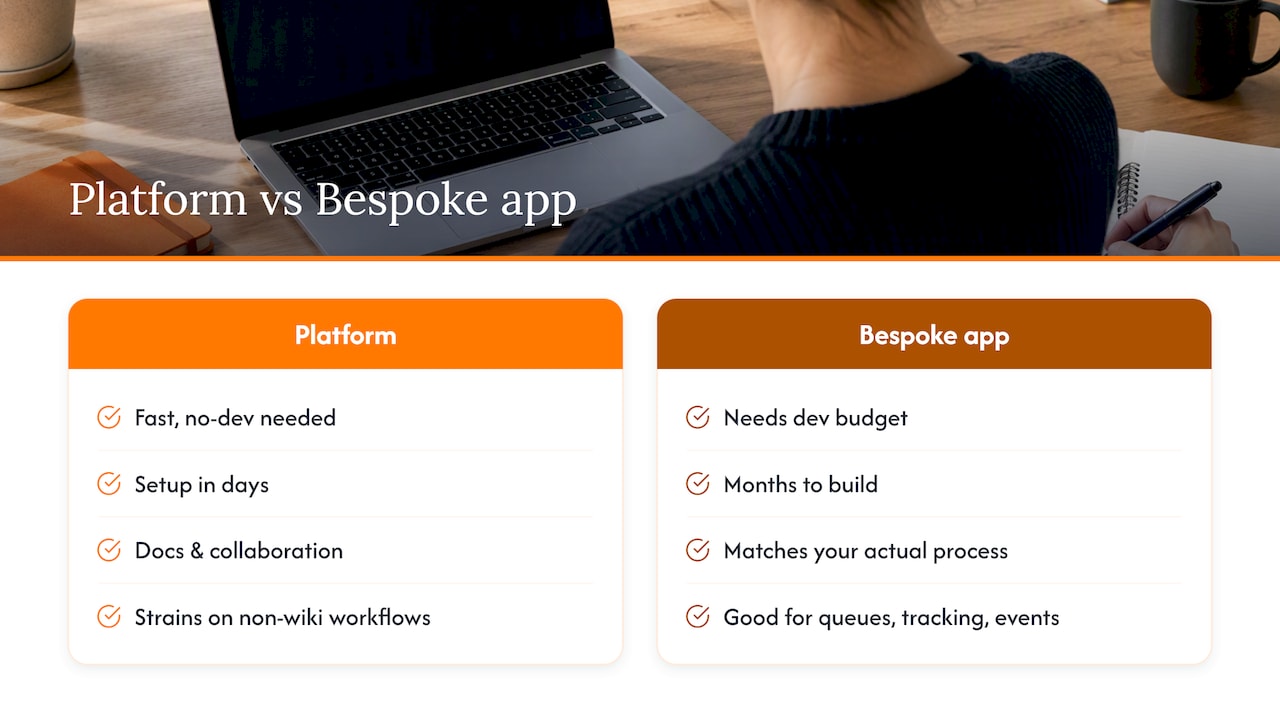
Off-the-shelf platforms win when your team needs documentation and collaboration fast, with no budget for custom development. They give immediate return because setup takes days, not months.
Where platforms start to strain is when your workflow does not look like a wiki at all, think queue management, attendance tracking or event registration bolted awkwardly onto Notion databases or Confluence pages. At that point, a bespoke internal app usually reduces friction because it matches your actual process rather than asking your process to adapt to generic pages and tables. The clearest sign you’ve crossed that line is when your team builds elaborate workarounds just to make a general tool do one specific job.
— Ronald
How we can help if a bespoke app makes more sense
When a general-purpose platform stops fitting the way your team actually works, we start with a complimentary app fit review to help determine the most economical solution for your situation before any commitment or technical brief is needed.

We offer a handful of ready-made products built around common business workflows, each adaptable rather than built from scratch:
- POSFlow runs a sample sale from product to payment, and you can try the demo directly.
- QueueFlow keeps every queue moving and everyone informed, with a complete queue journey demo available.
- PresenceFlow turns attendance into a live operating view, and you can see it in action before deciding anything.
- EventFlow handles event registration workflows for teams that outgrow spreadsheet-based signups.
If any of these look closer to what your team actually needs than another wiki page, book an app fit review and we’ll tell you plainly which route costs less over time.
FAQ
Why are some teams moving away from Notion?
Teams that outgrow Notion’s flexible structure often find that without strict naming and ownership rules, workspaces become cluttered and hard to navigate, which the G2 comparison notes as a recurring reviewer complaint. This is a governance issue more than a product flaw, and it usually points to needing clearer internal rules rather than a different tool entirely.
Is Atlassian Confluence being discontinued?
No, Confluence remains an actively maintained Atlassian product with ongoing updates and enterprise adoption. Reviewers on G2 continue to rate it strongly for team collaboration and knowledge sharing in larger organisations.
Who is Notion’s biggest competitor?
Confluence is the most commonly compared alternative for team documentation and collaboration, particularly among larger or more structured organisations. The right choice between them depends on whether your team needs enforced structure or prefers to build its own as it grows.
Is Notion still a relevant tool for teams in 2026?
Yes, Notion remains widely used, with reviewers on G2 citing ease of use and features like Notion AI for rapid content creation as ongoing reasons teams choose it. Its relevance depends more on whether your team enforces its own governance than on the tool itself ageing out of use.
What if neither Notion nor Confluence fits our workflow?
Some operational workflows, such as queue management, attendance tracking or point-of-sale processes, do not fit naturally into either wiki-style tool. In those cases, a tailored internal app, built or adapted around the specific process, often removes more friction than forcing a general collaboration platform to do that job.